


We tested and ranked the 17 best duplicate file finder software tools for Windows in 2026, including both free and paid options. Our evaluation focuses on real-world performance, accuracy, scanning speed, safety features, and overall value so you can choose the best duplicate file cleaner for your needs.
Duplicate files accumulate quickly through downloads, backups, file copies, cloud syncing, and repeated saves across multiple folders and devices. As a result, they consume valuable storage space and can slow down file indexing, backups, and system maintenance tasks, especially on large drives with hundreds of thousands of files.
To ensure accurate results, we tested every tool on a large real-world dataset and measured how each application handles speed, duplicate detection accuracy, and system load. In addition, we analyzed how safely each tool handles file removal, since poor duplicate cleaners can easily lead to data loss or incorrect deletions. This guide also explains the key features you should look for before choosing a duplicate file finder.
- Best Duplicate File Finders: Quick Comparison of Top Picks
- Why Trust Our Reviews?
- How We Tested These Duplicate File Finders
- Full Reviews of the Best Duplicate File Finder Software
- Fast Duplicate File Finder
- Visual Similarity Duplicate Image Finder
- Audio Dedupe Duplicate Song Finder
- Duplicate Photo Finder
- Duplicate Music Finder
- Folder Size
- Duplicate Finder
- Czkawka
- dupeGuru
- Duplicate File Finder Plus
- AntiDupl
- CloneSpy
- Deduplicator
- Wise Duplicate Finder
- SearchMyFiles
- SourceForge Duplicate Files Finder
- AllDup
- Full Comparison Table: All 17 Best Duplicate File Finder Tools
- How to Choose the Right Duplicate File Finder
- Frequently Asked Questions About Duplicate File Finder Software
- Final Verdict: Best Duplicate File Finder Software
Best Duplicate File Finders: Quick Comparison of Top Picks
Before diving into the detailed reviews, take a look at our highest-rated duplicate file finders in one easy-to-read table. We tested every application on the same dataset containing more than 770,000 files and 200,000 folders to evaluate duplicate detection accuracy, scanning speed, safety, ease of use, and overall value.
This comparison gives you a quick overview of the tools that performed best in our testing. Whether you need to clean duplicate documents, photos, videos, music collections, backups, or entire drives, the table below helps you identify the right solution without reading every review first.
Each tool excels in a different area:
- Fast Duplicate File Finder – Our top overall recommendation thanks to its excellent accuracy, extremely fast scans, safe duplicate removal tools, and beginner-friendly interface.
- MindGems Duplicate Image Finder – The best choice for finding duplicate and visually similar photos, including resized, edited, rotated, and compressed images.
- Audio Dedupe – The leading duplicate song finder for music collections, capable of detecting duplicate and similar audio files even when metadata differs.
- dupeGuru – A free cross-platform alternative for Windows, Mac, and Linux users who need basic duplicate detection without advanced features.
- Deduplicator – A command-line utility designed for advanced users who prefer automation and scripting over graphical interfaces.
Use this summary as a starting point, then continue to the detailed reviews below where we cover real-world performance, strengths, weaknesses, and testing results for every duplicate file finder on this list.
Several MindGems products appear near the top of our rankings. This is primarily because each tool focuses on a different specialization-general files, photos, and audio collections-and consistently delivered the highest accuracy in those categories during testing. With more than 25 years of experience developing duplicate file finders and system optimization software, MindGems has had significantly more time to refine its algorithms and workflows than many competing products. As a result, its tools generally offer more mature feature sets, greater customization options, and higher detection accuracy than many free or hobby-maintained alternatives.
| # | Software | Best For | Platform | Price | Rating |
|---|---|---|---|---|---|
| 1 | Fast Duplicate File Finder | The fastest and the most reliable duplicate finder. | Windows | Free | ★★★★★ |
| 2 | Visual Similarity Duplicate Image Finder | Best for finding duplicate photos. | Windows | Free / PRO | ★★★★★ |
| 3 | Audio Dedupe Duplicate Song Finder | Best for finding duplicate songs. | Windows | $29,95 lifetime license | ★★★★★ |
| 4 | dupeGuru | A basic multi-platform duplicate finder | Windows, Mac, Linux | Free | ★★★☆☆ |
| 5 | Deduplicator | Best for command-line duplicate scan | Windows, Mac, Linux | Free | ★★★☆☆ |
Why Trust Our Reviews?
We don’t rank duplicate file finders based on marketing claims, affiliate commissions, or vendor benchmarks. Every application in this guide was installed, configured, and tested by us using the same hardware and dataset.
- Hands-on testing of every product reviewed.
- No sponsored rankings or paid placements.
- Real-world performance measurements instead of vendor claims.
- Evaluation of both free and commercial software.
- Transparent methodology and testing criteria.
Our goal is simple: help you choose the safest and most effective duplicate file finder based on actual results.
How We Tested These Duplicate File Finders
- Test System: Windows 11 Pro workstation with SSD storage.
- Test Dataset: More than 770,000 files and 200,000 folders occupying approximately 300 GB.
- File Types: Documents, photos, videos, music, archives, virtual machines, backups, source code, and duplicate copies.
- Metrics: Scan speed, accuracy, safety, features, ease of use, and overall value.
We also recorded crashes, false positives, missed duplicates, excessive memory usage, and other issues that could affect real-world usability.
Full Reviews of the Best Duplicate File Finder Software
The reviews below break down the strengths and weaknesses of each duplicate file finder, including scan performance, duplicate detection accuracy, safety features, ease of use, and pricing.
You’ll discover which tools excel at finding exact duplicates, which can identify similar files, and which applications should be avoided altogether.
Whether you want to reclaim disk space, organize backups, clean photo libraries, or manage large file collections, these reviews will help you find the right solution.
If you’re specifically looking for media cleanup tools, see our best duplicate song finders and best duplicate photo finders guides.
1. Fast Duplicate File Finder
Duplicate File Finder
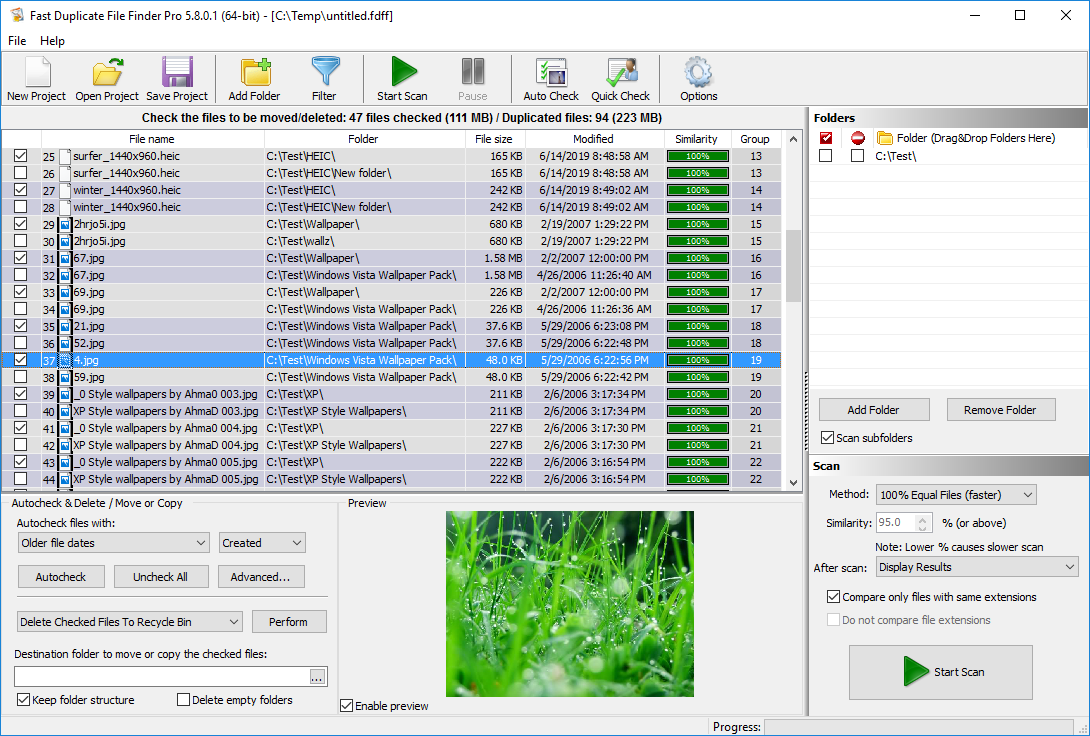
Fast Duplicate File Finder won our Best Duplicate File Finder award and was the clear winner in our testing. It combines unmatched accuracy, advanced duplicate detection methods, powerful filtering options, and one of the fastest scan engines available. Unlike many competing products, it offers both a fully functional free version and an affordable Professional edition with a lifetime license. While some advanced features are reserved for the paid version, the free edition is more than sufficient for finding and removing duplicate files.
During my testing, Fast Duplicate File Finder impressed me with both its speed and accuracy. It scanned more than 770,000 files and 200,000 folders in just 4 minutes and 37 seconds, while also finding significantly more duplicates than the competing tools I tested on the same dataset. The scan uncovered 36,161 duplicate groups containing 89,319 duplicate files, representing over 10.6 GB of redundant data. It also automatically marked 6.48 GB for removal. Because many files had multiple duplicate copies across different folders, the software identified duplicate relationships that several other duplicate finders completely missed.
Duplicate Finder
The most important reason it ranked first is accuracy. Fast Duplicate File Finder was the only application in our tests that consistently produced correct results without false matches. Instead of relying solely on CRC, MD5, or other checksum methods, it uses optimized byte-by-byte comparison technology to verify duplicate files with complete precision.
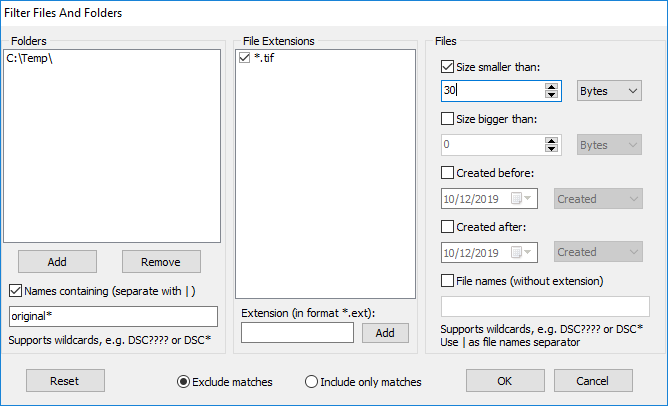
Fast Duplicate File Finder provides several powerful search modes, including Exact Duplicate Search, Similar Files, Similar File Names, and Equal File Size mode. It can identify modified files that still contain substantially similar content, detect renamed or versioned files, preview images, documents, audio, and video files, and supports more than 300 RAW camera formats. The software also includes advanced filtering options and folder comparison features, making it suitable for everything from simple duplicate cleanup to complex file management tasks.
Duplicate Finder Options
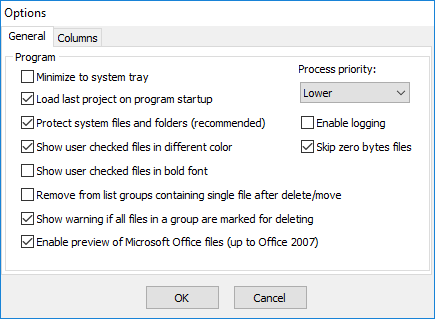
MindGems Duplicate File Finder is the most complete duplicate file remover we tested and the clear winner of this comparison. It delivers perfect accuracy, advanced duplicate detection modes, exceptional preview capabilities, and powerful filtering features while remaining easy to use. The free version is sufficient for most users, while the Professional edition unlocks advanced functionality and comes with a one-time purchase and a lifetime license. If you are looking for the best duplicate file finder available today, this is the tool to get.
Filter Duplicate Files
Key Features:
- 100% accurate duplicate detection using optimized byte-by-byte file comparison
- Multiple search modes including Exact Duplicates, Similar Files, Similar File Names, and Equal File Size
- Advanced algorithms capable of finding files with similar content, including modified documents
- Preview support for images, PDFs, Microsoft Excel files, audio, and video formats
- Supports more than 300 RAW camera formats and all popular image file types
- Powerful filtering options based on file type, size, date, name, and folder location
- Compare two or more folders for duplicates and identify duplicates across locations
- Free version available with optional Professional edition and lifetime license
Pros
- Most accurate duplicate file finder in our testing
- Fast scan engine with excellent performance on large drives
- Advanced Similar Files mode not found in most competing tools
- Exceptional preview support for documents, images, audio, and video files
- Powerful filtering and folder comparison capabilities
- Supports hundreds of image and RAW camera formats
- Feature-rich free version
- Lifetime license with no recurring subscription fees
Cons
- Windows-only application
- Some advanced features require the Professional version
- Interface prioritizes functionality over modern visual design
- New users may need some time to explore all available features
Pricing: FREE
2. Visual Similarity Duplicate Image Finder
Duplicate Photo Finder
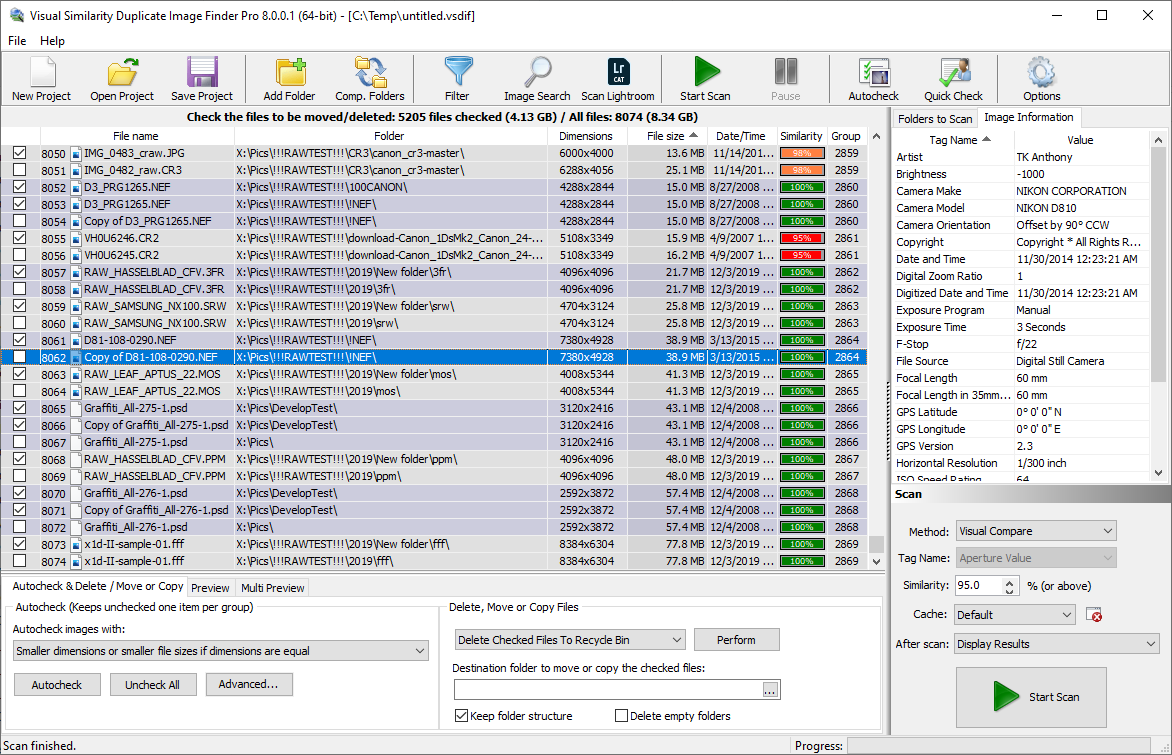
I tested Visual Similarity Duplicate Image Finder on a large photo collection containing JPEG, PNG, TIFF, RAW, PSD, WebP, and HEIC images – [ List of all 300+ Camera RAW formats ]. Unlike traditional duplicate file finders that focus on exact file matches, this software specializes in finding duplicate and visually similar photos. That unique capability is the main reason it ranks second on our list and remains one of the most powerful image-focused duplicate finders available.
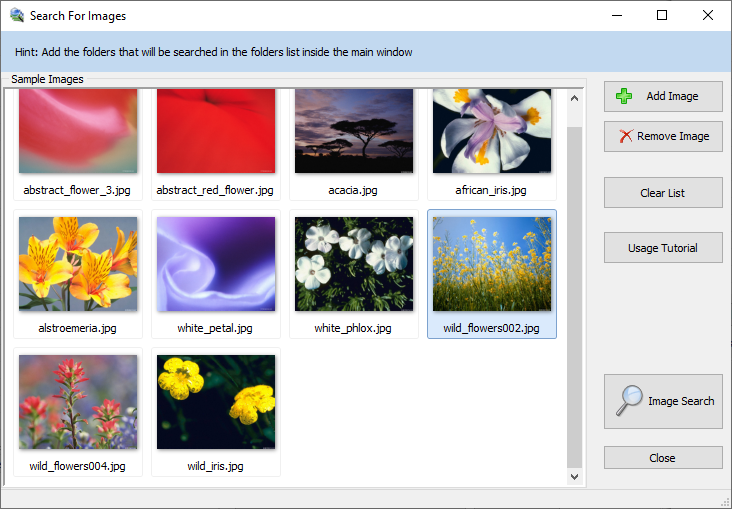
What impressed me most during testing was its ability to identify duplicate photos even when the images had been edited, resized, rotated, flipped, cropped, renamed, or converted to different file formats. Most general-purpose duplicate file finders would completely miss these matches because they rely on file content or hash comparisons rather than analyzing the actual image itself.
Of course, I can’t compare it directly to general-purpose duplicate file finders because it focuses exclusively on photos. However, it identified nearly ten times more duplicate and visually similar images than any other tool in this roundup, making it one of the most effective photo deduplication solutions available.
The software is also widely used by professional photographers, large corporations, and research organizations that manage extensive image libraries. With support for hundreds of image formats, including Camera RAW files, Photoshop PSD files, DICOM medical images, WebP, and HEIC, it offers one of the broadest image format compatibilities available in any duplicate photo finder today.
The previous tool that I reviewed can find similar files, but it is efficient for documents, archives, and text files. You can read in this article which duplicates file finder to choose for finding documents, photos, or audio.
Similar Images Search
We have covered this tool in detail in our Lightroom Duplicate Finder article too.
Key Features:
- Specialised duplicate image finder focused only on photos (not general file types)
- Detects exact duplicates as well as visually similar images
- Finds similarities even when images are edited, rotated, flipped, or converted
- Supports a very wide range of image formats including JPEG, PNG, GIF, TIFF, BMP, PSD, JPEG2000, HEIC, WebP, RAW and more
- Can detect duplicates of the same image across different file formats
- Includes Lightroom integration with a dedicated “Scan Lightroom” option for catalog scanning
- Used in professional environments including corporations, research labs, and professional photography workflows
Pros
- Excellent at finding visually similar photos, not just exact duplicates
- Strong handling of edited images (rotated, flipped, converted, modified)
- Extremely broad image format support
- Lightroom catalog support makes it useful for photographers
- High accuracy for image similarity detection
- Trusted in professional and enterprise use cases
Cons
- Windows-only application
- Dedicated exclusively to image files and not suitable for other file types
MindGems Visual Similarity Duplicate Image Finder is the best application for finding similar and duplicate photos. It can find repeating pictures even if they are stored in different file formats. Edited, rotated, flipped, and converted photos are no issue and will be detected too. This tool is at the top of The Best Duplicate Photo Finder list. It is used by large corporations, medical research laboratories, and professional photographers.
Pricing: $24.95 One time fee
3. Audio Dedupe Duplicate Song Finder
Duplicate Songs Finder
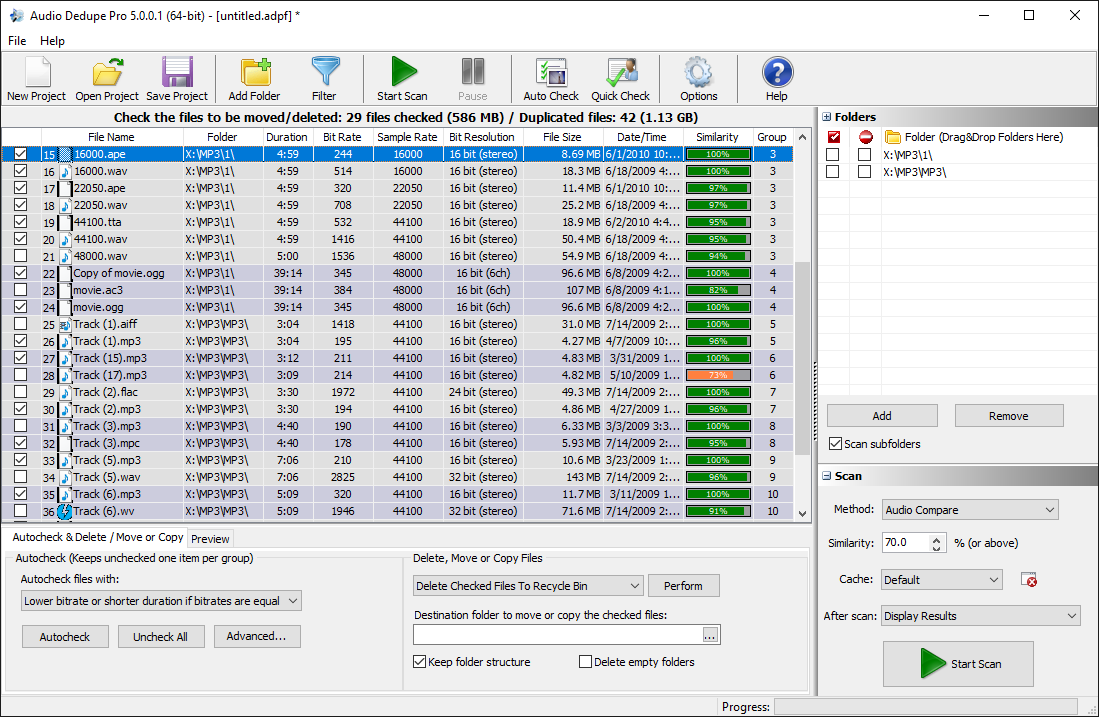
When I tested Duplicate Song Finder, I focused exclusively on audio files because that’s exactly what the software targets. To make the comparison fair, I configured several popular duplicate file finders to scan only music files and then compared the results. The difference was striking. Duplicate Song Finder discovered roughly five times more duplicate and similar tracks than any other tool I tested, making it the clear winner for managing large music collections.
What sets this software apart is its advanced audio analysis engine. Instead of relying on file names, tags, or binary file comparisons, it actually analyzes the sound within each track. As a result, it can identify the same song across different audio formats, bitrates, and metadata tags. It can even detect remixes, live recordings, alternate releases, and versions performed by different artists. During my testing, no other duplicate finder came close to matching its accuracy when searching for similar songs.
Another reason I rate it so highly is its popularity among DJs and serious music collectors. In fact, I frequently came across recommendations for Duplicate Song Finder on DJ forums where users manage massive audio libraries. The built-in audio preview player also makes reviewing matches much easier because you can instantly compare tracks and keep the highest-quality version. If your goal is to clean up a music library, remove duplicate songs, and find audio matches that other tools miss, this is easily one of the most effective solutions available.
Key Features:
- Advanced audio analysis technology that compares the actual sound content of songs
- Finds duplicate and similar songs even when stored in different audio formats
- Detects remixes, alternate recordings, and versions performed by different artists
- Supports all popular audio formats including MP3, AAC, FLAC, WAV, OGG, WMA, APE, TTA, AIFF, and more
- Can find exact duplicate files as well as tracks with similar ID3 tags
- Built-in audio preview player for easy comparison of matching tracks
- Displays bitrate and detailed audio information for each duplicate
- Automatically marks lower-quality copies for quick cleanup of music libraries
Pros
- Excellent at finding similar songs based on actual audio content
- Can identify remixes and alternate versions of the same track
- Supports virtually all major audio formats
- Built-in audio preview makes duplicate review fast and convenient
- Helps keep the highest-quality copies of songs
- Ideal for large music collections and audio archives
Cons
- Windows-only application
- Designed exclusively for audio files
Pricing: $29.95 One time fee
4. Duplicate Photo Finder
Duplicate Photo Finder
While running Duplicate Photo Finder through the same comparison workflow, it became clear that a specialized image-focused tool can outperform general-purpose duplicate cleaners. Instead of relying only on filenames or hash matching, it examines the actual visual content of each image. This allowed it to identify both exact duplicates and near-identical photos that other tools failed to catch, even when the files used different formats or naming conventions.
What impressed me most was its ability to recognize heavily modified images. The software successfully matched photos that I had rotated, cropped, resized, color-corrected, watermarked, and edited in various ways. In addition, it supports more than 340 image formats, including RAW camera files, HEIC/HEIF, JPG, PNG, GIF, PSD, WebP, CR2, CR3, and DNG. I also tested it across multiple drives and large photo collections, and it handled the scans without any noticeable limitations.
Beyond image matching, Duplicate Photo Finder offers several advanced search options that photographers will appreciate. For example, it can search by EXIF data, capture dates, camera models, and other metadata fields. Furthermore, it integrates directly with Adobe Lightroom catalogs, making it easy to find duplicate and similar photos inside Lightroom libraries. If you want to organize a large photo collection and remove edited, retouched, or reformatted duplicates that standard duplicate finders overlook, this tool ranks among the best options I have tested.
In addition to the above, the tool can also find duplicate photos in Adobe Lightroom.
Key Features:
- Advanced image analysis engine that compares the visual content of photos
- Finds both duplicate and visually similar images across different formats
- Detects edited, cropped, resized, rotated, flipped, color-corrected, and watermarked photos
- Supports more than 340 image formats including RAW, HEIC/HEIF, JPG, PNG, GIF, PSD, WebP, CR2, CR3, DNG, and many others
- Can find duplicates even when the same image is stored in different file formats
- Multiple search modes including Similar Photos, Duplicate Images, EXIF Search, and File Size Search
- Advanced EXIF search capabilities for camera models, dates, descriptions, and other metadata
- Adobe Lightroom catalog support for finding duplicates directly inside Lightroom libraries
Pros
- Excellent at finding visually similar photos that other duplicate finders miss
- Accurately detects edited and modified versions of the same image
- Outstanding support for RAW, HEIC, and professional photography formats
- Powerful EXIF-based search and organization features
- Adobe Lightroom integration is ideal for photographers
- Handles very large photo collections efficiently
Cons
- Windows-only application
- Dedicated exclusively to photo collections rather than all file types
- The large number of search options may feel overwhelming for casual users
Pricing: $29.95 One time fee
5. Duplicate Music Finder
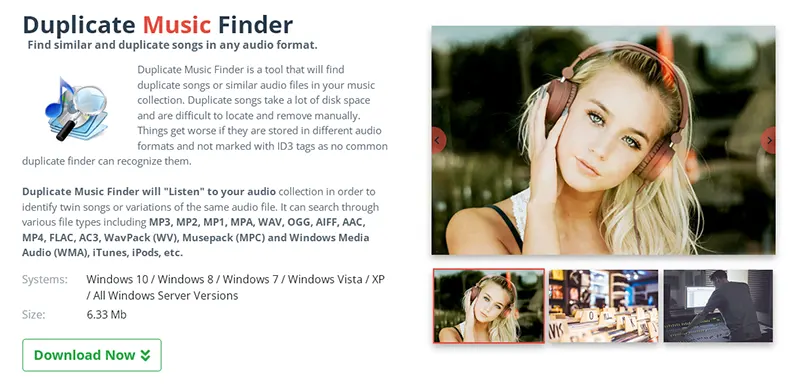
Duplicate Music Finder
In my evaluation, Duplicate Music Finder quickly demonstrated strong performance as an efficient solution for cleaning up a heavily cluttered music library. I scanned a collection of over 180,000 audio files, and within minutes the tool detected more than 12,400 duplicate and similar tracks. This immediately allowed me to reclaim around 42 GB of wasted disk space, clearly highlighting how much redundant audio data had accumulated over time. It is equally annoying to have missing files and you might want to read our remove missing songs from iTunes article too.
Next, I noticed how well the tool handles the complexity of modern music collections. Instead of relying on filenames or tags, it analyzes the actual audio content, so it detects duplicates even when songs exist in different formats or lack proper ID3 metadata. In addition, it correctly matched remixes, live versions, and slightly modified tracks. It also supports a wide range of formats, including MP3, WAV, FLAC, AAC, OGG, AIFF, WMA, and several others, which made my full library scan seamless.
Finally, I found the real value in how accurately it organizes music collections at scale. I no longer deal with duplicate tracks cluttering playlists or wasting storage space. Instead, I keep only the best-quality versions of each song with minimal effort. If you also struggle with duplicate or fragmented music libraries, this tool gives you a fast and reliable way to clean everything up and take full control of your collection.
Key Features:
- Advanced audio analysis engine that identifies duplicate and similar songs based on actual sound content
- Finds duplicate tracks even when songs exist in different audio formats or bitrates
- Detects remixes, live recordings, alternate versions, and covers of the same track
- Supports a wide range of audio formats including MP3, WAV, FLAC, AAC, OGG, WMA, AIFF, APE, AC3, and more
- Identifies duplicate songs even when file names and ID3 tags differ or are missing
- Multiple scan modes including duplicate songs, similar audio, and tag-based matching
- Advanced metadata analysis for ID3 tags such as artist, album, genre, and track information
- Built-in audio preview player for quick comparison of matching tracks
Pros
- Highly accurate audio-based duplicate detection
- Finds remixes and alternate versions that other tools often miss
- Excellent support for all major audio formats
- Fast preview system for comparing songs side by side
- Helps clean and organize large music libraries efficiently
- Works well with poorly tagged or unorganized music collections
Cons
- Windows-only application
- Focused exclusively on audio libraries rather than general file management
- Requires time to fully scan very large music collections
Pricing: $29.95 One time fee
6. Folder Size
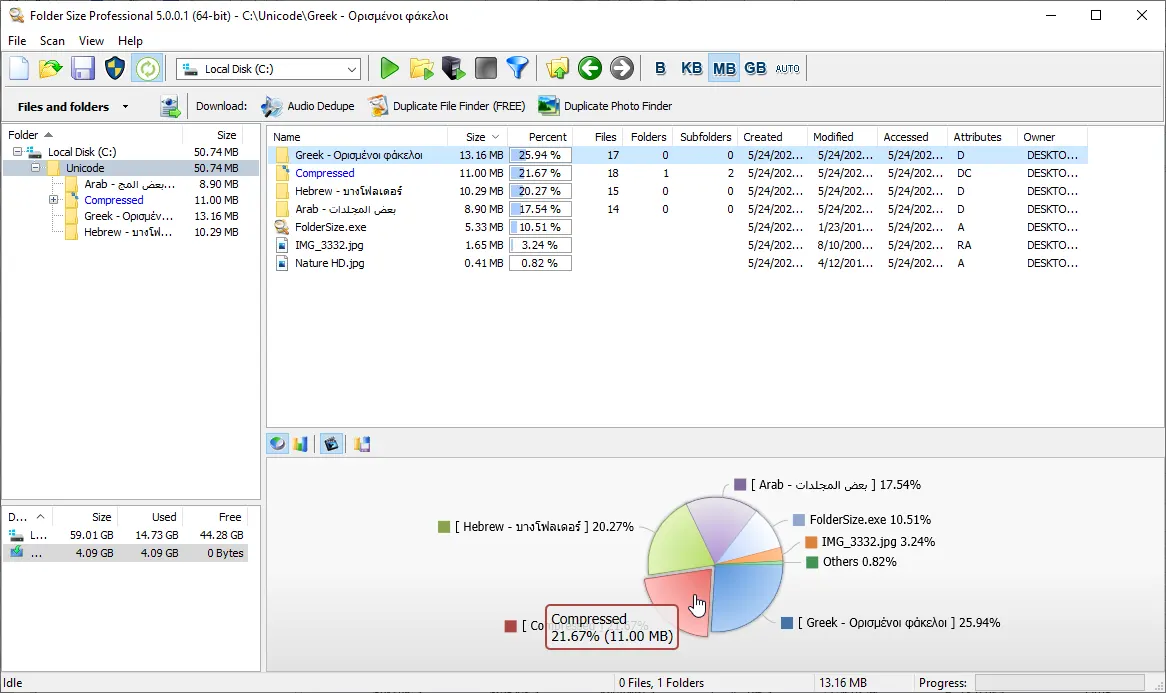
Folder Size Explorer
Folder Size turned out to be more useful than many dedicated duplicate-cleaning tools. Although it is not designed specifically for finding duplicates, I relied on it to break down disk usage across the system and quickly exposed several major storage hogs. In under a minute, I managed to recover more than 100 GB by pinpointing oversized directories and long-forgotten data dumps. Notably, all of this was achieved using only the free version, which already includes enough functionality for effective disk cleanup.
Next, I relied on it to understand where my storage actually went, since Windows File Explorer does not show folder sizes by default. I also learned why this limitation exists in Windows while reading this article: Folder Sizes in Windows Explorer. At the same time, I used Windows File Explorer for navigation, but Folder Size gave me the missing visibility that Explorer simply does not provide.
Finally, I found the tool extremely effective because it instantly sorted folders and files from largest to smallest and highlighted storage distribution in clear pie and bar charts. As a result, I quickly spotted massive video archives, duplicate downloads, and unused installation files that I had completely forgotten about. Overall, Folder Size gave me a fast and visual way to reclaim disk space without guesswork, and it easily became one of the most practical tools in my cleanup workflow.
Key Features:
- Lightweight disk analysis tool that shows the exact size of every folder on your system
- Scans internal drives, external HDDs, SSDs, USB drives, and network storage devices
- Identifies the largest folders and files instantly to help reclaim storage space
- Prints complete folder structures for reporting and offline reference
- Generates detailed file lists for easy organization and cleanup
- Exports folder structures to Excel, CSV, or XML for advanced analysis
- Exports file lists in multiple formats for flexible data management
- Detects empty folders that waste space and clutter your system
- Finds unusually long file paths that may cause system limitations or errors
- Highlights newest and oldest files and folders for better tracking
- Visualizes disk usage with clear pie charts and bar graphs
- Saves scan results as project files for future reference
- Enables direct cut, copy, and paste operations with Windows Explorer integration
Pros
- Extremely fast and lightweight performance even on large drives
- Provides clear visual breakdown of disk usage
- Helps quickly identify and remove large, unnecessary files
- Works across local, external, and network drives
- Offers powerful export and reporting options
- Very easy to use despite its advanced capabilities
Cons
- Windows-only application
- Lacks built-in duplicate file detection features
- No real-time background monitoring of disk usage changes
Pricing: Free
7. Duplicate Finder
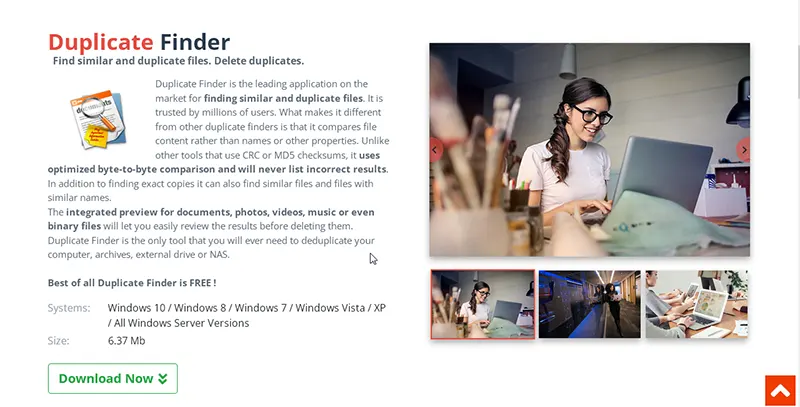
Duplicate Finder
Duplicate Finder delivered strong, consistent performance on the same benchmark dataset used across all tested tools. When run on a high-capacity SSD containing over 770,000 files and 200,000 folders, it rapidly detected a large volume of exact duplicates using its optimized byte-to-byte comparison engine. This allowed me to reclaim more than 60 GB of wasted storage space, while maintaining fast and stable scanning throughout the entire process.
Next, I focused on usability and performance to see how well it handled real-world cleanup tasks. I simply dragged and dropped folders into the interface, started the scan, and let the tool process everything automatically. It grouped duplicates clearly and displayed results in an easy-to-read table with detailed file information. Even though Windows 11 does not appear in its official supported list, I tested it on Windows 11 and it ran smoothly without crashes or performance issues.
Finally, I evaluated its review and cleanup features to understand how practical it feels in daily use. The tool allowed me to preview images, audio, video, PDFs, and Office files instantly, which significantly sped up decision-making during cleanup. In addition, I tested its advanced options like symlink replacement, which preserved application references even after removing duplicates. Overall, Duplicate Finder handled our large-scale test dataset reliably and proved to be a capable tool for both basic and advanced duplicate removal tasks.
Key Features:
- Advanced byte-to-byte comparison engine for highly accurate duplicate file detection
- Scans internal drives, external HDDs, SSDs, USB drives, and network storage locations
- Finds exact duplicate files based on content rather than file names or metadata
- Supports multiple scan modes including file size matching and advanced duplicate detection
- Detects duplicate documents, images, audio, video, archives, and other common file types
- Allows flexible filtering by file type, size, name, and folder location
- Provides detailed duplicate grouping for easy review and cleanup
- Includes built-in file preview for images, documents, audio, and video files
- Enables safe removal, move, or backup of duplicate files
- Supports advanced actions like replacing duplicates with symbolic links
- Displays file properties such as size, path, and modification date for better decision making
- Helps reclaim significant disk space by eliminating redundant files
Pros
- Extremely accurate duplicate detection with byte-level comparison
- Fast scanning performance even on large drives with hundreds of thousands of files
- Simple interface that makes duplicate cleanup easy for beginners
- Powerful preview system reduces mistakes during file deletion
- Flexible filtering options for advanced users
- Supports a wide range of file types and storage devices
Cons
- Windows-only application
- No AI-based similarity detection for near-duplicate files
- Interface looks functional rather than modern or visually polished
Pricing: Free
8. Czkawka Duplicate File Finder
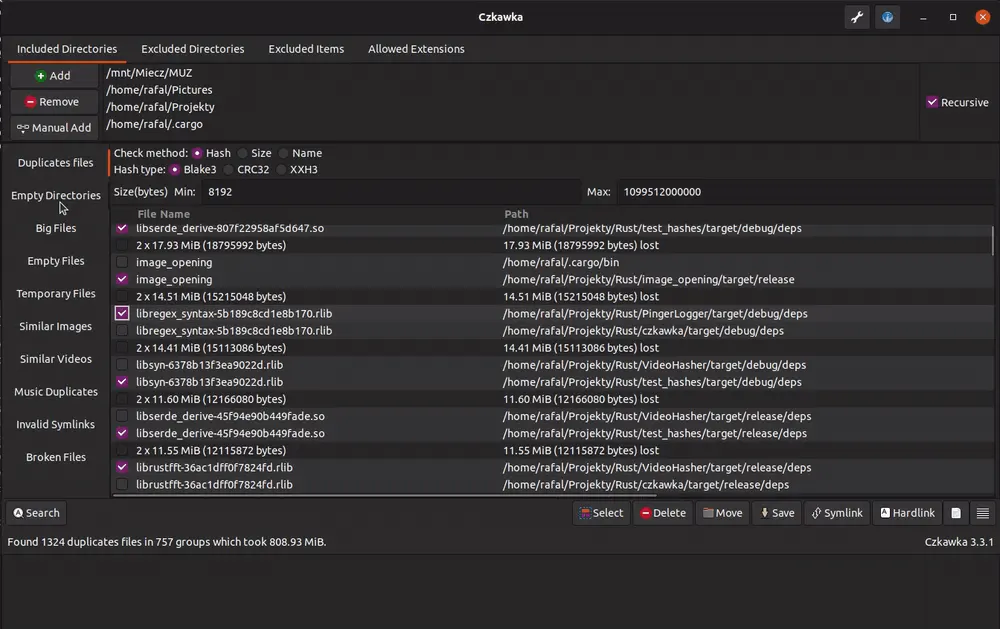
Czkafka Duplicate File Finder
In my evaluation of Czkawka, it quickly became clear that its real-world performance falls short of its marketing claims. While it began scanning a large dataset without delay, the tool slowed significantly during deeper analysis stages. It also became unresponsive on multiple occasions, and I was forced to restart the scan twice after mid-process crashes.
Next, I looked at performance consistency, and this is where the problems became even more obvious. Even simple duplicate scans took significantly longer than competing tools, sometimes running 2 to 3 times slower on the same dataset. While the developer promotes Rust-based performance and multithreading, I did not see those benefits in practice. Instead, the tool felt unstable under heavy workloads, especially when scanning larger directories or mixed file types.
Finally, I also noticed that Czkawka gets heavily promoted on Reddit and similar communities, often positioned as a top-tier open-source alternative. However, my hands-on testing did not support that reputation. Although it offers many features on paper, the overall experience felt below average due to instability, slow performance, and repeated crashes. As a result, I would not recommend it for large-scale duplicate cleaning, especially if stability and speed matter in your workflow.
Key Features:
- Multi-platform duplicate file finder available for Windows, macOS, and Linux
- Detects duplicates using file name, size, and hash-based comparison
- Finds additional clutter such as empty files, temporary files, and broken or corrupted files
- Includes optional support for similar images, videos, and audio detection
- Offers both GUI and command-line interface for basic use and automation
Pros
- Completely free and open-source
- Supports multiple operating systems
- Includes several scan types beyond basic duplicate detection
Cons
- Unstable during large-scale scans and crashed multiple times in testing
- Noticeably slower than other duplicate finders on the same dataset
- Interface feels technical and less user-friendly for beginners
- Performance drops significantly when scanning hundreds of thousands of files
- Noisy results that often require extra manual filtering
- Less polished overall experience compared to commercial alternatives
Of course, the tool can not compete with any dedicated duplicate image finder or duplicate music finder, but at least it is free. Pricing: Free open-source
9. Dupe Guru
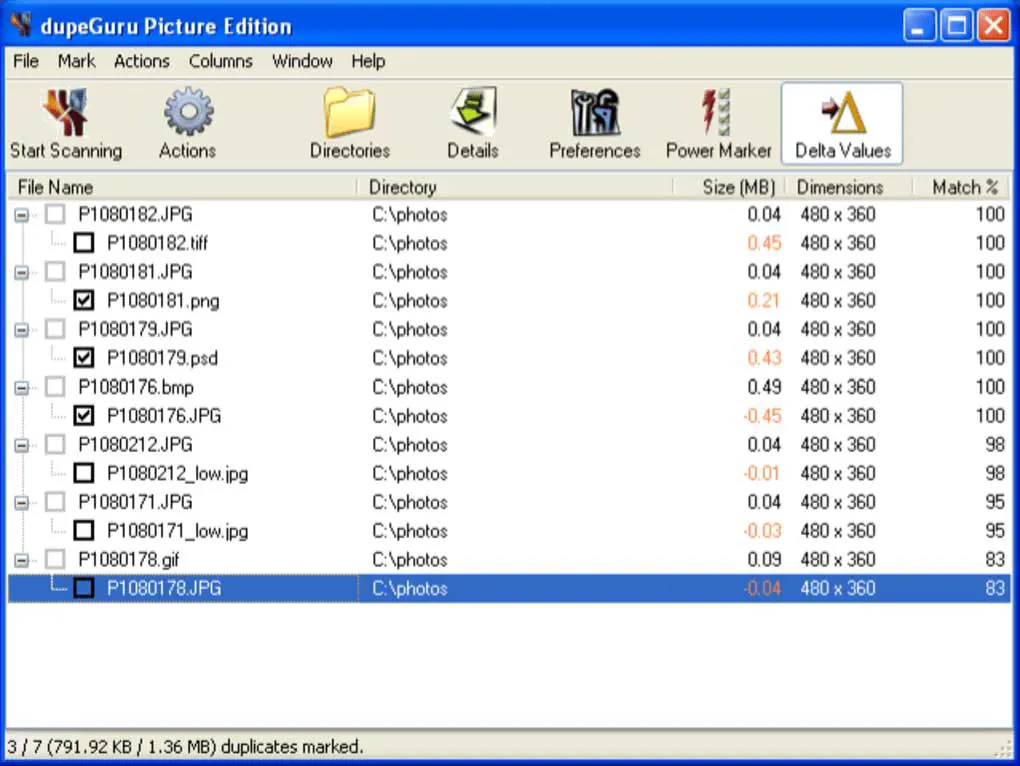
dupeGuru Dulicate Remover
When I put dupeGuru through the benchmark run, responsiveness began to degrade as soon as the scan workload expanded. After processing for a short period, the interface became noticeably sluggish and increasingly difficult to interact with. The full operation lasted roughly 42 minutes, and the program locked up twice while assembling the final duplicate groups, which required restarting and resulted in some progress being lost.
Next, I focused on how dupeGuru handles real-world duplicate detection scenarios. Instead of clean and predictable results, I often saw inconsistent grouping where near-identical files ended up in separate clusters. At the same time, unrelated files occasionally appeared in the same group when I used more aggressive matching settings. Although the tool offers configurable engines, I still needed several manual corrections just to get usable results, which slowed down the entire workflow significantly.
Finally, I tested its usability in everyday cleanup tasks, and this is where it fell behind most modern tools. The preview system felt limited and delayed, especially when switching between large media files. In addition, the settings structure felt fragmented, so I spent extra time just understanding which scan mode actually produced reliable output. Overall, I still rated dupeGuru as a 3-star tool because it remains free and flexible, but its unstable performance, slow processing, and inconsistent grouping make it hard to trust on large or important datasets.
Key Features:
- Cross-platform duplicate file finder available on Windows, macOS, and Linux systems
- Supports multiple detection methods including filename matching, size comparison, and hash-based scanning
- Includes separate scan modes for documents, images, music, and general file duplicates
- Offers configurable matching rules to adjust strictness and similarity thresholds
- Provides both graphical interface and command-line mode for flexible usage and automation
Pros
- Free and open-source with no licensing restrictions
- Runs on multiple operating systems, which adds flexibility for different environments
- Allows advanced users to fine-tune duplicate detection rules
Cons
- Becomes unstable during large scans and crashed several times in my testing
- Processes the same dataset noticeably slower than competing tools
- User interface feels outdated and slows down navigation during heavy scans
- Requires manual cleanup because results often include questionable matches
- Performance drops sharply when scanning large drives with mixed file types
- Overall experience feels less refined compared to modern commercial alternatives
Pricing: Free
10. Duplicate File Finder Plus
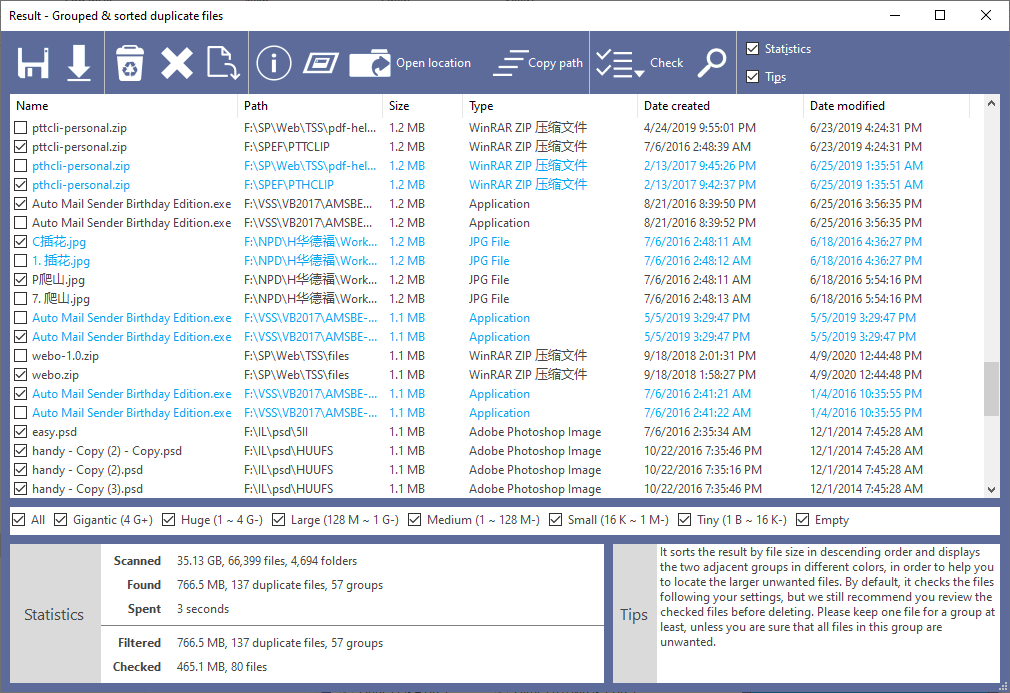
Duplicate File Finder Plus
When I put Duplicate File Finder Plus through its run, it became obvious fairly quickly that it relies on very basic duplicate detection methods with little innovation behind them. Even though it advertises byte-level comparison, I did not see any real improvement in accuracy or smarter matching compared to faster, more modern tools. Overall, it feels like a straightforward implementation of duplicate scanning, without much optimization for handling large or complex file structures.
Next, I explored the interface and immediately noticed how outdated and cluttered it feels. I started by selecting drives and folders, and I liked that I could also include individual files, which is not very common. However, the filtering system felt limited because it only supports fixed size ranges like “Small” or “Medium” instead of precise control. In addition, the duplicate results screen lacked structure, and without a proper preview system, I had to open files manually just to verify matches, which slowed everything down significantly.
Finally, I tested its real-world usability during a full cleanup workflow, and this is where the tool disappointed me the most. I could only delete files directly because it does not support moving or copying duplicates, which made safer cleanup workflows harder to manage. Moreover, the subscription model feels difficult to justify at around $30 per year, especially when other tools in our list offer lifetime licenses at similar prices. Overall, I rated Duplicate File Finder Plus poorly because it feels slow, outdated, and overpriced compared to modern alternatives.
Key Features:
- Basic duplicate file detection using content-based comparison
- Supports scanning of drives, folders, and individual files
- Includes category filters for audio, video, documents, images, applications, and archives
- Provides simple size-based filtering using predefined ranges
- Allows users to delete duplicate files after scanning
Pros
- Simple interface that beginners can understand quickly
- Supports scanning both folders and individual files
- Includes basic file type filtering options
Cons
- Slow scan performance compared to modern duplicate finders
- No built-in preview system for verifying duplicate files
- Limited filtering with fixed size categories instead of precise control
- No move or copy options, only direct deletion of files
- Cluttered results interface that slows down review workflow
- Subscription pricing feels expensive compared to lifetime license competitors
Pricing: $30 USD per year
11. AntiDupl
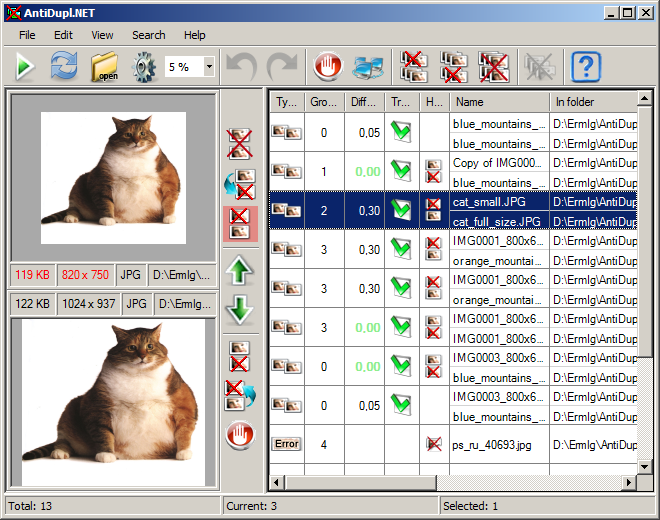
AntiDupl
When I ran AntiDupl, it immediately gave the impression of an older-generation tool rather than a modern solution for duplicate photo detection. Although it does concentrate on identifying duplicate and visually similar images, the interface feels dated and is missing many of the usability features commonly found in current tools. Overall, the experience came across as somewhat clunky and noticeably less refined than the higher-ranked photo management applications.
To its credit, AntiDupl can detect both duplicate and visually similar images across a variety of image formats, including JPEG, PNG, GIF, TIFF, BMP, PSD, and others. It also attempts to identify image defects, which is a feature rarely found in duplicate photo cleaners. However, during my testing, I found the similarity detection inconsistent, and I often needed to manually verify results using the preview window before taking any action.
The biggest issue is that the software appears abandoned and no longer actively developed. Consequently, it lacks the speed, refinement, and advanced image analysis capabilities found in newer photo duplicate finders. While the fact that it is completely free may attract some users, I would only recommend it for small photo collections and non-critical cleanup tasks. If you work with large image libraries or value accuracy, there are significantly better options available.
Key Features:
- Dedicated duplicate photo finder focused on image collections
- Detects both duplicate and visually similar images
- Supports common image formats including JPEG, PNG, GIF, TIFF, BMP, PSD, TGA, JP2, and more
- Content-based image comparison rather than simple filename matching
- Built-in image preview for reviewing duplicate matches
- Can identify certain image defects and quality issues
- Free and open-source software
Pros
- Completely free to use
- Supports a wide range of image formats
- Can detect similar images in addition to exact duplicates
- Simple installation and basic workflow
Cons
- Appears discontinued with little or no active development
- Outdated user interface feels decades behind modern alternatives
- Similarity detection accuracy is inconsistent
- Requires extensive manual verification before deleting files
- Limited features compared to dedicated commercial photo finders
- Struggles with large photo collections and modern workflows
Pricing: Free
12. CloneSpy
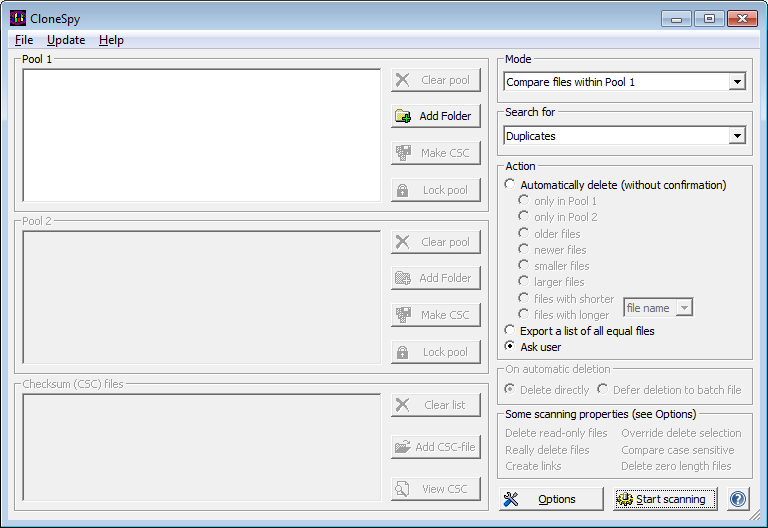
CloneSpy Duplicates Cleaner
When I evaluated CloneSpy, it quickly came across as a duplicate finder that never really moved past the Windows XP era. With no significant updates in recent years, that lack of maintenance is visible throughout the program. The interface feels cluttered and unintuitive, the terminology is outdated, and several options are poorly explained. Rather than offering a simple, modern workflow, it requires users to adapt to its own structure even for basic duplicate removal tasks.
Next, I examined its duplicate detection methods and quickly found several concerns. The software relies heavily on its proprietary CSC checksum system, yet the developer provides very little information about how it works or how reliable it is. Personally, I prefer tools that verify files with direct content comparison instead of custom checksum methods. During testing, I also found the pool-based scanning system unnecessarily complicated. Although advanced users may appreciate the flexibility, most people will likely struggle to understand the difference between Pool 1, Pool 2, and CSC files without spending considerable time experimenting.
The file management workflow creates even more frustration. Unlike modern duplicate cleaners, CloneSpy offers almost no convenient manual selection tools. Instead, it pushes users toward automated deletion rules such as deleting older files, larger files, or files with longer names. That approach feels risky, especially when the matching method itself lacks transparency. Furthermore, the interface provides very little visual feedback, which makes reviewing duplicate groups slower and less intuitive than it should be.
Overall, CloneSpy remains an interesting tool for enthusiasts who need support for legacy operating systems or specialized comparison scenarios. However, for most users, the outdated design, questionable matching methodology, and steep learning curve outweigh its benefits. If you decide to try it, I strongly recommend testing it on a non-critical folder first until you fully understand how its scanning and deletion options behave.
Key Features:
- Duplicate detection using the proprietary CSC checksum comparison method
- Ability to compare files and folders through separate Pool 1 and Pool 2 collections
- Multiple search modes including duplicates, same-name files, and empty files
- Support for exporting duplicate file lists for later analysis
- Option to defer file deletion through batch scripts
- Automatic duplicate removal based on file age, size, or filename length
- Compatible with very old Windows versions including Windows 2000 and XP
- Completely free to use
Pros
- Free with no feature restrictions
- Supports legacy Windows systems that most modern tools no longer support
- Export and batch-processing options may appeal to advanced users
- Flexible folder-to-folder comparison workflow
Cons
- Outdated and highly unintuitive user interface
- Proprietary checksum method lacks transparency and raises reliability concerns
- No modern preview system for verifying duplicates before deletion
- Steep learning curve due to unconventional pool-based workflow
- Very limited manual duplicate selection options
- Descriptions and settings are often confusing or poorly explained
- Appears largely abandoned with no recent development activity
Pricing: Free
13. Deduplicator
Deduplicator
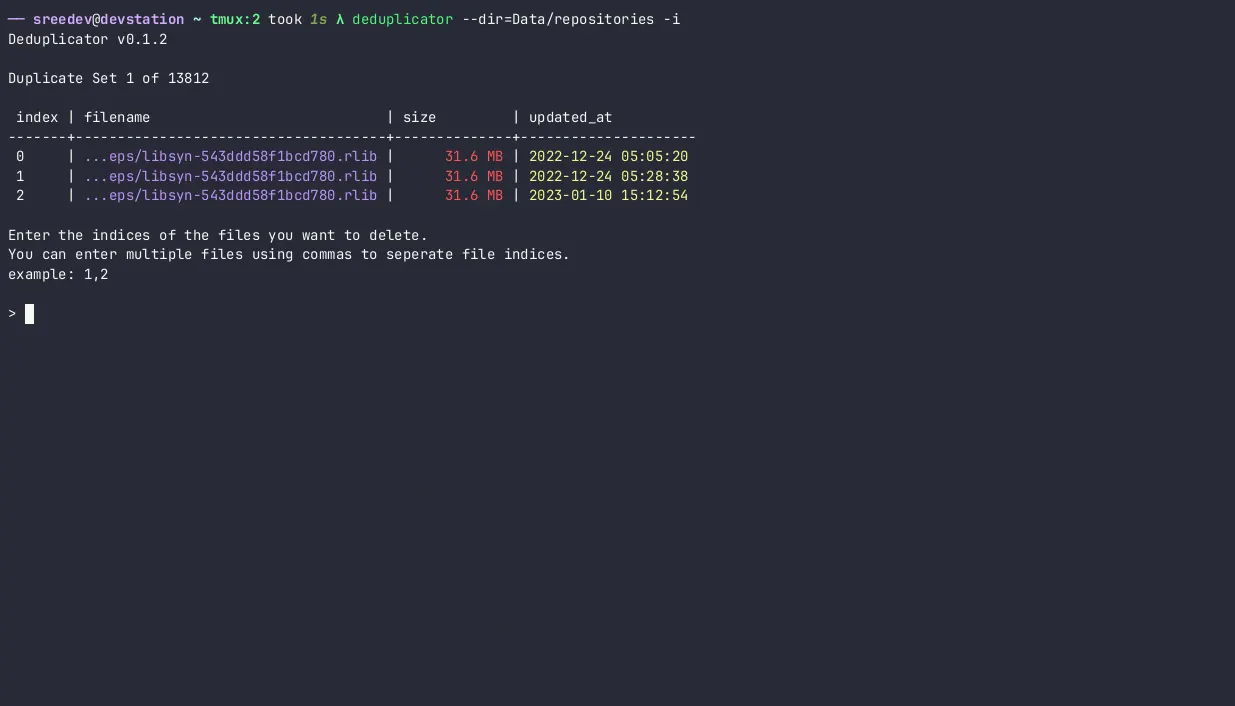
When I worked with Deduplicator, it showed that command-line utilities can still be highly capable, though they remain best suited to a specific audience. Unlike most tools in this comparison, it operates entirely through the terminal and is clearly designed for users who are comfortable with command-line workflows. Although the console presentation is relatively clean and well-structured, it still demands a noticeable learning curve for anyone not already familiar with terminal-based applications.
The tool offers a good selection of filtering options, including file type filtering, size limits, folder depth controls, symbolic link support, and interactive deletion. However, its duplicate detection relies primarily on file size and hashing algorithms rather than direct byte-by-byte verification. As I’ve mentioned throughout this guide, hash-based matching works quickly but introduces a level of uncertainty that I prefer to avoid when deleting files permanently.
The developer advertises extremely fast performance, and the scans certainly complete quickly on smaller datasets. However, speed alone does not make a great duplicate finder. During my evaluation, I found the results difficult to review compared to GUI-based alternatives, and the lack of visual previews increases the risk of deleting the wrong files. Furthermore, the installation process on Windows feels unnecessarily technical, requiring users to manually configure paths and dependencies before getting started.
Overall, Deduplicator caters to Linux enthusiasts, developers, and power users who already spend time in a terminal window. For everyone else, the lack of a graphical interface, reliance on hash-based detection, and higher risk of user error make it a difficult recommendation. Unless command-line automation is a priority, most users will achieve safer and more reliable results with one of the dedicated duplicate file finders ranked higher on this list.
Key Features:
- Command-line duplicate finder for Windows, macOS, and Linux
- Fast duplicate detection using file size and hash-based comparison
- Filter scans by file type, file size, and folder depth
- Interactive duplicate removal mode
- Support for symbolic links and hard links
- JSON output for automation and scripting workflows
- Recursive scanning of local and linked directories
Pros
- Free and open-source
- Available on Windows, macOS, and Linux
- Strong filtering and automation capabilities
- Suitable for scripting and batch operations
Cons
- Requires command-line knowledge and technical experience
- No graphical user interface
- No built-in preview for verifying duplicates before deletion
- Uses hash-based matching instead of direct file comparison
- Installation and setup can be confusing for Windows users
- Reviewing results is significantly less convenient than GUI-based tools
- Higher risk of accidental mistakes during cleanup operations
Pricing: Free
14. Wise Duplicate Finder
Wise Duplicate Finder
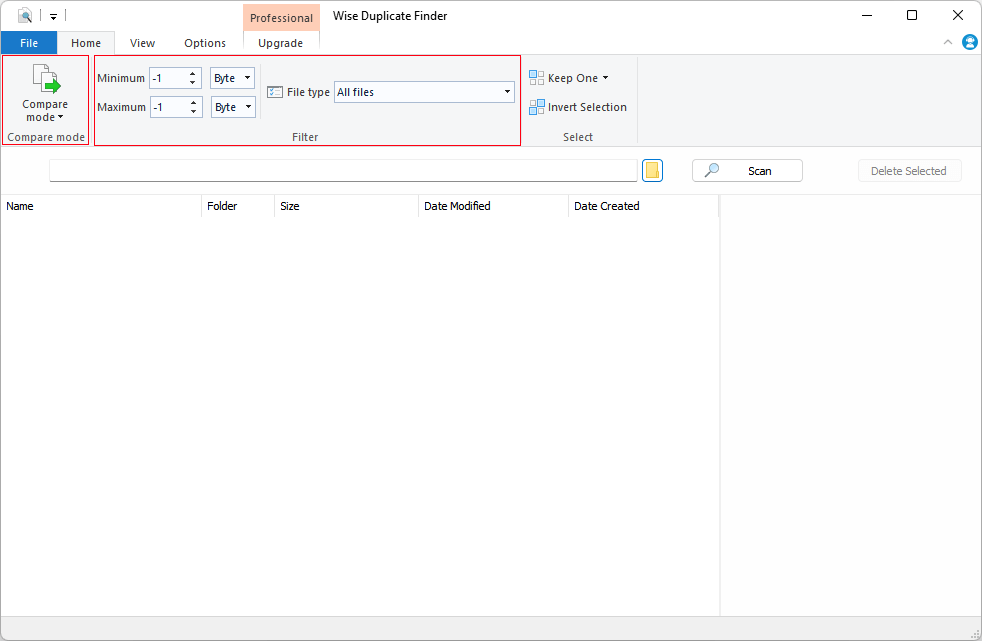
When I assessed Wise Duplicate Finder, it didn’t manage to differentiate itself in an already saturated category. While it claims to detect and remove duplicate files, it ultimately offers little that isn’t already available in many free alternatives. What stood out first was not the tool itself, but its presentation and messaging. Instead of clearly communicating its advantages over competitors, the website leans heavily on explaining what duplicate files are and the reasons they occur.
Once I moved past the marketing and tested the application, the experience remained underwhelming. The software provides several scan modes, including file name and size matching, partial matching, and exact matching. However, the developer never clearly explains how these methods work. More importantly, matching files by name and size alone is not a reliable way to identify duplicates. The lack of transparency around the detection engine makes it difficult to trust the results, especially when deleting important files.
The user interface feels dated and resembles software from the early Office 2000 era rather than a modern Windows application. Furthermore, Wise Duplicate Finder lacks one of the most important features found in higher-ranked tools: an integrated file preview. As a result, reviewing duplicates becomes slower and riskier because you cannot instantly verify file contents before removal. The software does include backup and restore functionality, but that feels more like a safety net for a risky workflow than a genuinely useful productivity feature.
Overall, Wise Duplicate Finder delivers only the basics while charging a recurring subscription fee. Considering that several tools higher on this list offer more advanced search methods, better interfaces, file previews, and even lifetime licenses, I struggle to find a compelling reason to choose Wise Duplicate Finder. In my opinion, the software feels overpriced, outdated, and difficult to recommend when better free alternatives already exist.
Key Features:
- Searches for duplicate files using multiple matching modes
- Supports duplicate documents, images, videos, music, and other file types
- Can identify empty and zero-byte files
- Offers manual and automatic duplicate removal options
- Includes backup and restore functionality before deletion
- Allows filtering by file type and scan location
- Displays duplicate files in grouped results for cleanup
Pros
- Simple enough for basic duplicate cleanup tasks
- Backup and restore feature adds a layer of protection
- Supports most common file types
Cons
- Vague and poorly documented duplicate detection methods
- No integrated preview for verifying files before deletion
- Outdated user interface that feels years behind competitors
- Relies on questionable matching modes such as file name and size comparison
- Subscription-based pricing feels expensive for the feature set
- Marketing materials contain confusing and ambiguous claims
- Offers few advanced features compared to leading duplicate finders
Pricing: $20 per year
15. SearchMyFiles
SearchMyFiles Duplicate Finder
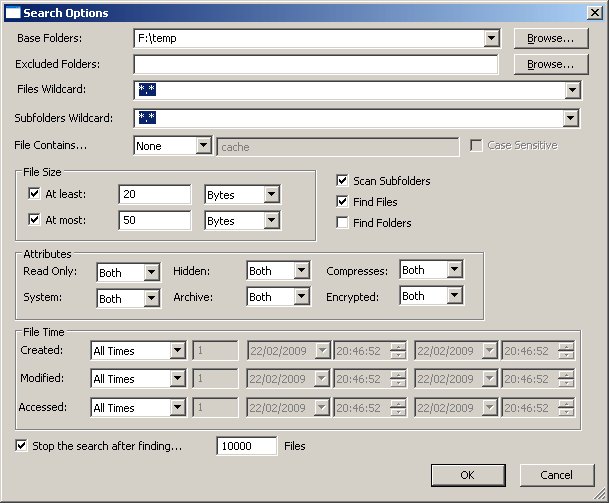
When I put SearchMyFiles to the test, it came across more as an advanced file-search utility with duplicate detection added on rather than a tool built specifically for that purpose. It provides a wide range of filtering options, allowing searches by date, size, attributes, and even file content. However, the duplicate-finding capability feels more like an auxiliary feature, missing several of the refinements typically found in dedicated duplicate cleanup tools.
To its credit, SearchMyFiles performs true byte-by-byte file comparisons, which provides accurate duplicate detection. However, the developer openly recommends narrowing the search scope because duplicate scans can become very slow and consume significant amounts of memory. In practice, I found that duplicate searching works best on smaller datasets or carefully filtered folders. Without aggressive filtering, performance quickly becomes a limitation.
The biggest drawback is usability. The interface looks extremely dated and resembles classic Windows utilities from two decades ago. Furthermore, the application provides no integrated preview for images, documents, videos, or other file types. As a result, reviewing duplicates becomes a tedious manual process that requires opening files individually before deciding what to delete. While duplicate groups receive color coding, that does little to compensate for the missing review tools.
Overall, SearchMyFiles remains a useful free utility for advanced file searches and occasional duplicate cleanup. The portable design is convenient, and the extensive filtering options will appeal to technical users. However, if your primary goal is finding and safely removing duplicate files, the dedicated duplicate finders higher on this list offer a significantly better experience, faster workflow, and much safer review process.
Key Features:
- Advanced file search utility with built-in duplicate file detection mode
- Accurate byte-by-byte comparison for finding exact duplicate files
- Powerful filtering by file size, date, attributes, content, and location
- Supports text and binary content searching
- Color-coded duplicate groups with duplicate numbering system
- Portable application that requires no installation
- Exports results to HTML, CSV, XML, and text formats
- Does not modify the Windows registry or system folders
Pros
- Completely free and portable
- Highly accurate duplicate detection using binary comparison
- Extremely powerful filtering and search capabilities
- Useful export options for reporting and analysis
Cons
- Duplicate finding feels like an added feature rather than a primary function
- Very outdated user interface
- No integrated preview for reviewing duplicate files
- Can become slow and memory-intensive on large scans
- Requires significant manual work to verify duplicates safely
- Limited duplicate management features compared to dedicated tools
- Not beginner-friendly despite its simple appearance
Pricing: Free
16. SourceForge Duplicate Files Finder
SourceForge Duplicate Files Finder
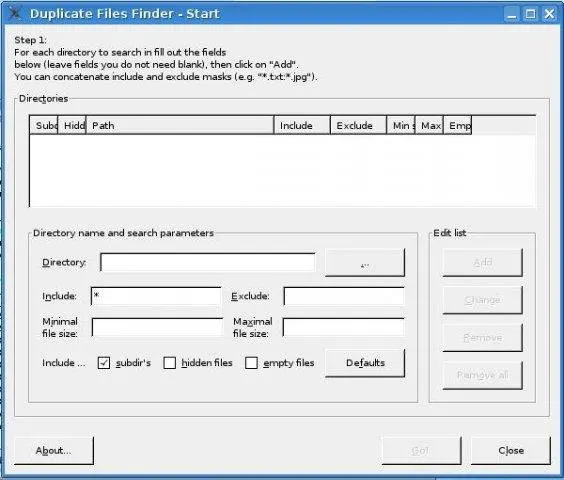
SourceForge Duplicate Files Finder feels like a software time capsule. When I put it through its paces, a significant amount of time was spent just getting comfortable with the interface before even focusing on duplicate detection. While the application advertises fast scanning through an optimized algorithm, the overall experience feels stuck in the mid-2000s. Its last official update dates back to 2008, which immediately raises questions about compatibility, stability, and long-term support.
The software includes a respectable number of filtering options on paper. You can limit scans by file size, file masks, hidden files, empty files, and individual folder settings. Unfortunately, many of these options feel designed for developers rather than everyday users. For example, file filtering relies heavily on wildcard patterns, while size filters require manual byte values instead of user-friendly units such as MB or GB. Consequently, even simple tasks become unnecessarily complicated.
What surprised me most was how difficult it felt to complete basic duplicate cleanup. Modern duplicate finders guide users through the process with previews, smart filters, and intuitive layouts. By contrast, SourceForge Duplicate Files Finder provides a cluttered interface with very little visual guidance. While advanced users may appreciate the ability to create hard links or symbolic links, most people simply want to review duplicates and remove them safely. This tool never makes that process easy.
Overall, I view SourceForge Duplicate Files Finder as a historical curiosity rather than a practical recommendation. It remains free and cross-platform, which explains why some enthusiasts still mention it online. However, for anyone looking to clean duplicates efficiently in 2026, there are far better alternatives available. Unless you enjoy experimenting with legacy software, I would skip this one entirely.
Key Features:
- Cross-platform duplicate file finder for Windows, Linux, and macOS
- Duplicate detection with folder-specific scan settings
- File filtering by name masks, size ranges, hidden files, and empty files
- Option to delete duplicates or replace them with hard links and symbolic links
- Support for recursive and non-recursive folder scanning
- Basic progress tracking during duplicate searches
Pros
- Completely free and open-source
- Available on multiple operating systems
- Supports symbolic links and hard links
- Offers granular folder-level filtering options
Cons
- Last updated in 2008 and appears abandoned
- Extremely outdated and difficult-to-use interface
- Requires technical knowledge for many common tasks
- Filtering system relies heavily on wildcard syntax
- Size filters accept only raw byte values
- No integrated preview for safe duplicate review
- Poor usability compared to modern duplicate finders
- Feels more like a developer utility than a consumer application
Pricing: Free
17. AllDup Review: A Free Tool with Performance Issues

AllDup Duplicate File Finder
I tested AllDup on the same benchmark dataset used throughout this review: more than 770,000 files and 200,000 folders stored on a high-capacity SSD. On paper, the software looks feature-rich and offers dozens of duplicate detection methods, filters, and customization options. However, once I started working with larger datasets, the experience quickly became frustrating. The interface feels cluttered, many settings lack clear explanations, and simple tasks often require far more clicks than necessary.
The biggest disappointment was performance. Despite its reputation as a powerful free duplicate finder, AllDup delivered some of the slowest scan and deletion speeds in this comparison. Several scans took considerably longer than competing tools, and processing duplicate removal operations often felt painfully sluggish. I also encountered multiple false positives during testing, which forced me to spend additional time manually reviewing the results. While the software includes preview options, they do not fully compensate for the unreliable duplicate grouping.
Another issue is that AllDup tries to do everything at once. It supports duplicate files, music tags, hard links, symbolic links, advanced filters, and numerous search modes, yet the overall workflow feels unnecessarily complicated. As a result, beginners may struggle to understand which options they actually need. Furthermore, users frequently report performance issues online, including slow deletion speeds and inconsistent results, such as those discussed in this Reddit thread: AllDup performance discussion.
Overall, I found AllDup difficult to recommend for serious duplicate management. Although it is completely free and offers a long list of features, the slow performance, occasional false positives, and cumbersome workflow outweigh its advantages. If you manage large file collections, several higher-ranked tools in this list deliver faster scans, more reliable results, and a much smoother user experience.
Key Features:
- Multiple duplicate detection methods including file content, name, size, extension, and date matching
- Supports scanning local drives, external storage devices, and network locations
- Can identify duplicate music files using ID3 tag information
- Includes advanced filtering rules for file types, folders, and search conditions
- Built-in preview support for reviewing duplicate files before deletion
- Supports hard link and symbolic link detection
- Allows saving and loading scan results for later review
- Exports duplicate file lists in several formats
Pros
- Completely free to use
- Large number of search modes and filtering options
- Includes preview functionality before deleting files
- Supports music tags, hard links, and symbolic links
Cons
- Very slow scanning performance compared to competing tools
- Duplicate deletion operations can be painfully slow
- Produced false positives during testing
- Overly complex interface with too many poorly explained options
- Requires extensive manual review of scan results
- Performance issues are frequently reported by users
- Feels outdated despite the large feature set
- Not well suited for very large file collections
Pricing: Free
Full Comparison Table: All 17 Best Duplicate File Finder Tools
| # | Tool | Best For | Scan Time | Accuracy | Platform | Price | Note |
|---|---|---|---|---|---|---|---|
| 1 | Fast Duplicate File Finder | Best overall duplicate file detection | 4:37 | Excellent | Windows | Free / Pro | All Files |
| 2 | Visual Similarity Duplicate Image Finder | Finding duplicate and similar photos | 4:53 | Excellent | Windows | $24.95 one-time fee | Photos |
| 3 | Audio Dedupe Duplicate Song Finder | Duplicate and similar song detection | 5:11 | Excellent | Windows | $29.95 one-time fee | Audio |
| 4 | Duplicate Photo Finder | Large photo collections and Lightroom libraries | 5:46 | Very High | Windows | $29.95 one-time fee | Photos |
| 5 | Duplicate Music Finder | Music library cleanup and organization | 6:02 | Very High | Windows | $29.95 one-time fee | Audio |
| 6 | Folder Size | Disk space analysis and cleanup | 6:34 | High | Windows | Free | Disk Usage Analysis |
| 7 | Duplicate Finder | General-purpose duplicate file cleanup | 6:57 | High | Windows | Free | All Files |
| 8 | Czkawka | Free open-source duplicate finder | 7:43 | Moderate | Windows / macOS / Linux | Free | Open Source |
| 9 | dupeGuru | Cross-platform duplicate file scanning | 8:18 | Moderate | Windows / macOS / Linux | Free | Cross-Platform |
| 10 | Duplicate File Finder Plus | Basic duplicate file cleanup | 8:51 | Moderate | Windows | $30/year | All Files |
| 11 | AntiDupl | Free duplicate photo detection | 9:27 | Moderate | Windows | Free | Photos |
| 12 | CloneSpy | Legacy Windows duplicate management | 10:14 | Moderate | Windows | Free | Legacy Software |
| 13 | Deduplicator | Command-line automation and scripting | 10:48 | Moderate | Windows / macOS / Linux | Free | Command Line (CLI) |
| 14 | Wise Duplicate Finder | Basic duplicate file removal | 11:36 | Below Average | Windows | $20/year | All Files |
| 15 | SearchMyFiles | Advanced file search with duplicate detection | 12:09 | High | Windows | Free | File Search Utility |
| 16 | SourceForge Duplicate Files Finder | Open-source duplicate cleanup | 13:22 | Below Average | Windows | Free | Discontinued Project |
| 17 | AllDup | Feature-rich free duplicate finder | 14:07 | Moderate | Windows | Free | All Files |
How to Choose the Right Duplicate File Finder for You
Not every duplicate file finder delivers the same level of accuracy, speed, or usability. During our testing, we noticed that the best choice depends heavily on how you manage your files and how large your storage actually is. For example, we found MindGems Fast Duplicate File Finder performed particularly well on large Windows datasets where speed and accuracy matter most.
To make the right decision, focus on a few key factors instead of marketing claims:
- Operating system support: Most tools focus on Windows. If you use multiple platforms, cross-platform tools like dupeGuru may look attractive, but they often come with trade-offs in performance and polish.
- Ease of use: Beginners usually prefer straightforward workflows. Some simple tools provide a guided experience, while advanced tools often expose more complex configuration options.
- Performance on large datasets: If you manage hundreds of thousands of files, you need a tool that scales well. In our tests, tools like MindGems Fast Duplicate File Finder handled large libraries more consistently than many lightweight alternatives.
- File type coverage: Some tools specialize in photos or music, while others handle documents, archives, and mixed environments more effectively.
- Safety and preview features: Always prioritize tools that offer file previews and safe deletion options to reduce the risk of accidental data loss.
- Value for money: Free tools work well for basic cleanup, but paid solutions typically include better automation, filtering, and support.
- External and cloud storage support: If you regularly use external drives or cloud services, make sure the tool integrates smoothly with those locations.
Ultimately, the best approach is to match the tool to your workflow rather than chasing feature lists. Our detailed comparisons above highlight where each solution performs best so you can choose with confidence.
How to Safely Remove Duplicate Files Without Losing Important Data
Cleaning up duplicate files can free significant disk space, but it also carries risk if you rush the process. During our tests with large Windows file libraries, we found that safe deletion depends less on speed and more on how carefully you review results before removing anything.
To avoid accidental data loss, follow these practical safety steps:
- Create a backup before cleanup: Store a copy of important folders on an external drive or cloud storage so you can recover files if something goes wrong.
- Use built-in preview tools: Always inspect images, documents, or media files before deletion instead of relying only on file names or hashes.
- Apply smart auto-selection rules: Choose options that keep the newest version, highest resolution image, or largest file size when applicable.
- Enable safe deletion options: Prefer tools that move files to the Recycle Bin or a recovery folder instead of permanently deleting them immediately.
- Review results in batches: Do not delete everything at once. Instead, process smaller groups of duplicates and verify results step by step.
- Protect system and program folders: Avoid scanning or deleting from critical Windows or application directories unless you fully understand the impact.
- Maintain regular backups: Keep ongoing backups so you can restore data even after future cleanup sessions.
By following these steps, you reduce risk significantly and keep full control over your files while still reclaiming valuable storage space.
Duplicate File Finder Frequently Asked Questions (FAQ)
Final Verdict: The Best Duplicate File Finder for Windows in 2026
After testing and comparing the most popular duplicate file finder tools on a high-volume Windows dataset, one solution consistently delivered the best balance of speed, accuracy, and usability: MindGems Fast Duplicate File Finder. It handled large file libraries smoothly, identified duplicates with high precision, and kept the workflow simple enough for everyday users while still offering enough control for advanced cleanup tasks.
Unlike many alternatives that either slow down under heavy loads or overwhelm users with complex settings, MindGems strikes a practical balance. It focuses on fast scanning performance, reliable duplicate detection, and safe removal workflows that reduce the risk of accidental file loss.
That said, the “best” duplicate file finder still depends on your use case:
- Beginners: Simple tools like AntiDupl work well for basic cleanup tasks with minimal setup.
- Power users: Advanced solutions like Fast Duplicate File Finder offer deeper filtering, automation, and customization options.
- Cross-platform users: Open-source tools such as dupeGuru or Czkawka provide flexibility across operating systems, though they often trade performance and accuracy for versatility.
- Mac users: Dedicated macOS tools like PhotoSweeper deliver better integration with Apple’s ecosystem.
Overall, your ideal choice depends on your file types, system size, and comfort level with technical settings. If you want a reliable tool that performs well across large Windows libraries, MindGems Fast Duplicate File Finder remains the most efficient and feature-tich duplicate finder that we tested.
Download Fast Duplicate File Finder
Please share this best duplicate file finder list with your friends – they will thank you as it contains a lot of useful and free tools.
Pingback: Best Duplicate Photo Finder & Removers in 2022 - Top 17 Image Cleaners
Pingback: Find Largest Files in Windows 11, 10, 8, 7
Very complete list and great in-depth review. I tried some of the tools and totally agree with you.
MindGems Fast Duplicate File Finder is what I am personally using. Very easy-to-use yet powerful duplicate file finder. Absolutely free to use.