
Duplicate Image Finder - FAQ
Delete Duplicate Images - Search Images By Sample
 About
About Features
 Download
 Register (buy)
 Screen Shots
 What's New?
 FAQ
FAQ Awards
 Tutorials
Below you will find the most frequently asked questions.
Click the question that you are interested in to scroll to the answers section. You can also use the search functionality in the web browser to find a particular keyword on the page.
Do not forget to check also the blog area as it contains a lot of information, tutorials and examples and provides a search option for easier navigation: www.mindgems.com/article/
Duplicate Image Finder Questions
- COPY, MOVE, or DELETE issues solutions.
- Why Should I Register?
- I can not download/register the product?
- Does Visual Similarity Duplicate Image Finder support RAW formats?
- How to exclude a folder from auto-mark?
- How to disable self-scan for a folder or how to compare folder A against folder B?
- The application disappears when minimized.
- Is there a limit for the count of images?
- Do you provide a library or dll that will find duplicates?
- Does Visual Similarity Duplicate Image Finder work on Mac OS?
- Can we compare scanned text and image documents?
- Do you sponsor educational institutions?
- The application freezes at %%, what is wrong?
- Which duplicate file finder to choose?
- I have two 100% identical files and VSDIF does not detect them. What is the issue?
- Auto-check does not select any files, what is wrong?
- Auto-check vs Quick Check - what is the difference?
- Some of my duplicate images are not identified or the identified images are not similar - what is wrong?
- How to search for similar images inside a folder using a sample image - Image Search?
- How does the CACHE feature work?
- The scan process is slow, how can I improve it?
- Error Loading: file name
- The scan finishes immediately with no duplicates
- Can I limit the search to 100 groups or 1000 images?
Duplicate Image Finder Answers
Why Should I Register?
- Registered users get free support and minor version updates ( new minor versions of the product)
- Registered users can suggest extra features that they would like to be included in the product
I can not download/register the product?
Please read the instructions in your registration email carefully and follow them precisely without ignoring any steps.
Does Visual Similarity Duplicate Image Finder support RAW formats?
How to exclude a folder from auto-mark?
In the folders list tick the 'Disable Automark For This Folder' checkbox for the corresponding folder.
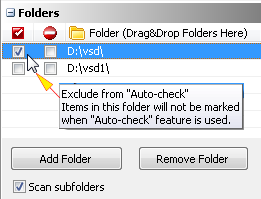
Please read this short tutorial for more details: Exclude A Folder From Auto-Check – Set “Source” Folder
How to disable self-scan for a folder or how to compare folder A against folder B?
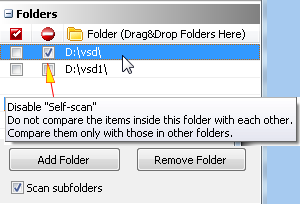
If you disable self-scan for folder 'VSD' the images inside it will not be compared against each-other - they will be compared only with images that are located in other folders.
If you disable self-scan for the folders 'VSD' and 'VSD1' the images in 'VSD' will be compared against the images in 'VSD1' and vice-versa instead of comparing all the images in 'VSD' and 'VSD1' against each other.
Please read this short tutorial for more details: How To Compare Two Or More Folders For Duplicates
The application disappears when minimized.
Is there a limit for the count of images?
Do you provide a library or dll that will find duplicates?
Does Visual Similarity Duplicate Image Finder work on Mac OS?
Can we compare scanned text and image documents?
Do you sponsor educational institutions?
The application freezes at %%, what is wrong?
- This can happen due to damaged images in your collection or due to images that are created by low-quality software which does not comply to the standards. In order to identify such images follow the steps below.
- Go to Option and check "Enable Logging"
- Run the scan
- Once the application freezes you can check the log file in "My Documents" folder to see which file started loading and could not complete. Just open the file in a text editor like NOTEPAD and search for all the occurrences of the word "ERROR". If the file does not contain the word "ERROR" examine the last ten files that were loaded. Most likely one or few of them are damaged and have caused the freeze. On newer operating systems the file is located in "Libraries\Documents" and named VSDIF_Log.txt
- Please send the damaged image file(s) to us for an analysis.
- Remove the corrupted file(s) and run a scan - it will continue properly.
- Do not forget to disable the logging option after you are done testing as it will slow-down the scan process.
- If you still experience problems go to Options and uncheck "Quick Load Images"
- Run the scan again and repeat the steps from 4 to 6.
- If the steps above do not help, make sure that your drive is not broken and does not have physical errors. You can try running the ScanDisk application from Windows.
Which duplicate file finder to choose?
I have two 100% identical files and VSDIF does not detect them. What is the issue?
- Make sure that you have not set any filters and that the files are really scanned.
- Go to options and make sure that all the file extensions in the "File types" tab are ticked. (Use "Select All" and click "OK")
- Use the default settings for your scan. You can check them in this Duplicate Image Finder Tutorial or Uninstall/Install the tool to reset all settings to their defaults and try a scan.
- This issue can happen if you have damaged images in your collection. Try this: The application freezes at %%, what is wrong
- Another very likely cause for such issue is a poor antivirus or system optimization tool that may block access to your files. Disable such tools, restart your computer and retry.
- Access permissions could be another cause for the problem - make sure that the user account used to start VSDIF has sufficient permissions to access the target location. Note that using an Administrator account does not imply that it has access to all locations especially such located on network shares or external drives.
Auto-check does not select any files, what is wrong?
- Most likely all or some folders are excluded from auto-check in the folders list. Go to the folders list and un-tick the "Exclude from auto-check" option for the desired folder.
- There are extra filters enabled in the advanced options. Go to the "Auto-check panel" and click the "Advanced..." button. Make sure that no filters are enabled. Click the "Uncheck all" button to uncheck all the extensions that are excluded and hit the "Ok" button. Retry the auto-check feature.
Auto-check vs Quick Check - What is the difference?
- "Auto-check" will automatically mark the files for deleting based on the selected options in the "Auto-check" panel and will not select any files that are located in the folders marked with the "Exclude from auto-check" option. It will select all files in a group and will ALWAYS KEEP ONE FILE UNCHECKED even if it matches the selected criteria - KEEP THE "ORIGINAL" file. Every consequential use of the auto-check option will reset the previously checked items and apply new selection based on the current auto-check settings.
- "Quick check" works in a slightly different way. It will select/deselect items based on the settings inside the "Quick check" panel. Using the "Quick check" feature the selection will be applied over the currently marked items. Unlike "Auto-check", "Quick check" will not clear the selection prior to applying the new selection. This makes it possible to combine multiple selection options. "Quick check" will keep unchecked copies of files inside a group only if they do not match the selected criteria. This means that unlike "Auto check" using "Quick check" may select/deselect all files in a group if they match the selected filters.
Some of my duplicate images are not identified or the identified images are not similar - what is the wrong?
- "Quick load images" - this option which is disabled by default may cause incorrect results. While this option is effective and works perfectly it can not handle "bad images" that may be present in your photo collection. There are a lot of applications that do not comply with the standards and if you have used one to process or convert your images the resulting files may not behave properly in other application including VSDIF. If you are not sure about the quality of your images disable this option and retry the scan. Please note that you have to create a NEW CACHE file in order for the change to take effect.
- Another possible reason is that some files may be damaged. Try to save the files in another format or in the same format using different photo management tool and retry.
- If the issue is related to landscape photos then this is how VSDIF works. Landscape photos do not have enough detail in order for VSDIF to detect them as too different. In most cases a landscape photo consists of sky and land or sky and sea which is identified by VSDIF as very similar and actually that result is CORRECT - they are all very similar landscape photos. We recommend you to scan those separately using much higher similarity level like 99% so that the different scenes are grouped in different groups.
How to search for similar images inside a folder using a sample image - Image Search?
Image Search Tutorial 1
Image Search Tutorial 2
How does the CACHE feature work?
On a fresh installation the tool is configured to use "Default" cache file so no changes from the user side are required in order to use the feature. If necessary a different cache file can be created and also the cache location can be set in the application settings. Setting up the cache file location on an SSD or other high-performance storage in order to further improve the scan speed is strongly recommended. The cache file is optimized in terms of memory usage too and does not require large amounts of disk space. While using the cache system the scan speed of subsequent scans can be 50 to 100 times faster depending on the image types, sizes and storage performance. Though available, using the "No cache" option is not recommended.
The scan process is slow, how can I improve it?
The scan speed depends mainly on the performance of your storage. This is because our detection algorithm is so optimized that images are compared faster than they can be loaded from your storage.
So how to optimize then?
Best thing to do is to store the files on a fast media like an SSD drive. If you have large volumes of images and that is not possible, VSDIF already includes plenty of performance optimizations - use the CACHE system which is enabled by default. There is an explanation how it works above.
Though our tools support all types of storage devices and network locations, if performance is an issue avoid scanning slow media like CDs. Network locations may be slow too depending on your network settings and network storage configuration. In such cases the files can be copied locally on a fast media, scanned, cleaned and then moved back to the desired location.
Error Loading: file name
- The file is either damaged or the tool that saved it does not comply with the standards - examine the file outside of the application. If your viewer can view the file try to convert and save it in another image format and see if the converted image can be loaded. If you have used the viewer to create the files that cannot be loaded in the first place, try using a different viewer/converter in order to convert them properly.
- The user account used to start the application does not have sufficient privileges to read the files - check the permissions of the files or start the application using an account that can access the files.
- A poor antivirus tool is blocking access to the files - check your antivirus tool logs. Try to disable the antivirus tool and retry. Please note that in many cases, exiting an antivirus application does not disable it. You have to locate the option to disable it in its settings.
Can I limit the search to 100 groups or 1000 images?
You can not directly limit the scan by a specific number of groups or images, because interrupting a search this way provides no practical benefit. There are many technical reasons why this approach is not meaningful. Most likely, you are trying to work with a smaller portion of a large library, but that is not the right workflow.
Here are the proper options:
- If you want fewer results, move the desired number of images into a separate folder and scan only that folder. This lets you work with any number of images you need. You can also compare those smaller folders with each other later.
- You can scan your entire library and save the project file as allduplicates.vsdif. This stores all results so you will not need to scan again. Then select all files after group 100, right-click them, and choose "Remove from list...". Save the project as first100.vsdif and you will have a project that contains only the first 100 groups.
After you finish working on those first 100 groups, load allduplicates.vsdif again, select the first 100 groups, and remove them. You can then repeat the same steps to work on the next 100 groups in a new project.