


Visual Similarity Duplicate Image Finder is a powerful tool for finding and removing duplicate and similar photos on Windows. It analyzes image content instead of file names, which helps detect true duplicates across folders and subfolders. This makes it easy to clean large photo collections and free up disk space quickly and accurately.
Table of Contents
- Introduction – Why You Need the Best Duplicate Image Finder
- What Makes Visual Similarity Duplicate Image Finder the Best
- Support for 300+ RAW and 40+ Image Formats
- Performance Improvements in VSDIF 7.9.0.1
- Faster Filtering for Large Image Collections
- Improved Project File Handling
- Why You Should Not Use a Basic Duplicate File Finder
- How Visual Similarity Duplicate Image Finder Helps You Find Duplicate Images
- Final Thoughts
Introduction – Why You Need the Best Duplicate Image Finder
You deal with photo collections that grow fast. As a result, you quickly lose control over duplicates and similar images. In many cases, you try to clean things manually, but you waste time and miss files.
I give you a better approach. You use Visual Similarity Duplicate Image Finder because it helps you find duplicate and similar photos with high precision. Most importantly, you get control over large image libraries on Windows without guesswork.
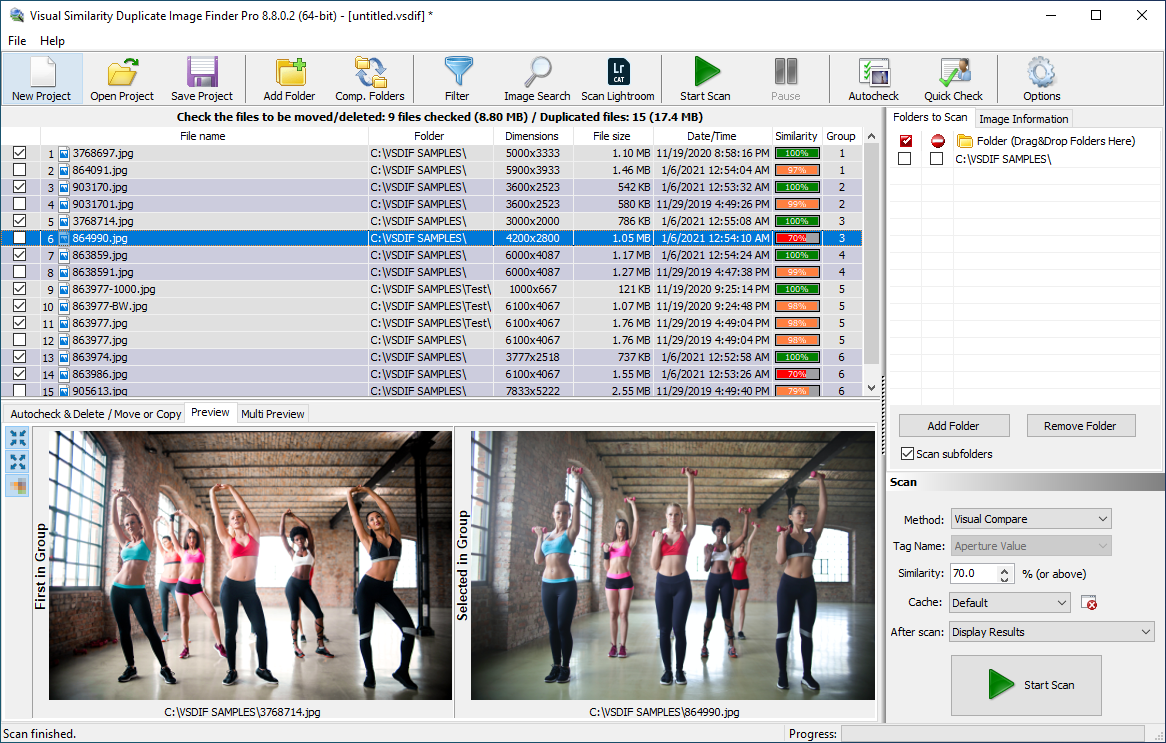
Best Duplicate Image Finder
What Makes Visual Similarity Duplicate Image Finder the Best
You need more than a basic duplicate checker. You need a tool that understands image content. That is exactly where I help you.
I do not rely only on file names or sizes. Instead, I analyze image content, so you find true duplicates and visually similar photos even when file names or formats differ.
Therefore, you get more accurate results and you clean your photo library faster.
Support for 300+ RAW and 40+ Image Formats
You often work with different devices and software. As a result, you store images in many formats. I support more than 300 RAW camera formats and more than 40 popular image formats.
In addition, I support Photoshop and Lightroom PSD files. This means you can compare professional editing files with standard images without limitations.
Because of this wide compatibility, you find more duplicates than with standard tools that fail to load many formats.
Performance Improvements in VSDIF 7.9.0.1
You expect speed when you scan large drives. That is why version 7.9.0.1 improves the core scanning engine.
I redesigned the scanning process to improve performance across all systems. You notice the biggest improvement when you scan drives with large numbers of images.
In addition, I reduce unnecessary processing steps, so you finish scans faster while keeping accuracy high.
Faster Filtering for Large Image Collections
You often apply filters before you start a scan. Now I optimize this step as well.
As a result, filtering works faster and reduces overall scan time. You also gain better control over which images I include in the comparison process.
Therefore, you save time and improve efficiency when you work with large photo libraries.
Improved Project File Handling
You often reuse settings for repeated tasks. Because of that, project file improvements matter.
I now store additional options such as “Do not compare file extensions” and “Compare only files with same extensions” inside project files.
As a result, you keep consistent scan behavior and avoid reconfiguring settings every time you run a new project.
Why You Should Not Use a Basic Duplicate File Finder
You might think a simple duplicate file finder solves the problem. However, that approach often fails with images.
Basic tools compare file names or sizes. Therefore, they miss visually identical images saved in different formats.
I solve this problem by analyzing image content directly. As a result, you detect duplicates even when files differ in resolution, format, or compression.
If you want accurate results, you need a dedicated image-focused solution instead of a general file tool.
How Visual Similarity Duplicate Image Finder Helps You Find Duplicate Images
You start by selecting the folders or drives you want to scan. Visual Similarity Duplicate Image Finder then analyzes your images using optimized algorithms that detect visual similarities and exact duplicates.
After the scan, the tool groups matching images, so you can review them easily. You decide which duplicates to keep and which to remove, giving you full control over your photo library.
Finally, the software safely removes the duplicates, freeing up disk space while ensuring you do not lose important files. With Visual Similarity Duplicate Image Finder, managing large image collections becomes simple, precise, and fast.
Final Thoughts
You get the best results when you use a tool built specifically for image comparison. Visual Similarity Duplicate Image Finder gives you speed, accuracy, and wide format support.
If you want to clean your photo library effectively, you use a dedicated duplicate image finder instead of a basic file utility.