

Looking for the best duplicate music finder? We tested and reviewed the top duplicate song finder tools to determine which ones can accurately identify duplicate songs, MP3 files, and audio tracks with different filenames, metadata, formats, and bitrates. Our hands-on comparison evaluates detection accuracy, features, ease of use, and overall value to help you choose the right tool for your music library.
- Best Duplicate Music Finders: Quick Comparison of Top Picks
- Why Trust Our Reviews?
- How We Tested These Duplicate Music Finders
- Full Reviews of the Best Duplicate Music Finder Software
- How to Choose the Right Duplicate Music Finder
- How to Safely Remove Duplicate Music
- Frequently Asked Questions About Duplicate Music Finder Software
- Final Verdict: Best Duplicate Music Finder Software for Windows
Best Duplicate Music Finders: Quick Comparison of Top Picks
Before diving into the detailed reviews, here is a quick overview of every duplicate music finder we tested. We evaluated each tool using the same controlled dataset of 10 audio files, designed to represent the most common duplicate song scenarios found in real-world music libraries.
This comparison gives you a fast, at-a-glance summary of how each duplicate song finder performed – before you read a single full review. Whether you are cleaning up a large MP3 collection, removing cross-format duplicates, or simply trying to reclaim storage space, the table below will help you identify the right tool without having to read every review first.
Each tool earned its place on this list for a different reason:
- Audio Dedupe – a top-rated duplicate music finder is the only tool that successfully identified all duplicate songs in our test set. It uses true audio fingerprinting to detect duplicates across different formats, filenames, bitrates, and missing ID3 tags.
- Duplicate Music Files Finder – A free legacy tool that showed partial signs of audio analysis. Outdated and limited, but it edged out the competition by detecting one cross-format duplicate the others missed.
- dupeGuru – A free cross-platform duplicate finder with a dedicated music mode that, in practice, performed no better than a generic file comparison tool.
- Czkawka – A free open-source utility with a strong reputation on Reddit, but one that detected only exact duplicates and suffers from serious rendering issues on Windows.
- Duplicate Files Fixer – A general-purpose file cleaner marketed deceptively as a duplicate song finder. It detected only exact duplicates and comes from a developer with a history of questionable promotional practices.
Use this table as a starting point, then continue to the full reviews below where we cover real-world test results, strengths, weaknesses, and detailed findings for every duplicate audio finder on this list.
Audio Dedupe appears at the top of our rankings because it was the only tool that delivered on the core promise of a duplicate music finder – detecting duplicate songs regardless of filename, format, bitrate, or metadata. Developed by MindGems, a software company with more than 25 years of experience building duplicate detection and system utility tools, Audio Dedupe reflects a level of algorithmic maturity and feature depth that free or hobby-maintained alternatives simply cannot match.
| # | Software | Best For | Audio Analysis |
Found Files |
Audio Preview |
Supported Platform |
Price | Rating |
|---|---|---|---|---|---|---|---|---|
| 1 | Audio Dedupe | Best overall duplicate music finder | ✅ Yes | 9 / 9 | ✅ Yes | Windows | $29.95 one-time | ★★★★★ |
| 2 | Duplicate Music Files Finder | Basic MP3 cleanup – legacy tool | ⚠️ Partial | 1 / 9 | ✅ Yes | Windows | Free | ★★☆☆☆ |
| 3 | dupeGuru | Basic exact duplicates only | ❌ No | 1 / 9 | ❌ No | Windows, Mac, Linux | Free | ★☆☆☆☆ |
| 4 | Czkawka | Open-source exact duplicate cleaner | ❌ No | 1 / 9 | ❌ No | Windows, Mac, Linux | Free | ★☆☆☆☆ |
| 5 | Duplicate Files Fixer | General file cleaner – not a music tool | ❌ No | 1 / 9 | ❌ No | Windows, Mac, Android, iOS | $39.95 per year | ★☆☆☆☆ |
Watch this Duplicate Music Finder tutorial video to learn how to scan large music collections, compare songs using audio fingerprinting, remove duplicate music safely and organize your music library.
Why Trust Our Reviews?
Led by , a software expert with more than 30 years of experience developing and testing system utility software, our team at MindGems evaluated each duplicate music finder on Windows 11 using real-world audio collections. We assessed detection accuracy, scan speed, ease of use, safety features, supported formats, and overall value to provide practical recommendations for different types of users.
Real-World Testing
Rather than relying solely on marketing claims, we installed and tested each tool ourselves using duplicate songs in multiple audio formats, including MP3, FLAC, WAV, AAC, and OGG. We evaluated how effectively each application detected exact duplicates as well as songs with different filenames, metadata, and audio properties.
Evaluation Criteria
Each duplicate song finder was scored based on:
- Detection accuracy
- Scan speed and performance
- Ease of use
- Safety features and recovery options
- Audio format support
- Value for money
Independent Reviews
While MindGems develops Audio Dedupe, we reviewed every product using the same testing process and evaluation criteria. Our goal is to help readers find the best duplicate music finder for their specific needs, whether that solution is ours or a competing product.
How We Tested These Duplicate Music Finders
Real-World Testing Methodology
Instead of using thousands of randomly selected songs, we created a carefully controlled test set designed to evaluate the specific duplicate detection capabilities of each tool. Our standardized collection contained 10 audio files representing the most common duplicate song scenarios found in real-world music libraries.
The test set included:
- Songs with different filenames but identical audio content
- Songs stored in different audio formats
- Songs encoded at different bitrates and quality levels
- Songs with modified, incomplete, or missing ID3 tags
- Songs with trimmed beginnings or endings resulting in different play times
This approach allowed us to verify whether each duplicate music finder could correctly identify duplicate songs under controlled conditions and accurately distinguish between exact duplicates, audio duplicates, and similar tracks.
Why only 10 files?
Our goal was not to measure scan speed on a large library, but to test duplicate detection accuracy. Each file was intentionally selected to represent a specific duplicate music scenario that commonly causes problems for music collectors. This controlled methodology makes it easier to compare the detection capabilities of different tools and identify their strengths and limitations.
On the other hand, testing with a carefully designed set of 10 files allows us to show the actual results produced by each tool. Rather than asking readers to trust our conclusions, we provide screenshots and detailed findings so you can see exactly how every duplicate music finder performs.
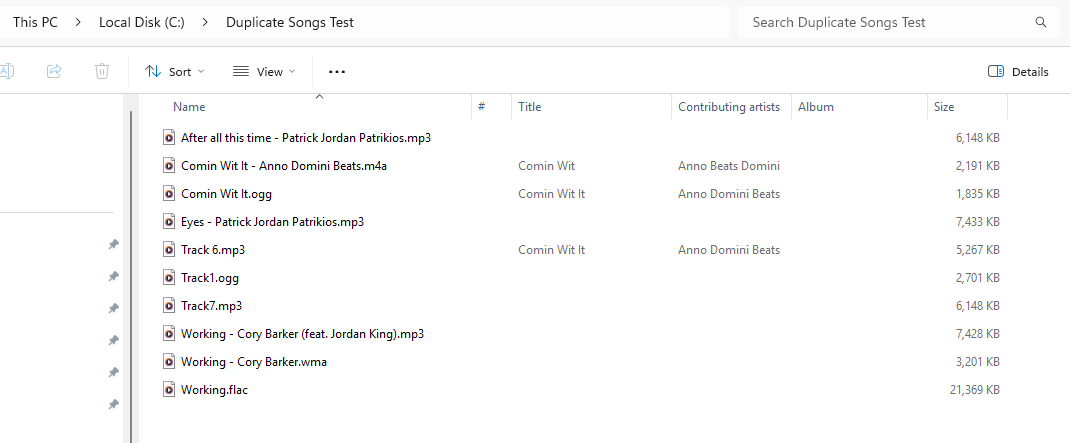
The test library used to evaluate duplicate music finder software. The collection contains duplicate songs stored in different formats, bitrates, file names, and audio qualities to measure detection accuracy.
This approach also makes it much easier to evaluate each tool’s capabilities. We could have tested these applications on 50,000 songs, but such a test would likely produce misleading results. If the collection consisted mostly of exact duplicates, nearly every tool would achieve excellent scores, making it difficult to identify meaningful differences between them.
Our goal is not simply to measure how many duplicates a tool can find. Instead, we want to determine whether it can handle the challenging scenarios commonly found in real music libraries, including different filenames, audio formats, bitrates, metadata variations, and modified audio tracks. These are the situations where duplicate song finders either succeed or fail, and where their marketing claims can be properly verified.
Full Reviews of the Best Duplicate Music Finder Software
The reviews below examine the strengths and weaknesses of each duplicate music finder, including detection accuracy, audio fingerprinting capabilities, supported formats, scan speed, ease of use, safety features, and overall value for money.
You’ll discover which tools can accurately identify duplicate songs with different filenames, metadata, formats, bitrates, or durations, and which applications are limited to finding only exact duplicates.
Whether you’re managing a large MP3 collection, organizing a music library, cleaning up duplicate audio files, or reclaiming storage space, these reviews will help you choose the best duplicate song finder for your needs.
If you’re looking for other duplicate removal tools, see our best duplicate song finders and best duplicate photo finders guides.
1. Audio Dedupe Duplicate Song Finder
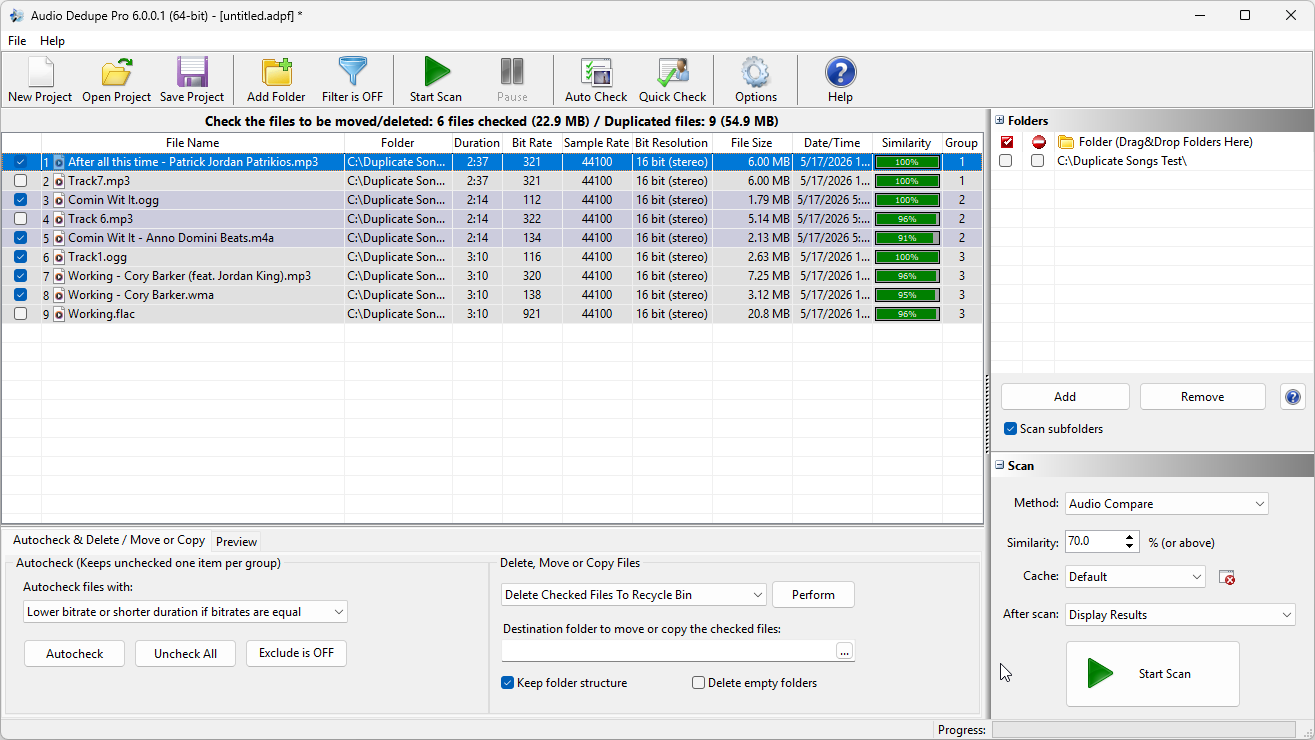
Audio Dedupe was the only tool in our testing that successfully identified all duplicate songs in the test library, including files with different formats, names, metadata, sizes, and audio quality.
Audio Dedupe won our Best Duplicate Music Finder award, proving to be one of the few tools that performs true audio analysis and fingerprinting.
It was the only tool in this list that successfully identified all duplicate songs in our test set of 10 files. The software reported 9 files out of 10 because one of the files was intentionally not a duplicate. We included it in the test to determine whether any of the tools would produce a false positive.
Audio Dedupe identified all duplicate music files even though they were stored in different file formats, had no ID3 tags, differed in size and playing time, had different file names, and varied in audio quality. This clearly demonstrates that the software is a dedicated duplicate song finder that analyzes the actual audio content rather than relying on file metadata.
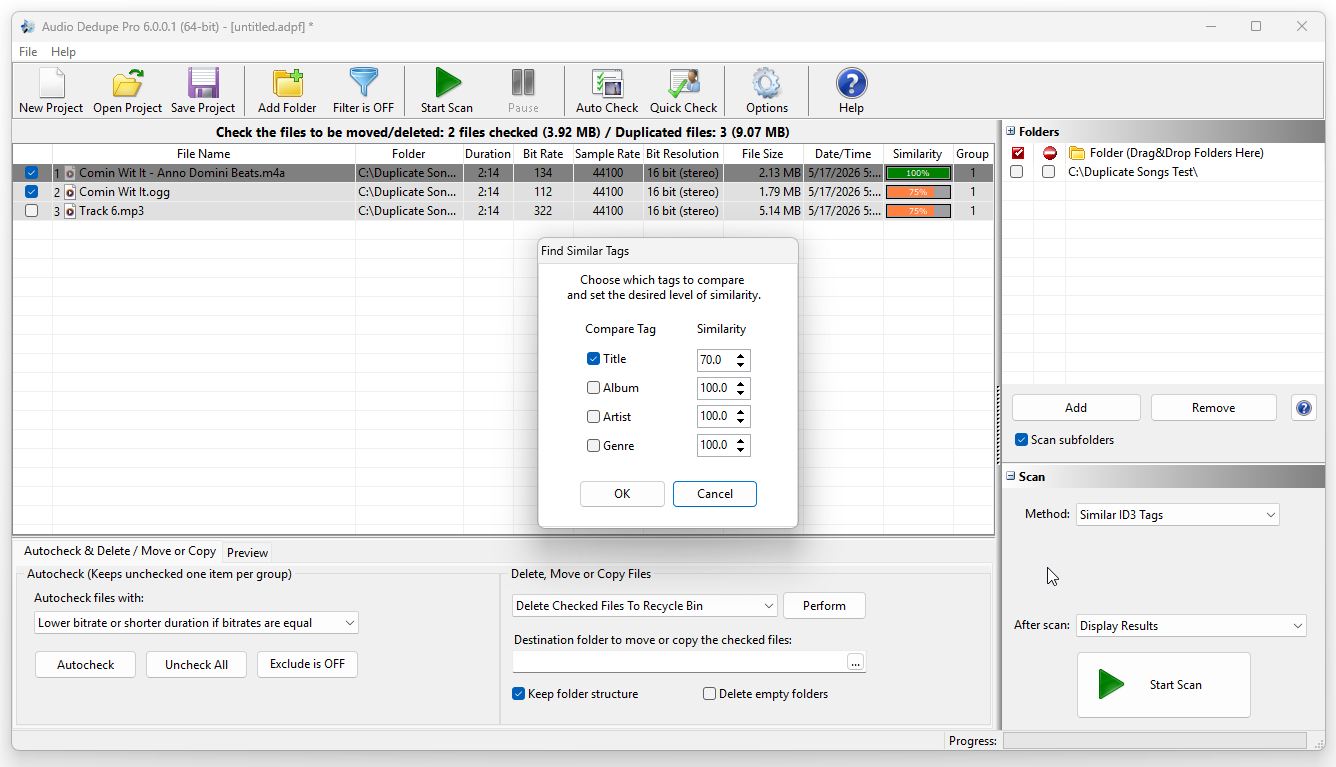
Audio Dedupe can identify songs with similar ID3 tags even when the text is not identical. The software recognizes reordered words, minor spelling differences, and similar metadata entries that other duplicate music finders treat as completely different.
Unlike many gimmicky tools that try to impress with flashy interfaces, Audio Dedupe uses a clean and familiar Windows user interface. It is immediately apparent that the software is designed to get the job done rather than compensate for missing features with visual effects. In addition, its use of standard Windows controls makes it straightforward and intuitive to use.
Based on our testing, this tool is miles ahead of every other product in this list in terms of performance, accuracy, and features. If you need a reliable solution that can accurately identify duplicate songs on your system, Audio Dedupe is the clear choice. It can easily scan hundreds of thousands of songs and is designed with both accuracy and performance in mind. Furthermore, its fingerprint cache stores previously analyzed files, making subsequent scans extremely fast.
Key Features:
- True audio analysis and fingerprinting that compares the actual audio content rather than file names, tags, or metadata.
- Find duplicate and similar songs even when they are stored in different audio formats and have different names.
- Supports MP3, FLAC, AAC, WAV, OGG, WMA, AIFF, AC3, MP4, Musepack, WavPack, and many other audio formats.
- Adjustable similarity percentage to find exact duplicates, alternate versions, remixes, and near-duplicate tracks.
- Automatically marks lower-quality copies based on bitrate, file size, song length, or file date.
- Integrated audio player with continuous playback for easy comparison of duplicate tracks.
- Multiple scan modes including Audio Compare, Exact Duplicate Files, ID3 Title, ID3 Artist, ID3 Album, and Folder Compare.
- Capable of scanning hundreds of thousands or even millions of audio files with multi-threaded processing and fingerprint caching.
- Copy, edit, and manage ID3 tags directly from within the application.
- Move, copy, delete, or send duplicate songs to the Recycle Bin.
Pros
- Excellent duplicate detection accuracy using true audio fingerprinting.
- Finds duplicates even when files have different names, tags, formats, lengths, or audio quality.
- Fast scanning performance with support for very large music collections.
- Fingerprint cache makes subsequent scans extremely fast.
- Integrated audio player simplifies duplicate verification.
- Multiple search modes for audio content, exact duplicates, tags, and folder comparisons.
- Automatically keeps the highest-quality version of a song.
- Works completely offline with no data uploaded to external servers.
- Lifetime license with no subscription fees.
Cons
- The tool may seem too complex for novice users, but it is configured for best results out of the box. In most cases, you only need to add your folders and click Scan.
Pricing: $29.95 one-time fee
2. Duplicate Music Files Finder
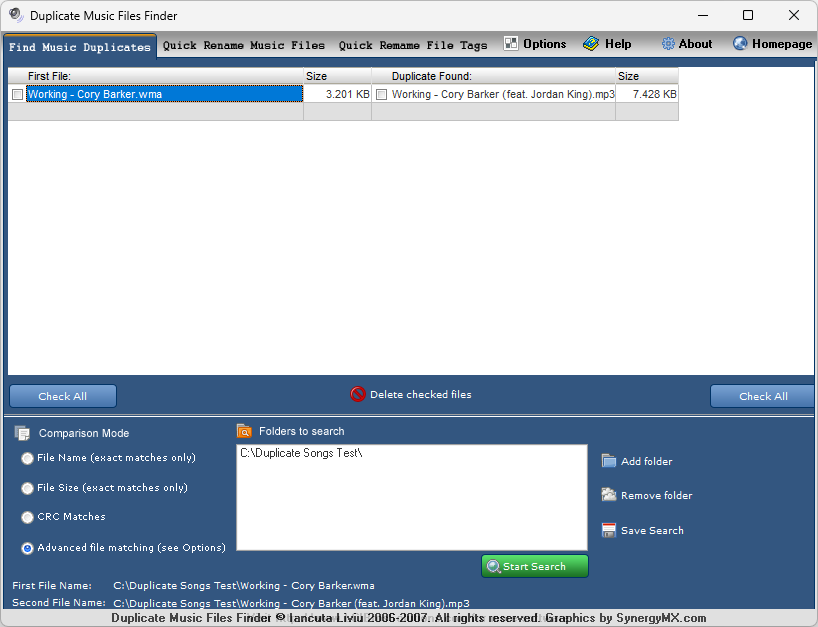
Duplicate Music Files Finder tool used to detect and remove duplicate audio files from a music library.
Duplicate Music Files Finder is the only other tool in this list, besides Audio Dedupe, that showed signs of performing actual audio analysis, but it might be matching only similar file names. Out of the 10 test files, it managed to identify only one duplicate. Surprisingly, the duplicate it found was a WMA version of an MP3 file, yet it completely missed the 100% identical copy that was included in the test set and successfully detected by all the other tools.
This tool primarily matches files by filename and metadata rather than analyzing the audio itself, which is why it scores low against the specific criteria this article tests for. It’s a different evaluation than general duplicate-finding ability – see how it performs on broader tasks in our Best Duplicate Song Finders guide, where it’s rated 3.4/5.
In general, this is an outdated and unimpressive tool. The latest version we could find dates back to 2007, and information about the software is so scarce that we had to rely on archived web pages to learn more about it. Nevertheless, it still managed to outperform several modern tools that are heavily marketed as duplicate music finders.
One significant design limitation is that the program displays only a single duplicate for each file instead of showing all matching duplicates in a group. This makes reviewing results unnecessarily difficult and may explain why only one duplicate was listed, even though the file it identified had several additional duplicates in our test set.
The program supports MP3, WMA, and WAV files and includes a built-in audio player that allows users to listen to songs before deleting them. It can search for duplicates using audio fingerprints and provides options to delete, move, or organize the files it finds. While these features were fairly advanced when the software was released, the application has not aged well and lacks many of the conveniences, performance improvements, and format support offered by modern alternatives. Overall, Duplicate Music Files Finder is an interesting historical example of audio-based duplicate detection, but it falls well short of current standards.
Key Features:
- Detects duplicate music files by searching MP3 tags, even when file names differ.
- Multiple comparison methods including MP3 tag matching, exact file name matching, and CRC match for byte-for-byte comparison.
- Supports MP3, WMA, and WAV audio formats.
- Play suspected duplicates directly in your preferred media player before deciding to delete them.
- Delete duplicate files or send them to the Recycle Bin safely.
- Quick Music Files Renamer (QMFR) module for batch-renaming poorly formatted music file names.
- Can also detect duplicates of non-music file types using CRC Match or Exact File Name methods.
- Option to ignore text in brackets and remove track numbers or delimiters from file names.
- Keyboard shortcuts for common actions and right-click context menu for quick file management.
- Automatic check for updates.
Pros
- Completely free (freeware) with no cost to download or use.
- Detects duplicates based on MP3 tags, not just file names, catching more duplicates.
- Multiple scan methods (tag match, exact name, CRC) offer flexibility for different use cases.
- Bundled file renamer module adds extra utility beyond duplicate detection.
- Can be used on non-music file types as well, making it somewhat versatile.
- Send to Recycle Bin option provides a safety net before permanent deletion.
Cons
- Outdated software last updated in 2007, with no development or support since.
- Limited format support – only handles MP3, WMA, and WAV files.
- Displays only one duplicate per file rather than grouping all duplicates together, making results harder to review.
- No true audio fingerprinting – relies on tags and file metadata rather than actual audio content analysis.
- CRC matching is slow as it requires reading the full content of each file.
- Scarce documentation and no active community or support resources.
Pricing: Free
3. dupeGuru
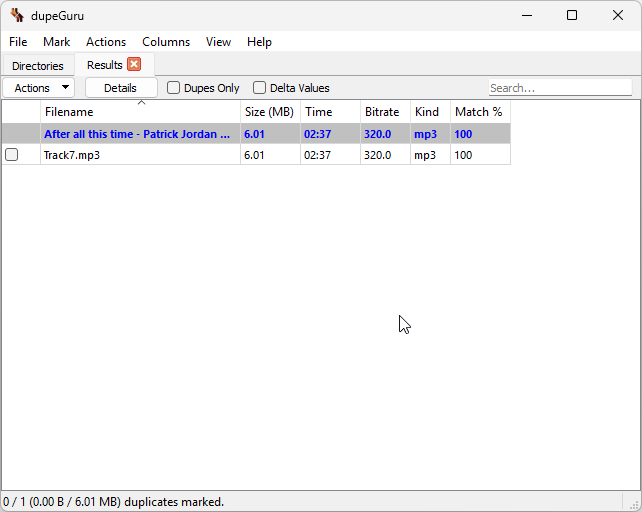
Test results from dupeGuru showing detected duplicate file groups, similarity matches, and scan output used to identify redundant files in a directory.
dupeGuru offers dedicated music and picture modes, and I used the music mode for my tests. Unfortunately, this made no difference – the tool found only one exact duplicate out of our entire test set. This is rather disappointing, as it performed no better than a generic duplicate file finder. I tested all available scan modes, and as you can see in the screenshot, only one duplicate was returned across all of them.
While dupeGuru is free and simple to use, the non-functional music mode immediately puts it at a disadvantage compared to other duplicate finders. It offers far fewer features, and its UI feels noticeably dated. If you’re only looking to find exact duplicates, there are better free alternatives that include audio preview and other useful features that make the process much easier.
Key Features:
- Three scan modes – Standard, Music, and Picture – each with its own scan types and specialized options.
- Music mode scans audio tags (artist, title, album, genre, duration) to identify duplicate tracks across different formats and bitrates.
- Fuzzy filename matching to catch duplicates even when file names are slightly different or not identical.
- Content-based scanning using MD5 hash comparison for byte-for-byte duplicate detection.
- Adjustable match threshold percentage to control how aggressively duplicates are identified.
- Reference folder system to protect specific directories from accidental deletion.
- Cross-platform support – runs on Windows, macOS, and Linux.
- Free and open-source under the GPL-3.0 license.
- Move, delete, or send duplicate files to the Recycle Bin directly from the results window.
Pros
- Completely free and open-source with no feature limitations or paid tiers.
- Cross-platform – works on Windows, macOS, and Linux.
- Fuzzy matching catches duplicates with slightly different file names.
- Reference folder system prevents accidental deletion of important files.
- Lightweight and fast for basic duplicate file scanning.
Cons
- Music mode relies solely on tag matching and offers no true audio fingerprinting or content analysis.
- Performed no better than a generic duplicate finder in testing, detecting only one duplicate out of the full test set.
- No built-in audio preview – you cannot listen to files before deciding to delete them.
- Outdated and bare-bones user interface that feels unpolished compared to modern alternatives.
- No automatic selection of lower-quality duplicates – manual review is required for every result.
Pricing: Free
4. Czkawka
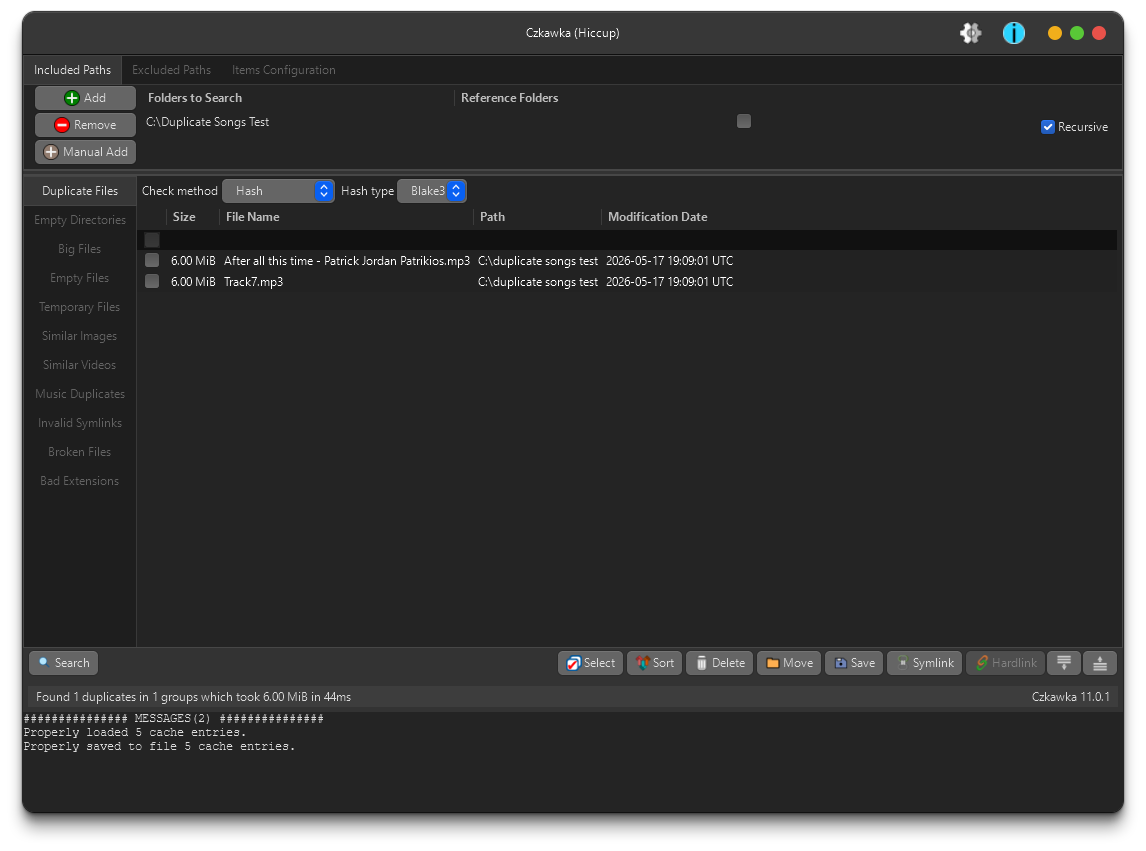
Czkawka scan results showing limited duplicate detection output with only one match found, alongside a rough and poorly rendered user interface with jagged fonts.
Czkawka comes highly recommended, particularly on Reddit, but my first experience with it was quite disappointing. Despite its reputation for finding similar songs and photos, it performed no better than dupeGuru, detecting only one duplicate from our entire test set – the single exact copy we included.
To make matters worse, the user interface is practically unusable. Every text element is heavily pixelated with no antialiasing whatsoever, making the results window genuinely painful to read. The screenshot included here is unscaled and represents exactly what appeared on my screen. I also tried the alternative Krokiet interface, but the rendering was no better.
I might have been less critical had the tool not been so widely praised. While it’s reasonable to keep expectations modest for free software, being unable to comfortably read the results is a dealbreaker regardless of price. If you are looking for a free tool to remove exact duplicate songs, there are far better options available – MindGems Fast Duplicate File Finder, for example, has been on the market for over 25 years, includes audio preview, and consistently delivers more reliable results.
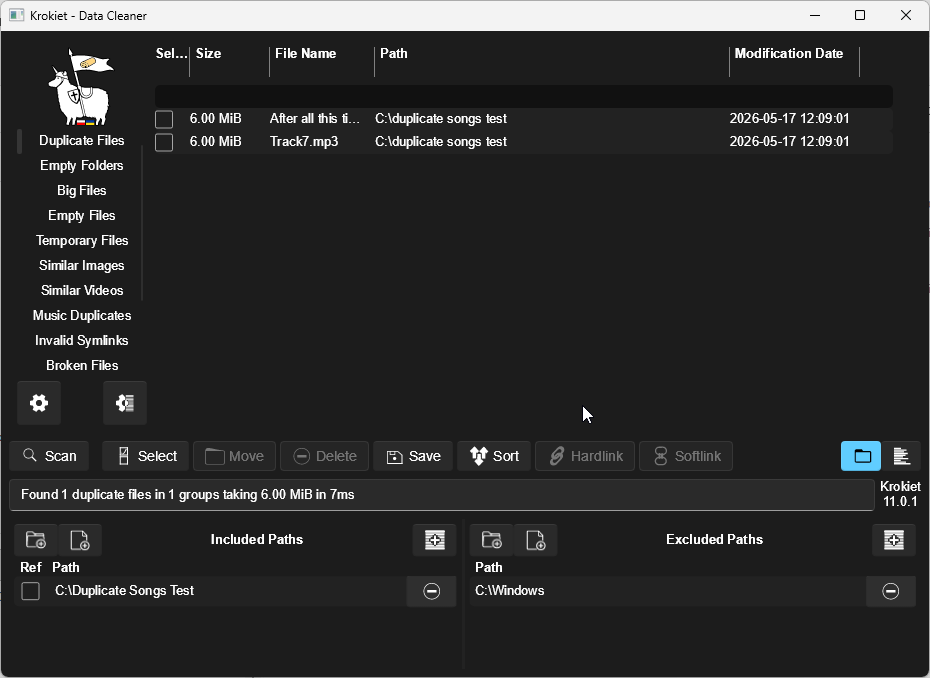
Krokiet user interface view in Czkawka showing the application layout and controls used for duplicate file scanning and management.
Key Features:
- Finds duplicate files using hash-based comparison for exact byte-for-byte matching.
- Music duplicate detection via tag scanning (artist, title, album, genre, year).
- Similar image finder with fuzzy matching to detect visually close but non-identical photos.
- Scans for empty folders, empty files, temporary files, broken files, and invalid symlinks.
- Identifies the largest files on your system to help free up storage space.
- Scan result caching makes subsequent scans significantly faster.
- Available in two GUI variants – GTK 4 (Czkawka) and Slint-based (Krokiet) – plus a CLI frontend for automation.
- Cross-platform support for Windows, macOS, Linux, and FreeBSD.
- Written in Rust for memory safety and multi-threaded scanning performance.
- Fully free and open-source with no telemetry or data collection.
Pros
- Completely free and open-source with no hidden costs, ads, or feature limitations.
- Fast scanning performance thanks to multi-threaded processing and scan result caching.
- Goes beyond duplicate files – also cleans up empty folders, temporary files, and broken files.
- Cross-platform with consistent functionality across Windows, macOS, and Linux.
- Actively maintained with regular updates and an engaged open-source community.
- CLI frontend available for scripting and automated workflows.
- No telemetry – no user data is collected or transmitted.
Cons
- Severely pixelated text rendering with no antialiasing makes the interface uncomfortable to use on Windows.
- The alternative Krokiet interface suffers from the same rendering issues and offers no improvement.
- Music mode relies solely on tag matching with no true audio fingerprinting or content-based analysis.
- Only detected one exact duplicate in testing – no different from a basic general-purpose duplicate finder.
- No built-in audio preview – files cannot be played before deletion.
- No automatic selection of lower-quality duplicates; manual review is required.
Pricing: Free
5. Duplicate Files Fixer
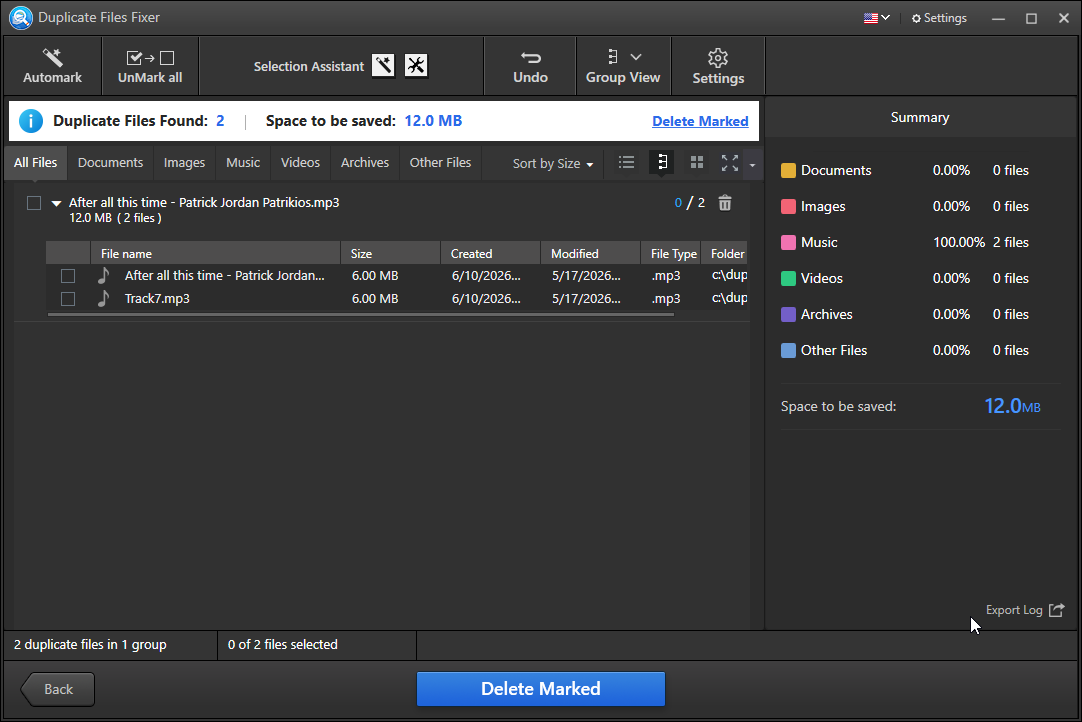
Scan results from Duplicate Files Fixer showing a very limited outcome with only one exact duplicate match detected in the selected directory.
I was hesitant to include Duplicate Files Fixer in an article about duplicate music finders, and for good reason – it is not a music-specific tool in any meaningful sense. However, I decided to include it because Systweak actively promotes it as a duplicate song finder in paid search ads, as you can see in my Google search results screenshot. This kind of misleading marketing is nothing new from Systweak. The company has a long track record of aggressive and deceptive promotional practices, and many of their products have been flagged as PUAs (Potentially Unwanted Applications) by numerous antivirus vendors, including Microsoft itself – refer to my screenshot below for details.
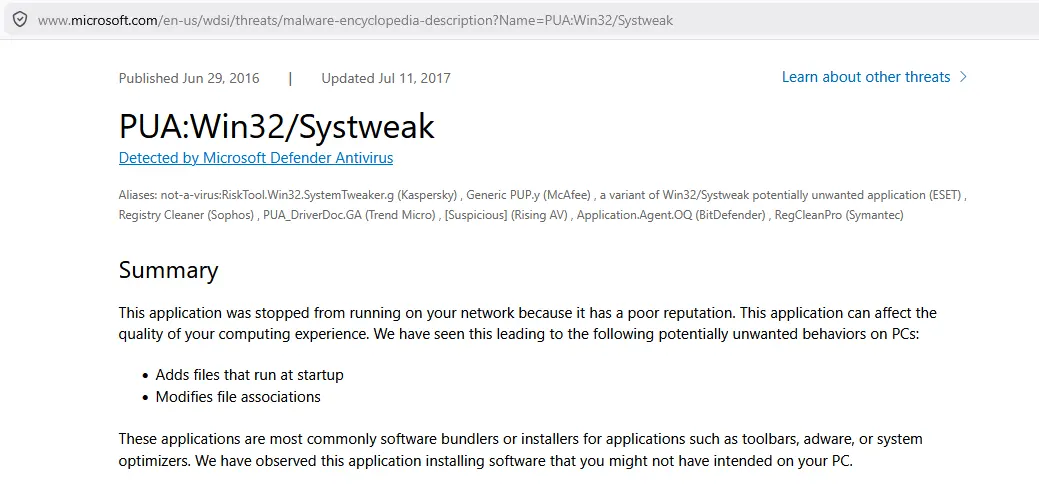
Microsoft Defender flags Systweak software as a Potentially Unwanted Application (PUA).
The test results were predictably poor. Duplicate Files Fixer detected only the single exact duplicate we intentionally planted in our test set – a perfect copy saved under a different file name. That is the bare minimum any file comparison tool should be able to accomplish, and it is a far cry from what a genuine duplicate music finder needs to do.
What you get with this tool is a brightly colored, polished-looking interface that does little to hide the lack of substance underneath. The visual design appears to be a deliberate attempt to compensate for weak functionality and give an impression of a premium product. I have documented the features, pros, and cons below for the sake of completeness, but I would strongly advise against installing any Systweak product. Their tools have a history of questionable behavior, and there are plenty of free, open-source alternatives that are more capable, more transparent, and far more trustworthy.
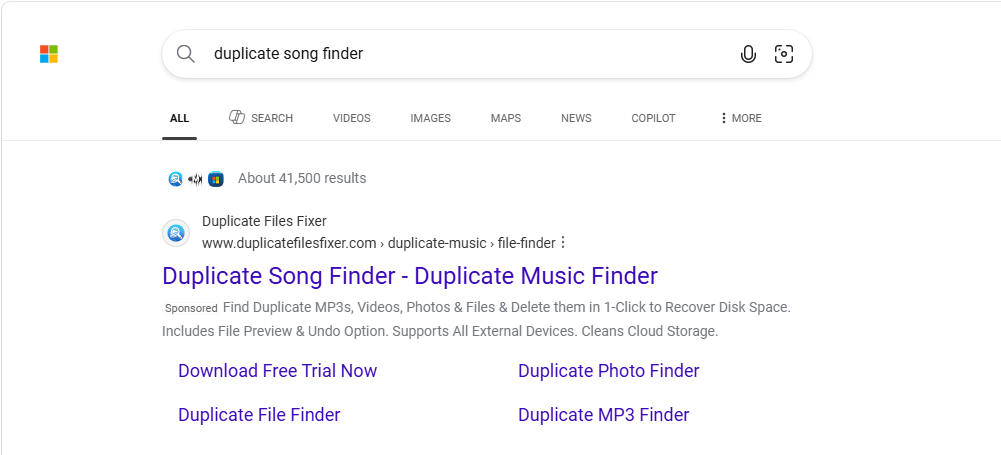
Sponsored search result for Duplicate Files Fixer presenting the tool as a duplicate music file finder, which may be misleading compared to its actual functionality.
Key Features:
- Scans for duplicate files across all major file types including audio, video, photos, and documents.
- Multiple scan modes: full scan, custom scan by file type, and targeted folder scanning.
- Content-based duplicate detection that identifies identical files regardless of file name.
- Auto Mark feature to automatically select duplicates for deletion, keeping one copy.
- Preview files before deleting to avoid accidental removal of the wrong copies.
- Undo function to restore files that were deleted by mistake.
- Folder and file type exclusions to narrow the scope of scans.
- Supports scanning of external drives, USB devices, Google Drive, and Dropbox.
- Scan history and summary report showing the number of duplicates found and recoverable space.
- Available on Windows, macOS, Android, and iOS.
Pros
- Colorful, polished interface that is easy to navigate for non-technical users.
- Supports a wide range of file types and scan modes for general-purpose duplicate removal.
- Preview and undo features reduce the risk of accidental file deletion.
- Can scan cloud storage services such as Google Drive and Dropbox in addition to local drives.
- Available across multiple platforms including Windows, macOS, Android, and iOS.
Cons
- Not a music-specific tool – marketed deceptively as a duplicate song finder despite having no audio fingerprinting or music-focused features.
- Detected only one exact duplicate in testing, performing no better than a basic file comparison tool.
- Systweak products have a long history of being flagged as PUAs (Potentially Unwanted Applications) by multiple antivirus vendors, including Microsoft.
- The free version is heavily restricted – bulk deletion requires purchasing a paid license.
- Paid license is subscription-based and billed annually at $39.95, making it poor value compared to free alternatives.
- No true audio analysis or fingerprinting – cannot detect duplicate songs in different formats or at different bitrates.
Pricing: $39.95/year for full access
How to Choose the Right Duplicate Music Finder
With so many tools marketed as duplicate music finders, it is important to know what to look for before committing to one. Most applications in this category are general-purpose duplicate file finders that have simply been rebranded or marketed to music users without offering any genuine audio-specific functionality. The tips below will help you identify the tools that are worth your time – and avoid the ones that are not.
- Test with real-world audio scenarios before trusting any tool: Before relying on any duplicate music finder, test it with a small set of files that represent common real-world scenarios – songs in different formats (MP3, FLAC, WAV, AAC), files with missing or incorrect ID3 tags, tracks with different filenames, and copies encoded at different bitrates or quality levels. A tool that can only detect byte-for-byte identical files is not a duplicate music finder – it is a basic file comparison utility with misleading marketing. Any genuine audio duplicate finder should be able to identify the same song regardless of its filename, tags, format, or encoding quality.
- Avoid subscription-based tools: Most subscription-based duplicate finders in this category are low-quality products that rely on recurring billing rather than genuine value. Our testing consistently found that paid subscription tools performed no better than free alternatives – and in many cases, they performed worse. A one-time license or a genuinely free open-source tool will almost always serve you better. If a tool charges a monthly or annual fee to unlock basic features like bulk deletion, that is a strong signal the product is built around monetization rather than quality.
- Prioritize true audio fingerprinting: The most important capability to look for is true audio content analysis – the ability to compare the actual sound of two files rather than their names, tags, or file size. Tools that use audio fingerprinting can identify duplicate songs even when they have different filenames, are stored in different formats, or were encoded at different bitrates. This is the defining feature that separates a real duplicate music finder from a generic duplicate file cleaner.
- Check audio format support: Make sure the tool supports all the formats in your collection. A capable duplicate song finder should handle MP3, FLAC, AAC, WAV, OGG, WMA, AIFF, and other common lossless and lossy formats. Limited format support is often a sign of a tool that was not purpose-built for music libraries.
- Consider your music library size: If you manage a large collection with tens or hundreds of thousands of tracks, scanning performance matters. Look for tools that use multi-threaded processing and fingerprint caching to keep scan times manageable. Lightweight or web-based tools may struggle with larger libraries and are generally not suitable for serious music collectors.
- Look for safety features: A good duplicate music finder should make it easy to review results before deleting anything. Features like built-in audio preview, automatic quality-based selection, grouped duplicate results, and Recycle Bin support all reduce the risk of accidentally removing files you intended to keep.
- OS compatibility: Confirm that the tool fully supports your operating system. Some applications are Windows-only, while others are cross-platform. Cross-platform availability is convenient, but it does not necessarily indicate a better product – what matters most is how well the tool performs on your system.
How to Safely Remove Duplicate Music
Removing duplicate songs carries a real risk of accidental data loss if not done carefully. Follow these steps to clean up your music library safely and confidently.
- Back up your music library first: Before running any duplicate scan, make sure your collection is backed up to an external drive or a cloud service such as Google Drive, OneDrive, or Dropbox. This is a non-negotiable first step – no matter how reliable the tool, having a backup ensures you can recover anything removed by mistake.
- Use a tool with true audio fingerprinting: A basic file comparison tool is not sufficient for cleaning up a music library. Use a dedicated duplicate music finder that analyzes actual audio content rather than relying on file names or tags. Audio Dedupe is the only tool in this comparison that passed our real-world tests, successfully identifying duplicate songs across different formats, bitrates, filenames, and missing ID3 tags. It is the tool we recommend for anyone serious about cleaning up their music collection.
- Test the tool before scanning your full library: Before scanning your entire collection, run a quick test with a small set of files that includes songs in different formats, tracks with missing or incorrect tags, and copies saved under different names. If the tool only finds byte-for-byte identical files, it is not a true duplicate music finder and is not worth using for a real music library.
- Preview matched files before deleting anything: Always listen to matched tracks before removing them. Audio Dedupe includes a built-in audio player that lets you compare duplicates directly within the application, making it easy to confirm a match before taking any action.
- Use automatic quality-based selection: Good duplicate music finders can automatically mark the lower-quality copy for deletion based on bitrate, file size, format, or song length – keeping the best version without requiring you to manually review every result.
- Delete to the Recycle Bin first: Always send duplicates to the Recycle Bin rather than permanently deleting them in a single step. Review the results one more time before emptying the bin to make sure nothing important was removed by mistake.
Tip: Audio Dedupe combines true audio fingerprinting, built-in preview playback, automatic quality-based selection, and safe Recycle Bin deletion in a single application – making it the most reliable and complete solution for safely cleaning up a duplicate music library.
Frequently Asked Questions About Duplicate Music Finder Software
Which Duplicate Music Finder Should You Use?
Our testing made one thing clear: the vast majority of tools marketed as duplicate music finders are nothing more than generic file comparison utilities in disguise. If you want a tool that actually does what it promises – identifying duplicate songs across different formats, filenames, bitrates, and missing tags – your options are extremely limited.
Audio Dedupe is the only duplicate audio finder in this comparison that passed every real-world test we threw at it. It was the only tool capable of detecting duplicate songs regardless of format, filename, bitrate, or the absence of ID3 tags. That is not a minor advantage – it is the entire point of a dedicated duplicate song finder, and every other tool in this list failed to deliver it.
Here is a quick summary to help you decide:
- You want the most accurate duplicate music finder available: Audio Dedupe is the clear choice. True audio fingerprinting, broad format support, multi-threaded scanning, and fingerprint caching make it the most capable and complete solution we tested.
- You only need to remove exact byte-for-byte copies: Any free tool in this list will get the job done – though none of them offer audio preview or quality-based auto-selection.
- You are managing a large music library: Audio Dedupe is purpose-built for scale. Its fingerprint cache ensures that rescanning large collections stays fast even as your library grows.
- You are on a tight budget: Audio Dedupe costs $29.95 as a one-time purchase with no subscription. Given that most subscription-based competitors performed worse in testing, it is easily the best value in this category.
If there is one takeaway from this comparison, it is this: do not trust marketing claims. Test any duplicate song finder with a small set of real-world files before scanning your entire library. Songs in different formats, missing tags, and different filenames will immediately reveal whether a tool is the real thing – or just another rebranded file cleaner.
Ready to find and remove duplicate songs from your music library?
One-time purchase. No subscription. Built specifically for music libraries of any size.