


Below we have tested and listed the top 21 best duplicate photo finder tools to remove duplicate and similar photos. If you are looking for the best tool to delete duplicate images, take a look at this comprehensive list.
- Best Duplicate Photo Removers: Quick Comparison of Top Picks
- Why You Can Trust Our Reviews?
- Our Testing Methodology for Duplicate Photo Finder Software
- Full Reviews of the Best Duplicate Photo Finder Tools
- MindGems Visual Similarity Duplicate Image Finder
- Duplicate Photo Finder
- Duplicate Image Finder
- Duplicate File Finder
- VisiPics
- macOS Photos App
- Similar Image Search
- Awesome Duplicate Photo Finder
- ManyProg Duplicate Image Remover
- PictureEcho
- Anti-Dupl
- All-Dup
- Breeftornado Duplicate Image Finder
- Duplicate Photos Fixer Pro
- Duplicate Photo Finder By RenegadeMinds
- Dupe Guru Picture Edition
- SimilarImages
- Duplicate Photo Cleaner
- Duplicate Photo & Video Cleaner
- Quick Photo Finder
- XnViewMp
- Full Comparison Table
- How to Choose the Right Duplicate Photo Finder
- How to Safely Remove Duplicate Photos
- Frequently Asked Questions (FAQ)
- Final Conclusion
In our modern era, almost every device has a camera. As a result, you take numerous photos, selfies, and pictures of things that you soon will not even need. Unfortunately, you tend to back up and duplicate those images along the way, too. Image sizes of modern devices are quite large, as a result, the process of cleaning duplicate photos becomes a necessity.
If you have several thousand images, finding similar and duplicate photos manually could be tedious. If you have tens of thousands of photos, manually removing duplicates may not even be an option. That is why the list below will help you choose the right duplicate image finder for your needs. Not all duplicate finders can find similar pictures or photos stored in different file formats. The more image formats a duplicate cleaner supports, the more duplicates it will list. All software in the list below is sorted from BEST to WORST.
Best Duplicate Photo Removers: Quick Comparison of Top Picks
Before we explore the detailed reviews, take a look at our top picks in one simple table. We tested each tool extensively on real-world photo libraries containing thousands of images in JPG, PNG, WEBP, BMP, TIF, PSD, DNG, HEIC, and RAW formats. Our evaluations focused on accuracy, speed, reliability, safety, features, and overall usability.
This quick summary helps you see which tools stand out at a glance. You can compare performance, supported platforms, pricing, and ease of use without reading every review first. It’s designed to guide you quickly to the software that fits your needs, whether you want professional-grade precision or a lightweight solution for casual use.
All four tools listed in the table offer unique advantages:
- MindGems Visual Similarity Duplicate Image Finder (VSDIF) – The fastest, most accurate, and feature-rich duplicate photo cleaner in our comparison. It can handle large libraries and supports more image formats than any other duplicate photo finder.
- VisiPics – A free, simple option for smaller libraries that focuses on basic duplicate detection without advanced features.
- macOS Photos App – Great for Mac users who want light library organization and basic duplicate detection integrated with their system.
- Duplicate File Finder – Best free app for finding exact duplicate photos.
Use this summary as your first guide before diving into our detailed testing and full reviews of each tool. It saves time and helps you immediately identify which software matches your needs.
| Rank | Software | Best For | Platform | Price | Rating |
|---|---|---|---|---|---|
| 1 | MindGems Visual Similarity Duplicate Image Finder (VSDIF) | Highest accuracy and fastest similar-image detection | Windows | Free / $24.95 perpetual license | ★★★★★ |
| 2 | VisiPics | Basic duplicate finding for smaller libraries | Windows | Free | ★★★☆☆ |
| 3 | macOS Photos App | Basic library organization with light duplicate detection | macOS | OS Integrated | ★★★★☆ |
| 4 | Duplicate File Finder | Best free app for exact duplicates | Windows | Free | ★★★★★ |
Watch this Duplicate Photo Finder tutorial video to learn how to scan large photo collections, find duplicate and similar images using advanced visual similarity analysis, safely remove duplicate photos, and organize your photo library.
Why You Can Trust Our Reviews
We follow a clear and consistent testing methodology for every product we review. With over two decades of experience working with duplicate detection software and file management solutions, we understand how these tools perform in real-world scenarios. To verify results, we test large and diverse photo libraries and repeat the same evaluations on Windows 11, macOS Sonoma, and Android 16 to ensure consistent performance across platforms.
We use real hardware, real photo collections, and real-world workflows. Every recommendation is based on hands-on testing rather than vendor claims or marketing materials. We do not accept paid placements or ranking changes, and we highlight both strengths and weaknesses so readers can make informed decisions.
Our reviews focus on the factors that matter most: accuracy, speed, safety, reliability, and overall value. We measure repeatable results, compare performance across competing tools, and evaluate how well each product solves real problems for users who want clean, organized photo libraries.
Our Testing Methodology for Duplicate Photo Finder Software
We evaluated each tool using a real photo library of over 30,000 images. The collection included JPG, PNG, WEBP, BMP, TIF, PSD, DNG, HEIC, and multiple RAW formats. We used this mixed dataset to reveal strengths and weaknesses in real conditions. Additionally, we tested every app on Windows 11, macOS Sonoma, and Android 16 to verify stable behavior across platforms.
- Accuracy – We checked how well each tool detected exact and similar duplicates, including rotated, cropped, or edited versions.
- Speed – We measured the time needed to scan the full 30,000-photo library.
- Features – We explored smart algorithms, similarity sliders, filters, grouping logic, export options, and automation features.
- Reliability – We monitored stability during large scans and verified that each tool handled heavy workloads without freezing or crashing.
- Safety – We inspected preview quality, confirmation steps, and restore options to ensure you avoid accidental data loss.
These metrics helped us build a clear picture of real-world performance. As a result, you will see which tools deliver consistent accuracy, fast scanning, safe cleanup, and stable performance with large photo libraries.
Full Reviews of the Best Duplicate Photo Finder Tools
Below we have listed the best duplicate photo finders and removers. Pick your choice and eliminate cloned and repeating images. This list contains tools that can find similar and duplicate photos. If you want to find files of any type then please check our list of best duplicate file finders.
1. MindGems Duplicate Image Finder
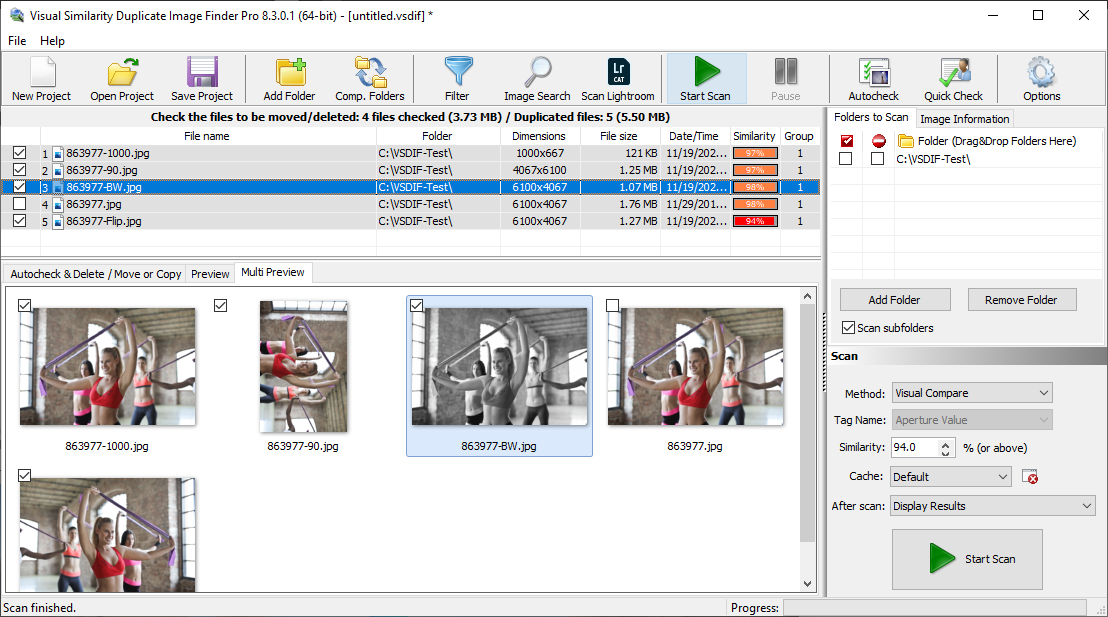
Best Duplicate Image Finder
MindGems Duplicate Image Finder, the clear winner in our comparison, is a powerful and feature-rich application that is easier to use than tools such as Ashisoft Duplicate Photo Finder and Duplicate Photo Cleaner. It combines an intuitive interface with advanced image analysis technology, making it suitable for both beginners and professionals. In addition, it delivers more accurate results, better performance, and a broader set of features while costing less.
It is easily the most professional duplicate image finder on this list. Unlike basic tools that only compare file names or file sizes, this software analyzes the actual visual content of your images. As a result, it can accurately detect similar and duplicate photos across virtually any image format.
Rotated, flipped, resized, edited, and scanned images are all identified with impressive accuracy. Moreover, the software includes advanced skew detection, which allows it to find similar scanned photos and documents even when they are slightly tilted or distorted.

VS Duplicate Image Finder
VSDIF also supports the largest number of image formats in its class. In fact, it works with more than 40 popular image formats, including Adobe Photoshop PSD files, as well as over 300 Camera RAW formats. Additionally, it offers five powerful search modes: Visual Compare, 100% Identical Files, File Size, EXIF Date Time, and Similar EXIF Tags.
It can find similar photos in Adobe Lightroom and is one of the best Lightroom duplicate finders. Has an integrated wizard to compare two or more folders. Includes Image Search feature that will find similar photos of one or more sample images. Something like Google’s Image Search for your photo library. To top it up VS Duplicate Image Finder is tested with more than 1 million images totaling over 1 Terabyte. In comparison, many of the competing tools will crash or are too slow to compare even 10, 000 photos.
MindGems Visual Similarity Duplicate Image Finder PRO Conclusion
Do not be afraid of the word “Professional”. Objectively the tool is even cheap for what it offers. To clarify, the PRO version costs as much as the majority of the duplicate picture finders on the Internet. However, it provides incomparably more features than them. Get this tool now and start the photo deduplication process. You will not need anything else to organize your photos. Regardless of the many features, VSDIF is very easy to use.
Thanks to its accuracy, speed, and extensive feature set, VSDIF is reviewed and recommended by many photography websites and remains the #1 choice for professional photographers.
Key Features:
- Highest accuracy rate in our tests
- Handles massive photo libraries with up to 1 million images
- Easy for beginners yet powerful for professionals
- Finds both visually similar photos and similar EXIF data
- Preview multiple photos side by side before taking action
- Includes options to move, copy, rename, and delete files
Pros
- Exceptional duplicate and similar photo detection accuracy
- Supports over 300 Camera RAW formats and PSD files
- Handles extremely large photo collections with ease
- Fast scanning engine with multiple comparison modes
- Advanced features for photographers and power users
- Simple interface that remains beginner-friendly
- One-time payment with lifetime license
Cons
- Feature-rich interface may feel overwhelming at first
- Windows-only application
- Advanced settings can take time to fully explore
Pricing: Lifetime standard license costs just $24.95, and the PRO version is just $39.95.
Note:
Why Choose MindGems Duplicate Image Finder? Unlike subscription-based competitors, VSDIF offers a one-time lifetime license for just $39.95. Additionally, it supports more than 40 popular image formats and over 300 Camera RAW formats, making it an excellent choice for photographers, designers, and users with massive photo libraries.
2. Duplicate Photo Finder

Duplicate Photo Finder
Duplicate Photo Finder claims to have 10 million downloads. It supports 350 image formats. Has 8 major versions and has been developed for 20 years. It is a very solid tool that can find similar and repeating images. DPF provides a very good explanation about why a duplicate file finder and a duplicate photo finder are different things.
In short, the standard duplicate finders are comparing the data in the files. In order to view a photo, an application has to decode that data and convert it into pixels. Then it should be able to analyze those pixels and compare them with the pixels of the other files. Storing those pixels in different file formats causes those files to have different file data. Nevertheless, they represent the same pixels. If a tool can not decode the corresponding file format it can not view the photo. It can not compare it with other photos either.
Duplicate Photo Finder is a robust tool that supports many image formats. It packs lots of options and works really fast. The results that it provides are good and there are not many incorrect detections. Overall this is one of the top duplicate image finders on the market.
Key Features:
- AI-powered visual comparison for highly accurate duplicate detection
- Finds edited, resized, rotated, flipped, cropped, and scanned images
- Supports over 340 image formats, including RAW, HEIC, PSD, AVIF, and WebP
- Handles massive photo libraries with millions of images
- Multiple scan modes including Visual Compare, EXIF, and Identical Files
- Search for similar photos using a sample image
- Fast hardware-accelerated scanning with internal image cache
- Preview, move, copy, rename, and delete duplicate photos easily
- Works with Lightroom libraries, external drives, and network folders
- Automatically select photos by quality, size, resolution, and date
Pros
- Exceptional accuracy when finding similar and duplicate photos
- Supports hundreds of image and Camera RAW formats
- Handles very large photo libraries smoothly
- Advanced AI-powered visual comparison technology
- Multiple scan modes for different duplicate search needs
- Fast scanning performance with hardware acceleration
- Ideal for photographers, designers, and power users
- One-time lifetime license with no subscription fees
Cons
- Large number of advanced options may require a short learning period
- Professional-grade features can feel excessive for casual users
- Windows-only software
Pricing: Lifetime standard license costs just $24.95, and the PRO version is just $39.95.
3. Duplicate Image Finder
Duplicate Image Finder
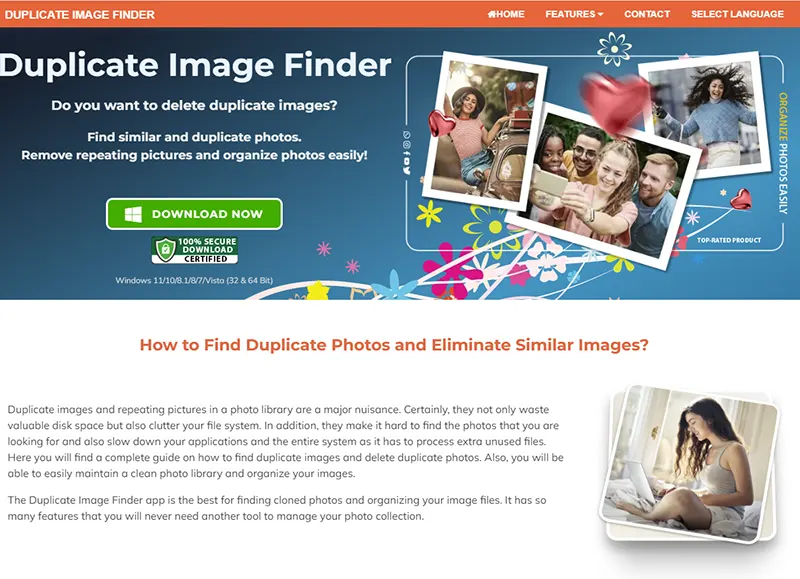
Duplicate Image Finder is another great tool for organizing photos. It can find all your similar pictures and provides also Reverse Image Search. That is an option for searching with a sample photo inside your photo gallery. In other words, it is something like Google Image Search but instead of searching on the web, it searches in your own photo library.Dup Image Finder will find Adobe Lightroom duplicates too. All you have to do is choose a Lightroom catalog and the app will find all duplicated and similar photos in it.
The tool is packed with features and scan modes. It performs very fast and accurately. The website promises that you will never need another tool to organize your photos. All that you need for a good deduplication is available. There are options to exclude and include file types and folders based on various properties. You can use auto-mark features to choose which photos to keep and which to remove automatically. In the end, you can get rid of the cloned files by deleting them or moving them to a backup location.
Key Features:
- AI-powered visual comparison for finding similar and duplicate photos
- Reverse Image Search using sample photos from your own library
- Detects edited, resized, rotated, flipped, cropped, and scanned images
- Supports Adobe Lightroom duplicate photo cleanup
- Works with over 340 image formats, including RAW, PSD, HEIC, AVIF, and WebP
- Multiple scan modes including Similar Images, EXIF, and Exact Duplicates
- Advanced filters for folders, file types, image sizes, and properties
- Auto-mark options for automatic duplicate selection
- Move, delete, copy, and backup duplicate photos safely
- Tested with over 1 million images and large photo libraries
Pros
- Excellent at finding visually similar and duplicate photos
- Includes Reverse Image Search for locating similar images instantly
- Supports Adobe Lightroom catalogs and photo libraries
- Fast scanning engine with accurate comparison results
- Advanced filters for file types, folders, and image properties
- Convenient auto-mark options help save time during cleanup
- Allows moving duplicates to a backup folder before deletion
- Clean and modern interface that is easy to navigate
Cons
- Windows-only application
- Advanced Lightroom features may be unnecessary for casual users
- Interface focuses more on functionality than visual design
Pricing: License costs just $24.95
4. Duplicate File Finder
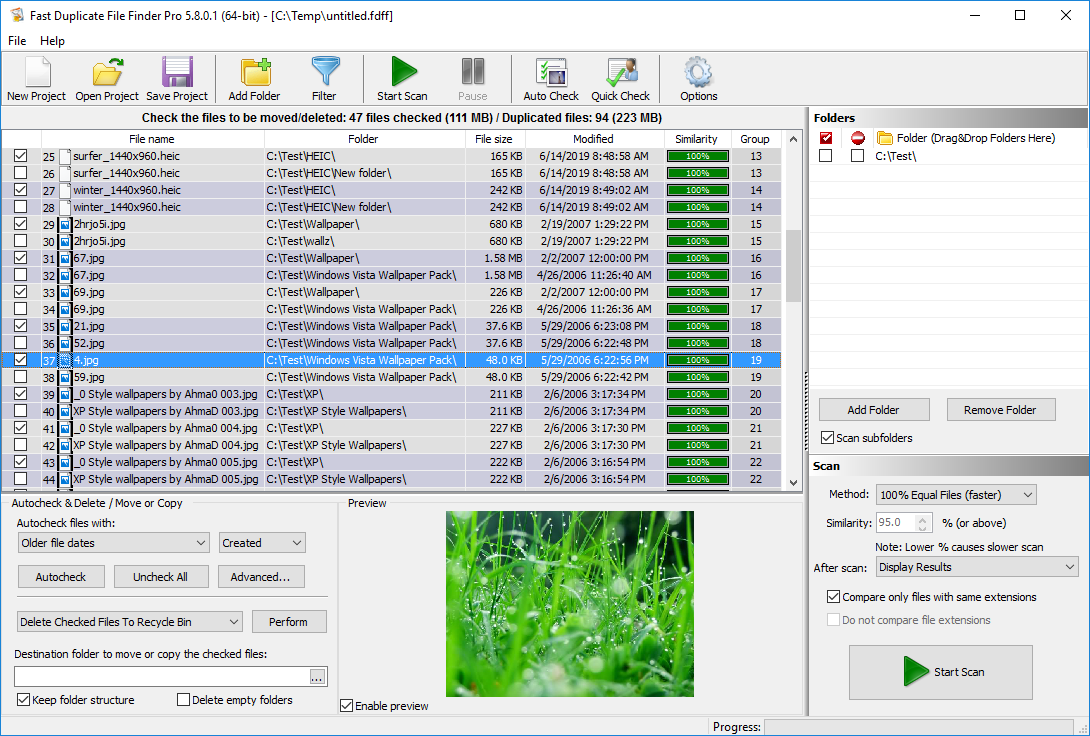
Duplicate File Finder – Find Duplicate Photos
This is a free duplicate finder and is not dedicated to finding similar photos. Nevertheless, this tool outperforms many commercial tools. While it can not find similar photos, it is great for removing exact duplicate images. That is because it has an internal preview for photos, music, videos, and documents. It also supports all the popular image formats including all RAW PHOTO IMAGES.
Duplicate File Finder is really easy to use. You add the folders that you want to scan. Hit the “Start Scan” button and it will group and list all duplicate pictures. The list of duplicates is very pleasant and easy to read. The repeating cloned pictures are grouped together with alternating colors.
This free tool is more effective than many commercial duplicate photo finders. It finds only exact copies of the photos, but that will still help to remove lots of unused files. On the other hand, you can use it to remove all duplicates from your system – not only photos.
Key Features:
- Finds 100% identical files with byte-by-byte accuracy
- Ultra-fast scanning engine optimized for massive file collections
- Supports internal and external drives, network folders, and NAS devices
- Advanced filters for file size, type, date, and folder selection
- Smart auto-select options for safe duplicate cleanup
- Preview duplicates before deleting, moving, copying, or renaming files
Pros
- Extremely fast duplicate file scanning performance
- Accurate byte-by-byte duplicate detection
- Works well with very large storage drives and NAS devices
- Advanced filtering and auto-selection options save time
- Simple interface that remains powerful for advanced users
Cons
- Windows-only application
- Advanced filtering options may be unnecessary for casual users
- Focuses on performance and functionality rather than visual design
Pricing: Free
5. VisiPics
VisisPics
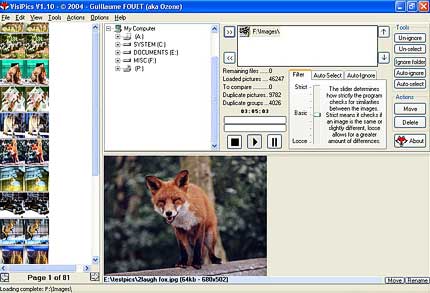
VisiPics compares the visual content of images instead of relying only on file names, file sizes, or other file attributes. As a result, it can find duplicate and similar photos even when they have different resolutions or file formats. In addition, the software can identify images that contain minor edits or cosmetic changes, which helps when organizing older photo collections.
The program displays matching photos side by side and provides useful details such as file name, file type, and file size. Furthermore, its auto-select feature speeds up the cleanup process by choosing files according to your preferred criteria. For example, you can keep the higher-resolution image, preserve the file with the smallest size, or combine multiple selection rules. Alternatively, you can review every match manually and decide which photos to remove.
During our testing with a library of more than 30,000 photos, VisiPics identified duplicate JPG images reasonably well. However, JPG files represented only about 20% of all duplicates in the test collection. The software missed many duplicates stored in other formats, which significantly reduced its overall detection rate compared to modern duplicate photo finders.
Another drawback is its limited support for image formats. VisiPics supports JPG, GIF, PNG, BMP, PCX, TIFF, and TGA files, all of which are older image formats. Consequently, it lacks support for many modern formats that users commonly store today, such as WebP, HEIC, AVIF, and numerous RAW camera formats.
Although VisiPics remains usable, its age shows in several areas. The interface looks outdated and resembles software from the Windows 95 era. Moreover, scan speeds lag behind newer competitors like MindGems Duplicate Image Finder, and detection accuracy falls short of the best duplicate photo finder software available today. Since the developer has not updated the program for more than five years, it appears to be discontinued. Therefore, users who need better performance, broader format support, and active development should consider a more modern alternative.
Key Features:
- Uses dual-core processors
- Highly efficient results with adjustable similarity levels
- Easy to use Interface, preview your duplicates easily, and pick the ones to delete with a simple click
- Starts to display the results while scanning, you don’t have to wait to delete your duplicates
- Smart Auto-Select mode, to save time while deleting pictures
Pros
- Finds visually similar photos, not just exact duplicates
- Detects duplicate images with different resolutions and file formats
- Identifies photos with minor edits or cosmetic changes
- Side-by-side comparison makes duplicate review easy
- Includes automatic file selection options
- Completely free to use
Cons
- Outdated user interface that feels decades old
- No updates or active development for more than five years
- Limited image format support (JPG, GIF, PNG, BMP, PCX, TIFF, and TGA)
- Does not support modern formats such as HEIC, WebP, AVIF, or RAW camera files
- Slower scan performance than modern duplicate photo finders
- Misses many duplicates outside of JPG format
- Lower detection accuracy compared to newer alternatives
- Windows-only application
Pricing: Free
6. macOS Photos App

The macOS Photos app helps identify duplicate images, but it is not designed for professional deduplication.
Apple Photos provides a simple and intuitive way to organize, edit, and sync photos across the Apple ecosystem. The app automatically groups images, creates albums, and offers built-in editing tools that help users manage growing photo libraries without installing additional software. As a result, many Mac users rely on Photos as their primary photo management solution.
In addition to its organization features, Apple Photos includes a built-in duplicate detection tool. While this feature offers a convenient way to remove obvious duplicates, it lacks the advanced capabilities found in dedicated duplicate photo finder software. For example, Photos focuses primarily on exact matches and often overlooks similar images, edited copies, and photos stored in different formats.
To evaluate its performance, I imported the same test library of 30,000 photos used throughout this review. During testing, Apple Photos failed to identify many duplicate and similar images. It ignored rotated photos, color-corrected versions, images with added borders, and other visually similar variations. Furthermore, the app missed a significant number of duplicates stored in RAW, PNG, WebP, and HEIC formats, which reduced its overall effectiveness for large-scale photo cleanup.
Apple Photos also restricts scanning to images stored within its managed photo library. Consequently, you cannot scan custom folders, external drives, NAS devices, or network locations directly. This limitation makes it difficult to clean up duplicate photos scattered across multiple storage devices.
Overall, Apple Photos works well as a photo organizer and synchronization tool. However, it falls short as a comprehensive duplicate photo finder. If you need to find duplicate photos across different formats, detect visually similar images, and clean large photo collections thoroughly, a dedicated duplicate photo finder will deliver far better results.
Key Features:
- Built-in duplicate photo detection for macOS users
- Seamless synchronization across iPhone, iPad, and Mac devices
- Automatic photo organization with albums, people, and memories
- Integrated photo editing tools for basic image adjustments
- Tight integration with iCloud Photo Library
Pros
- Completely free for Apple users
- Clean and intuitive interface that requires no learning curve
- Excellent integration with the Apple ecosystem
- Automatically organizes and syncs photos across devices
- Includes built-in editing and photo management tools
Cons
- Duplicate detection misses many similar and edited photos
- Limited duplicate cleanup capabilities compared to dedicated tools
- Cannot scan custom folders, external drives, or network locations
- Provides few options for reviewing and managing duplicate matches
- Works only within the Apple Photos library on macOS
Pricing: Free
7. Similar Image Search
Similar Image Search
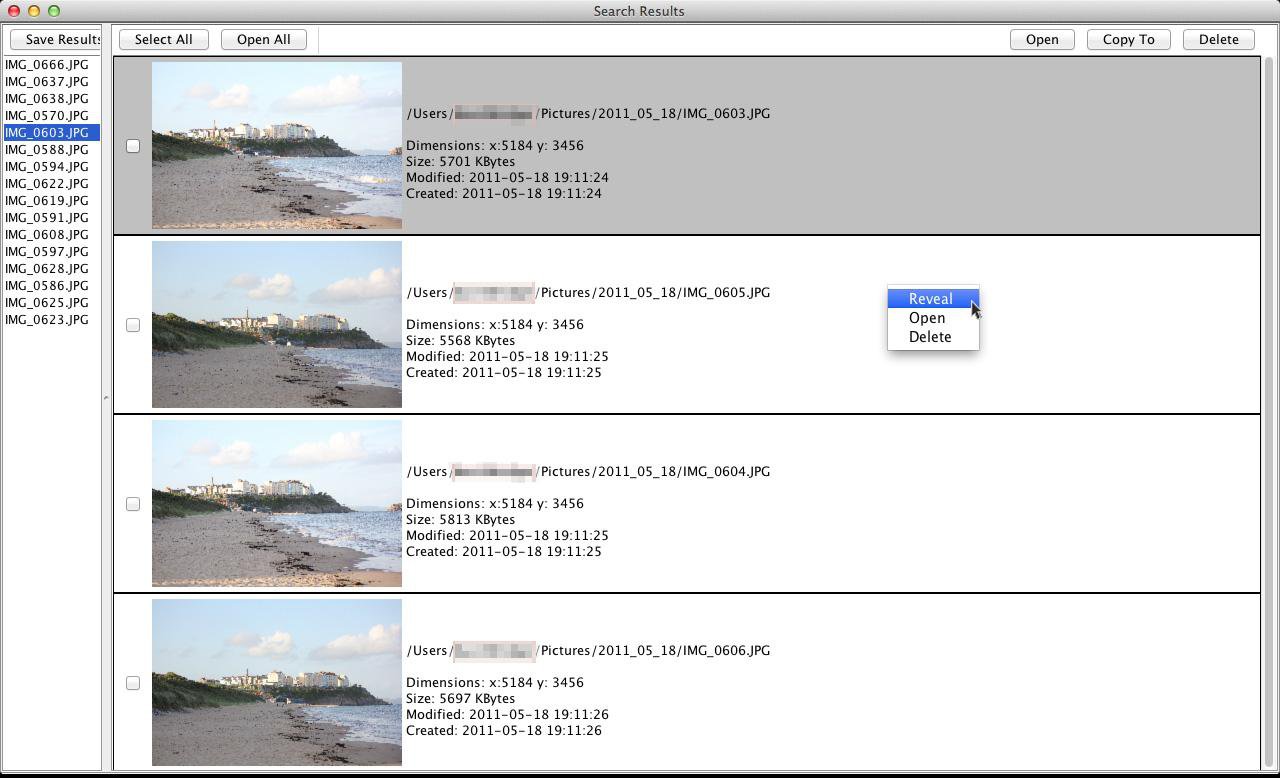
Similar Image Search (SIS) takes a different approach from most duplicate photo finders. Instead of focusing on automatic duplicate detection, it builds an image library and lets you search for visually similar photos using a sample image. According to the developer, the software aims to provide a “search by image” experience similar to Google Images. In addition, it can compare images outside the library against those already indexed, which makes it useful for finding related photos.
During my testing, I added a folder to the library and used the Reverse Image Search feature to look for duplicate and similar photos. The process was straightforward: first, I indexed the folder, then I launched a reverse image search to find visually related images. The software displayed matching photos and allowed me to open, copy, or delete them directly from the results.
However, I quickly discovered that Similar Image Search works better as a visual image search tool than as a dedicated duplicate photo finder. While it can locate images that resemble a sample photo, it does not automatically group duplicate photos or organize duplicate sets efficiently. Consequently, reviewing large photo collections requires significantly more manual work than with modern duplicate photo finder software.
Another drawback involves installation and usability. Similar Image Search requires Java and the Java Runtime Environment (JRE) to run. Furthermore, the application comes as a JAR file, which may feel unfamiliar or inconvenient for many users compared to standard Windows or macOS applications.
Overall, Similar Image Search serves a specific purpose. Photographers who want to search large memory card dumps for visually similar photos may find it useful. However, if your primary goal is to identify, group, and remove duplicate photos automatically, more specialized duplicate photo finder tools deliver faster, more accurate, and more convenient results.
Key Features:
- Find similar photos or exact duplicates in your photo libraries.
- Compare photos from outside your libraries with ones within.
- Save processed libraries and results so you don’t have to reprocess them next time.
- Optimized for multi-core processors, Windows, and macOS.
Pros
- Runs on both Windows and macOS
- Can detect duplicate and similar photos in libraries
- Supports comparing images inside and outside a library
- Lightweight and simple to use for basic tasks
- Useful for quick, manual duplicate checks
Cons
- Requires Java installation, which adds extra setup steps
- Provides only basic duplicate detection capabilities
- Does not show similarity scores between images
- Offers very limited automatic selection options
- Lacks advanced filtering and grouping features
- Results are not very comprehensive compared to modern tools
- Feels outdated compared to modern duplicate photo finders
Conclusion:
The tool delivers only basic duplicate detection, and the results lack consistency and depth. Although it runs on both macOS and Windows, it requires Java, which adds an extra setup step that many users may find inconvenient.
In addition, the results list does not show similarity scores, which makes it difficult to evaluate how closely images match. The tool also offers very limited selection options, since it does not support automatic marking of files beyond a simple “select all” function.
Overall, this tool falls behind modern duplicate photo finders in both usability and functionality. Dedicated solutions provide a more complete, accurate, and user-friendly experience.
Pricing: Free
8. Awesome Duplicate Photo Finder
Awesome Duplicate Photo Finder
Please note that this Russian tool is still recommended on many websites, but IT INSTALLS MALWARE on your computer:
Adware.SpecialSearchOffer is Malwarebytes’ detection name for a family of browser hijackers that change the search settings of affected browsers.Type and source of infectionAdware.SpecialSearchOffer is usually installed by bundlers. Typically, it comes as a browser extension on the affected system. The extension changes the default search engine of the affected browser and changes it to a search site that redirects to Yahoo search, while adding sponsored results.
As this tool is quite popular, we ran and tested it on an isolated virtual machine, but we absolutely do not recommend installing it.
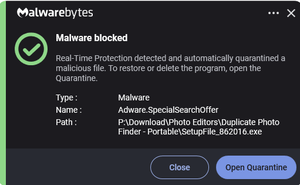
Malwarebytes detects and blocks Awesome Duplicate Photo Finder as Adware.SpecialSearchOffer.

Security software detects malicious behavior in Awesome Duplicate Photo Finder.
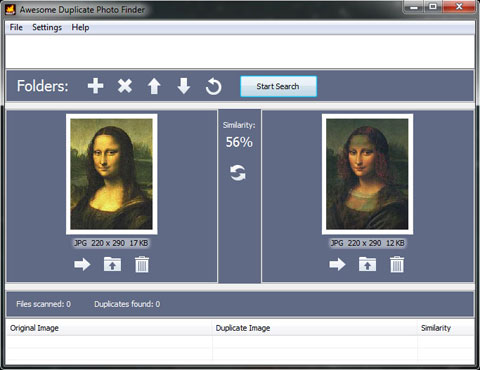
Awesome Duplicate Photo Finder is a free tool that helps find and remove duplicate photos on your computer. You can use it to clean up your photo collection from duplicates or even similar images with minimal setup.
In my test, the program proved very easy to use. AD Photo Finder can compare resized pictures and even images with modified colors, such as black-and-white versions. However, it supports only a limited set of formats, including JPG, BMP, GIF, PNG, and TIFF.
To start the process, I dragged folders directly from Windows Explorer into the program and clicked the “Start” button. After that, I simply had to wait, since the tool does not perform particularly fast on larger collections.
The developer also states that the software contains no adware, spyware, registration, popups, or other unwanted software. However, many users report concerns about adware appearing after installation, so better skip this tool.
One major limitation is that the tool does not offer any automatic duplicate marking option. Instead, I had to manually review and delete files one by one. Therefore, when dealing with thousands of duplicates, the workflow quickly becomes impractical and very time-consumin
Key Features:
- Finds duplicate and similar photos on a computer
- Compares resized images and color-edited versions (e.g., black and white)
- Simple drag-and-drop folder input from Windows Explorer
- Basic scan-and-review workflow with manual control
- Supports JPG, BMP, GIF, PNG, and TIFF formats
Pros
- Free to use with no upfront cost
- Very easy to set up and operate
- Detects both exact duplicates and basic similar images
- Lightweight and simple interface
- No complex configuration required
Cons
- No automatic duplicate marking or auto-selection
- Requires manual review and deletion of each file one by one
- Becomes impractical with large collections (thousands of duplicates)
- Slow performance on bigger folders
- Limited format support compared to modern tools
- Some users report possible adware concerns during installation
System requirements: Microsoft Windows 2000/XP/2003/Vista/Windows 7/8/Windows 10
This tool is not actively supported. It had 1 update for 7 years. Make sure to test the downloaded files for viruses.
Pricing: Free with adware.
9. ManyProg Duplicate Image Remover
ManyProg Duplicate Image Remover
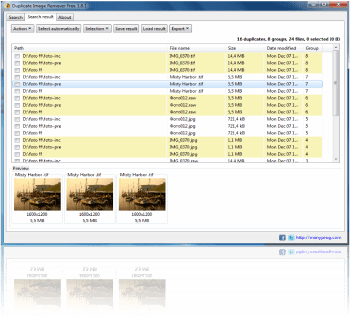
Duplicate Image Remover claims to quickly find and delete duplicate images on a computer in order to free up disk space and improve system performance. In my test, I noticed that it focuses on a very simple workflow: scan, review results, and then remove duplicates manually from the final report.
After the scan completes, the tool lists detected duplicates and allows you to mark the images you want to delete. Then you need to confirm the removal action to clean up the selected files. However, the overall process feels basic and lacks any advanced automation.
During my testing, I also found that the software only detects exact duplicates by comparing image pixels. It does not identify similar images, edited versions, or resized copies, which significantly limits its usefulness for modern photo libraries.
In addition, the interface and overall functionality feel very minimal. The application only provides the essential features needed for duplicate detection, and it does not offer advanced controls or intelligent grouping options. As a result, it works for very simple cleanup tasks, but it struggles to handle more complex or large-scale photo collections effectively.
Key Features:
- Scans and detects exact duplicate images on a computer
- Compares images based on pixel-level similarity
- Provides a simple scan and review workflow
- Allows manual selection and deletion of duplicate files
Pros
- Simple and easy to use interface
- Quick setup with minimal configuration required
- Works for basic exact duplicate image detection tasks
Cons
- Detects only exact duplicates and misses similar images
- No advanced grouping or intelligent comparison features
- Requires manual review and deletion of files
- No automation for marking or selecting duplicates
- Limited functionality compared to modern duplicate photo tools
- Very basic interface with minimal usability improvements
- Not suitable for large or complex photo libraries
Pricing: Free
10. PictureEcho
PictureEcho
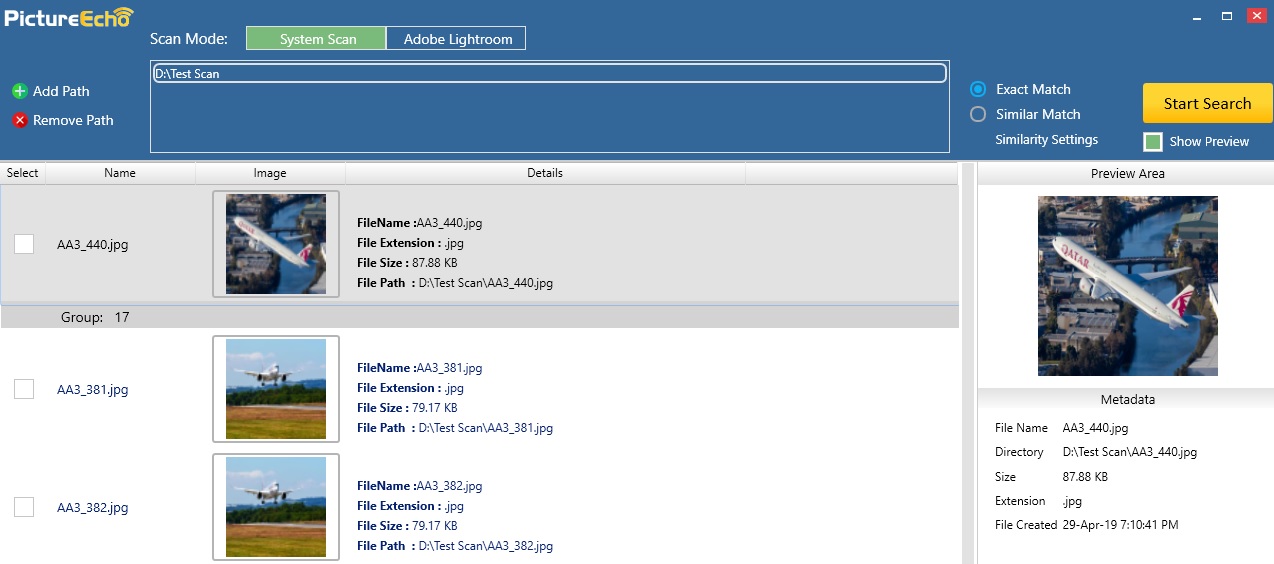
PictureEcho markets itself as a “human-like” duplicate photo analyzer that detects duplicate and visually similar images faster than manual searching. At first glance, this promise sounds impressive, especially for users with large photo libraries. However, in real-world use, I found the claims do not match the actual performance.
The tool relies on a time-based comparison system instead of true image analysis. It offers four “similarity” modes based on time differences between photos, including 30 seconds, 1 minute, and 60 minutes. Additionally, the fourth mode ignores time entirely and asks the user to manually interpret the results. While this approach may sound innovative, it quickly becomes impractical during real testing.
In my experience, PictureEcho performed poorly when analyzing a large mixed photo library. It either failed to detect obvious duplicates or incorrectly marked unrelated images as matches. Furthermore, the smallest setting of 30 seconds proves far too broad, since users can capture many completely different photos within that time window.
Although the interface looks modern and polished, the functionality feels more like a gimmick than a real duplicate finder. It does not provide reliable image similarity detection, and it struggles with accuracy even in simple test cases. As a result, it works only for very basic duplicate checks and does not deliver dependable results for serious photo cleanup tasks.
Ultimately, PictureEcho disappoints in practical use. It looks attractive on the surface, but it does not provide the level of precision or reliability that users expect from a modern duplicate photo finder.
Key Features:
- Time-based detection using fixed intervals (30 seconds, 1 minute, 60 minutes)
- Photo comparison based on capture timing instead of visual content
- Manual interpretation mode that requires user judgment for all results
- “Smart grouping” that clusters images by time window rather than actual similarity
- Basic scan feature that labels unrelated images as potential matches
Pros
- Modern and visually appealing user interface
Cons
- Fails to detect real duplicates reliably in practical testing
- Relies on time-based logic instead of actual image comparison
- Produces misleading results by grouping unrelated images together
- Uses deceptive “AI-like” marketing without real intelligent analysis
- Creates confusion with arbitrary time windows that lack real usefulness
Pricing: $39.97 per year is overpriced for a tool that delivers gimmicky functionality
11. AntiDupl
AntiDupl
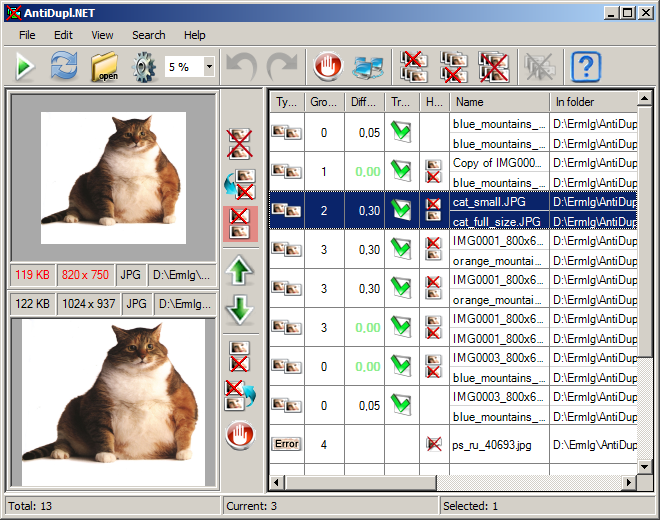
AntiDupl.NET scans image libraries and detects duplicate photos across a wide range of formats, including JPEG, PNG, GIF, BMP, TIFF, PSD, and several others. Importantly, it compares images based on visual content rather than file names or metadata. As a result, it can detect not only exact duplicates but also visually similar images and certain image defects.
In addition, the tool supports a broad range of graphic formats such as EMF, WMF, EXIF, ICON, JP2, DDS, and TGA. Since it uses content-based comparison, it attempts to identify differences at the pixel level instead of relying on simple file matching.
However, during my testing, I noticed several usability and accuracy issues. The interface feels cluttered and outdated, which makes navigation less intuitive. Moreover, the results sometimes lack consistency. In some cases, the tool flagged images as duplicates incorrectly, while in other cases it assigned very low similarity scores to exact duplicates stored in different formats. This happens because the tool measures differences rather than clearly presenting similarity, which creates confusion during review.
Although AntiDupl.NET remains free and open-source, it feels more like a basic utility than a modern duplicate photo solution. It delivers decent detection capability, but the inconsistent results and dated interface reduce its overall usability in real-world workflows.
Key Features:
- Detects duplicate and visually similar images based on content comparison
- Supports a wide range of formats including JPEG, PNG, GIF, BMP, TIFF, PSD, and more
- Identifies images with defects or quality issues
- Compares images at pixel level instead of relying on file names or metadata
- Free and open-source duplicate image detection tool
Pros
- Free and open-source software
- Supports many common and advanced image formats
- Can detect both exact duplicates and similar images
- High detection capability for content-based comparisons
Cons
- Cluttered and outdated user interface
- Inconsistent duplicate detection results in some cases
- Confusing similarity scoring system that measures differences instead of clarity
- Sometimes misidentifies or misclassifies duplicate images
- Not as user-friendly as modern duplicate photo finder tools
Pricing: Free (Open Source)
12. AllDup
AllDup
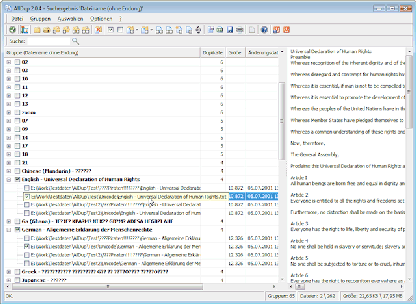
AllDup Duplicate Image Finder claims that it can scan duplicate image files quickly and accurately using advanced searching algorithms. According to the developer, it detects a wide range of image formats during scanning, which should ensure that no duplicate photo gets missed.
In addition, the tool allows you to customize comparison criteria for duplicate detection. You can combine several search parameters, including file name, file extension, file size, file content, last modified date, creation date, and file attributes. For file content comparison, AllDup reads files byte by byte from start to finish and checks them for equality in parallel, which in theory should improve accuracy.
However, during my evaluation, I found a clear mismatch between the marketing claims and real-world performance. Although the website promotes it as a duplicate image finder, the tool behaves like a standard duplicate file checker. As a result, it only detects duplicate photos when they share the same format and does not identify images stored in different formats as duplicates.
Furthermore, I tested it against a mixed image collection and confirmed that format variations significantly reduce its effectiveness. Because of this limitation, it fails to meet the expectations set by its own description.
Overall, AllDup remains a free tool, which is why it still appears in many duplicate remover lists. However, based on my testing, it does not deliver true duplicate image detection. Therefore, I will replace it with more capable alternatives as better tools become available.
Key Features:
- Detects duplicate files using multiple comparison criteria
- Supports file name, size, date, and content-based matching
- Byte-by-byte file comparison for exact matches
- Customizable search filters for duplicate detection
Pros
- Free to use
- Highly configurable search options
- Accurate for exact duplicate files
Cons
- Does not detect duplicate images across different formats
- Functions more as a file duplicate finder than an image finder
- No true visual similarity detection
- Limited usefulness for modern photo libraries
Pricing: Free
13. Breeftornado Duplicate Image Finder

Beeftornado Duplicate Image Finder
Breeftornado Duplicate Image Finder takes a very different approach from most duplicate photo finders. Instead of offering a graphical interface, it runs as a Python script and requires Python 2.7 or later to operate. While the developer originally tested it on macOS, it should run on most systems with Python installed. However, if you are not comfortable working with command-line tools and scripts, this software will likely feel difficult to use.The script aims to identify both duplicate and visually similar photos by analyzing image content rather than relying on file names or metadata. As a result, it can detect images that have undergone minor edits, format conversions, or other small changes. In addition, you can configure the similarity threshold to control how aggressively the tool identifies potential duplicates.
During my testing, I found the concept more promising than the actual execution. While the script successfully analyzed image content and generated similarity scores, the results often lacked accuracy. In several cases, it reported completely different images as being more than 99% similar. Furthermore, because the tool operates entirely from the command line, there is no visual review interface to verify matches quickly. Consequently, reviewing results becomes tedious and time-consuming.
Another drawback is performance. Compared to modern duplicate photo finders, the script processes images slowly and requires considerably more manual configuration. Although advanced users may appreciate its flexibility, most users will find the setup process unnecessarily complicated.
Breeftornado Duplicate Image Finder Conclusion
While Breeftornado Duplicate Image Finder offers an interesting content-based approach to duplicate detection, it falls short in practical use. The script requires technical knowledge, produces inconsistent similarity results, and lacks a visual interface for reviewing matches. Therefore, despite being free and configurable, it remains difficult to recommend for everyday duplicate photo cleanup.
Key Features:
- Content-based duplicate and similar image detection
- Configurable similarity threshold
- Supports images with minor edits and format changes
- Runs on multiple platforms through Python
Pros
- Free and open-source
- Can detect visually similar images
- Highly configurable for advanced users
Cons
- Requires Python and command-line knowledge
- No graphical user interface
- No visual review of duplicate matches
- Frequently reports unrelated images as highly similar
- Poor accuracy makes results difficult to trust
- Slow performance on larger photo collections
- Too technical for most users
Pricing: Free (Open Source)
14. Duplicate Photos Fixer Pro
Duplicate Photos Fixer Pro
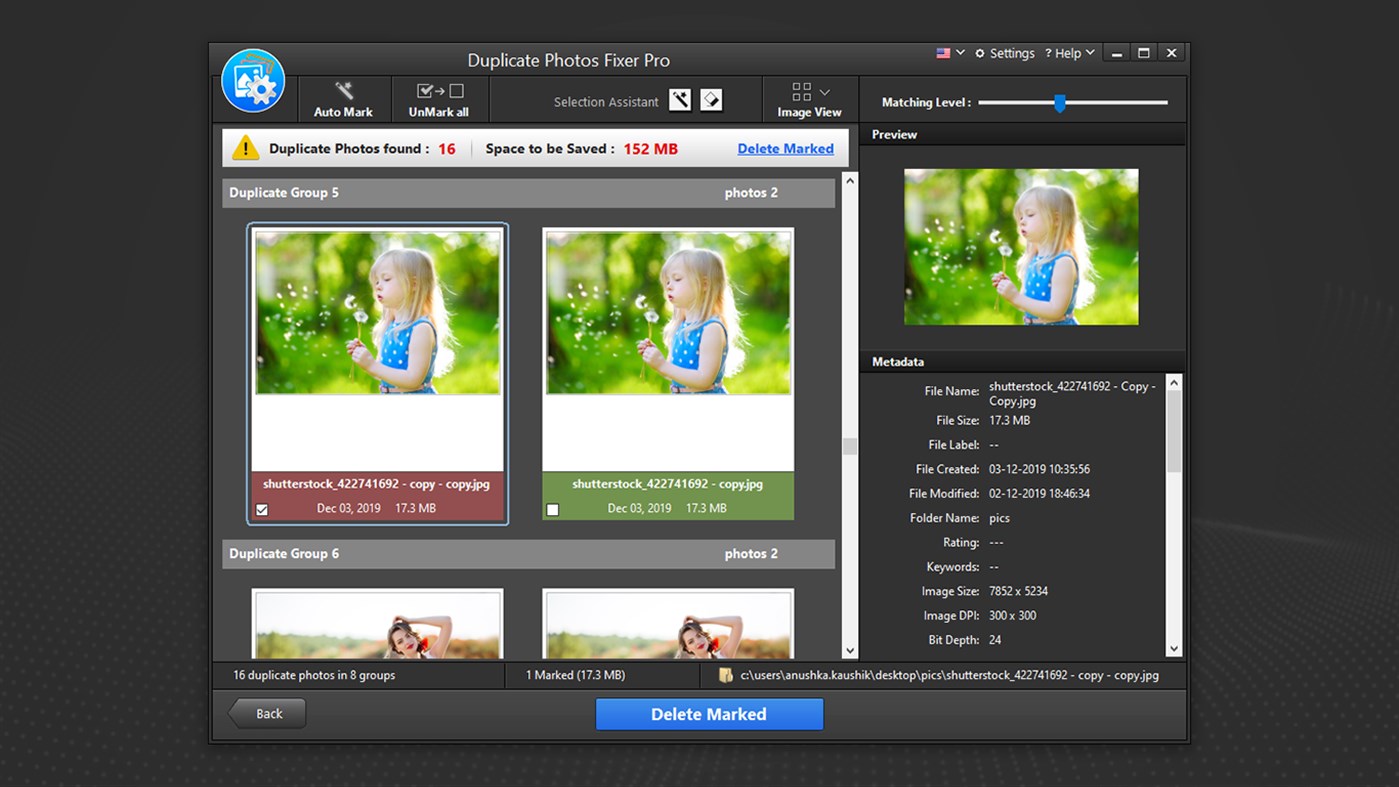
At first glance, Duplicate Photos Fixer Pro looks like a capable duplicate photo finder. In fact, I initially considered placing it among the top tools in this comparison. However, after testing it thoroughly, my opinion changed quickly as it seems that you should not install Duplicate Photos Fixer. More concerning is the fact that the Malwarebytes website reports issues with all SysTweak products.
“PUP.Optional.Systweak is Malwarebytes’ detection name for a family of potentially unwanted program (PUP) that originally presented itself as the optimization software called RegClean Pro. Once executed, it falsely shows users that it has found multiple errors in the registry. It then offers to fix these errors by giving users the option to purchase and download the full version of the software.””
Even Microsoft lists Systweak tools as Potentially Unwanted Applications that contain adware:
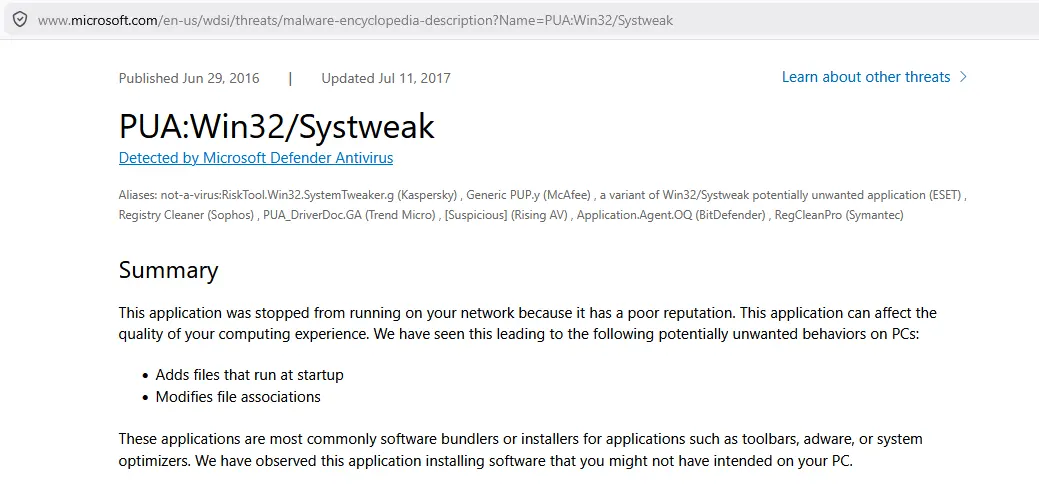
Microsoft lists SysTweak as malware
The biggest concern involves trust and safety. Duplicate Photos Fixer Pro comes from SysTweak, a company whose products have attracted numerous complaints over the years. Furthermore, Microsoft lists some SysTweak software as Potentially Unwanted Applications (PUA), which raises legitimate concerns about installing their products.
During my testing, the polished interface created a good first impression. Unfortunately, the attractive UI hides a surprisingly weak duplicate detection engine. The software struggled to find similar photos accurately and appeared to rely heavily on metadata such as timestamps and photo locations rather than true visual analysis.
The problems became even more obvious when I tested it with our standard library of 30,000 photos. The application repeatedly became unstable and crashed before completing the scan. In addition, it supports a relatively limited number of image formats and delivered disappointing detection accuracy even on supported files.
Overall, Duplicate Photos Fixer Pro feels like a gimmicky product wrapped in a professional-looking interface. Despite its marketing claims, it failed to provide reliable duplicate detection, making it difficult to recommend.
Key Features:
- Duplicate photo detection based on metadata and file attributes
- Adjustable matching levels
- Scans internal and external storage devices
- Automatic duplicate selection options
Pros
- Modern and attractive user interface
- Easy to use for beginners
Cons
- Poor duplicate and similar photo detection accuracy
- Relies heavily on timestamps and metadata
- Misses many obvious duplicate and similar images
- Crashes on large photo collections (30,000+ images in our test)
- Limited image format support
- Questionable reputation and PUA concerns around SysTweak products
- Looks far more capable than it actually is
Pricing: 42 USD/per year
15. RenegadeMinds Duplicate Photo Finder
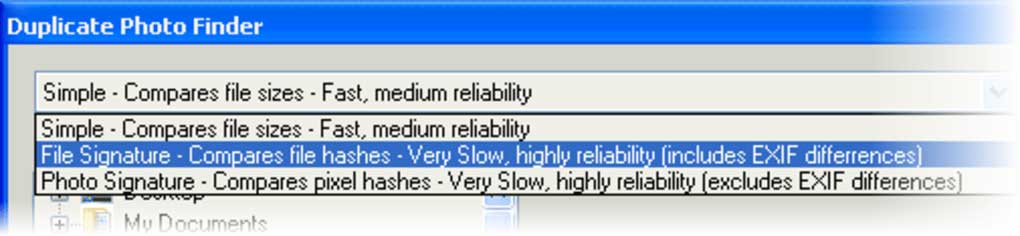
RenegadeMinds Duplicate Photo Finder
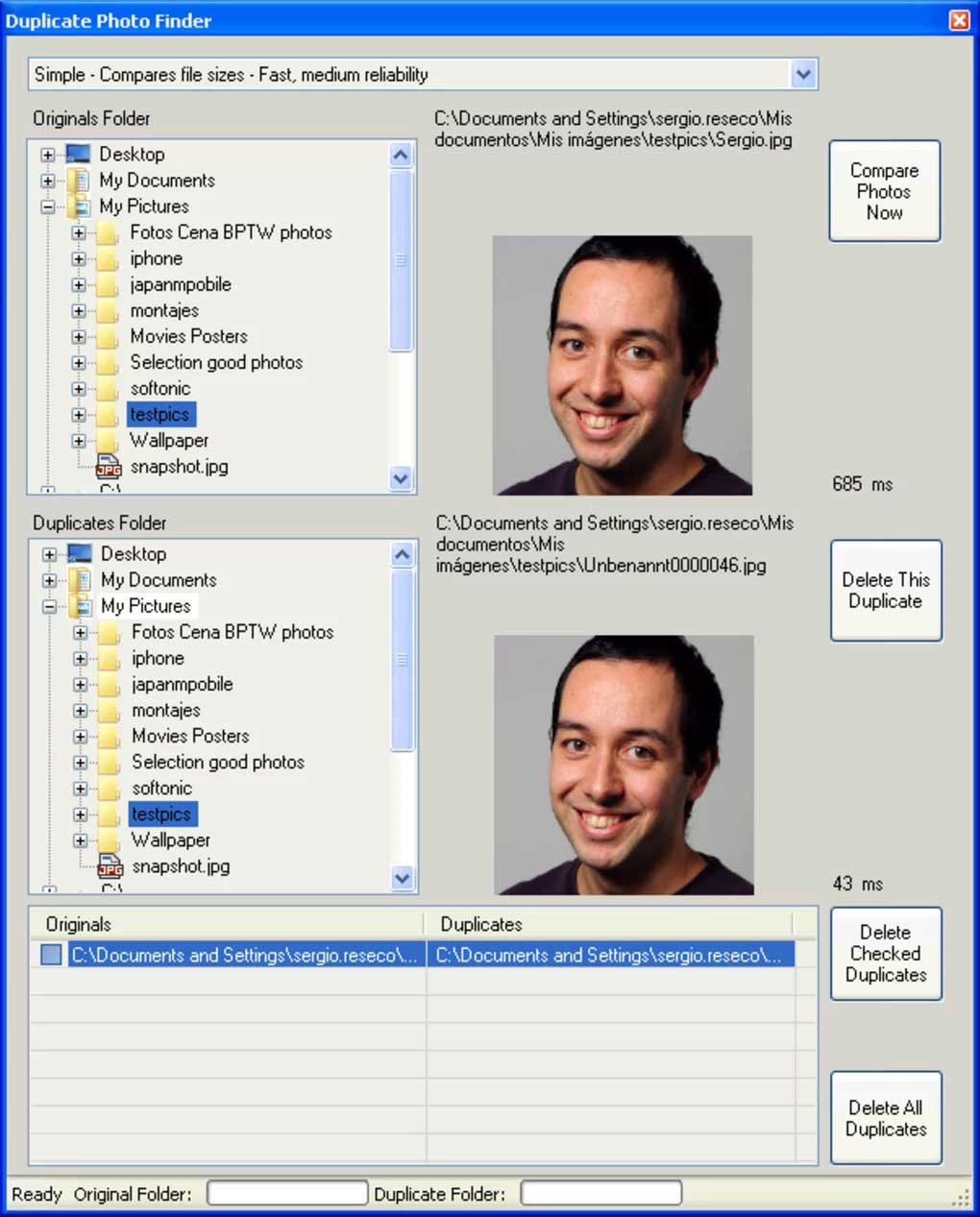
RenegadeMinds Duplicate Photo Finder Duplicates List
RenegadeMinds Duplicate Photo Finder takes a deliberately minimalistic approach to duplicate photo detection. The developer targets casual users and hobbyists who want a simple tool without advanced options or a steep learning curve. However, after testing it, I found that the simplicity comes at the cost of functionality and performance.
The software only scans JPG files, which immediately limits its usefulness for modern photo libraries. It does not support PNG, WebP, HEIC, RAW, or many other common image formats. In addition, the tool offers three scan modes based on file size, file hashes, and pixel hashes. While the hash-based methods provide the best accuracy, they are also extremely slow. In fact, even the developer describes the most useful scan modes as “very slow.”
During my testing, scan times proved to be one of the biggest drawbacks. The software took considerably longer than modern duplicate photo finders while offering far fewer features. Furthermore, it cannot detect visually similar images, edited photos, or duplicates stored in different formats. Instead, it focuses almost entirely on exact duplicate JPG files.
The interface remains simple and easy to understand, but the overall feature set feels outdated. As a result, the tool struggles to meet the needs of anyone with a large or diverse photo collection.
Overall, RenegadeMinds Duplicate Photo Finder feels more like a basic utility than a serious duplicate photo management solution. While it is free and easy to use, its limited format support, slow performance, and lack of advanced detection capabilities make it difficult to recommend beyond the most basic duplicate cleanup tasks.
Key Features:
- Scans JPG photos for duplicates
- File hash and pixel hash comparison
- Bulk duplicate deletion
- Recycle Bin protection
Pros
- Free to use
- Simple interface
- Easy to learn
Cons
- Supports only JPG files
- Very slow scan speeds
- Cannot find similar photos
- No support for RAW, HEIC, PNG, or WebP
- Too basic for modern photo libraries
Pricing: Free
16. DupeGuru Picture Edition
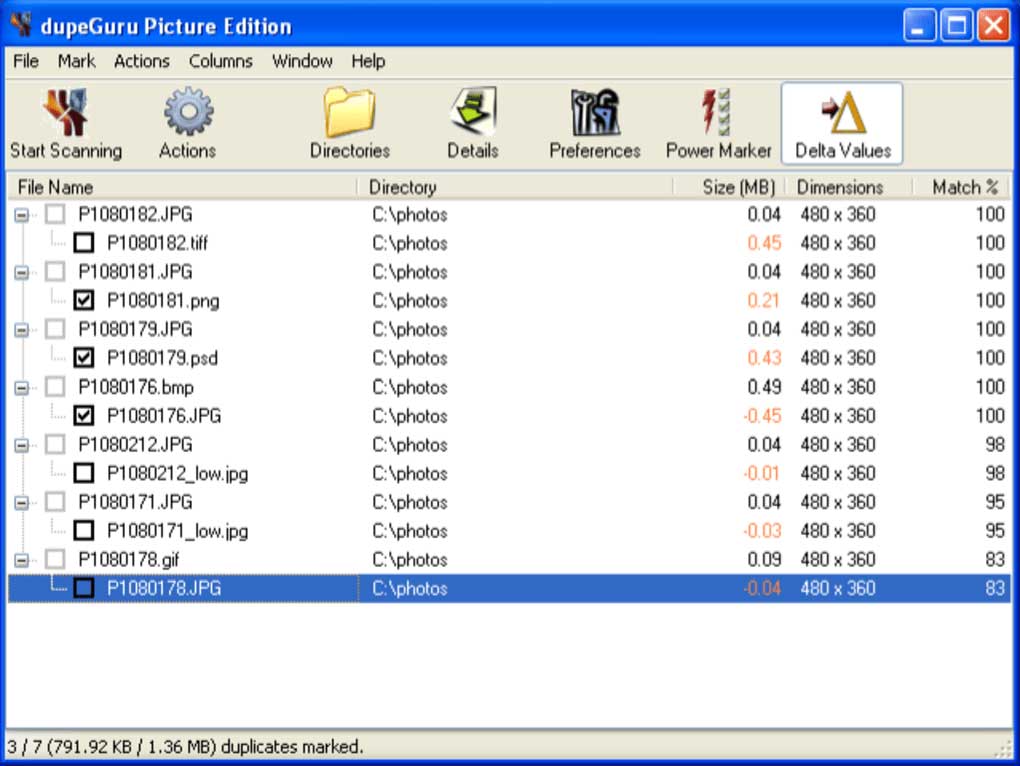
DupeGuru Picture Edition
DupeGuru is a free cross-platform duplicate finder available for Windows, macOS, and Linux. Unlike many tools in this category, it attempts to handle multiple types of duplicates, including files, photos, and even music collections. The software also offers a dedicated Picture Mode that promises to find similar images rather than just exact duplicates.
During my testing, the tool performed adequately when finding exact duplicate files. However, the results became much less impressive when I started testing its image similarity detection. Although DupeGuru claims to identify similar pictures using fuzzy matching, the accuracy proved inconsistent and often produced questionable matches.
The software’s broad focus also works against it. Instead of specializing in photo analysis, DupeGuru tries to handle files, music, and images within the same application. As a result, none of these features feel particularly advanced. Compared to dedicated duplicate photo finders, its image detection capabilities fall noticeably behind.
Another issue is the installation process. Setting up the software can be unnecessarily complicated, especially for less technical users. In some cases, installation requires manual steps that most modern applications no longer demand.
Overall, DupeGuru Picture Edition feels outdated and overly ambitious. While it remains a free option and offers support for multiple platforms, its image matching accuracy, usability, and feature set fail to compete with modern duplicate photo finders. For occasional use it may be acceptable, but there are significantly better alternatives available today.
Key Features:
- Cross-platform support (Windows, macOS, Linux)
- Exact duplicate file detection
- Fuzzy matching for similar filenames and images
- Dedicated Picture and Music modes
Pros
- Free and open-source
- Works on multiple operating systems
- Can find exact duplicate files reliably
Cons
- Inaccurate similar image detection
- Outdated and cumbersome installation process
- Basic feature set compared to dedicated photo finders
- Slow and inconsistent results
- Tries to do too many things and excels at none
Pricing: Free
17. SimilarImages
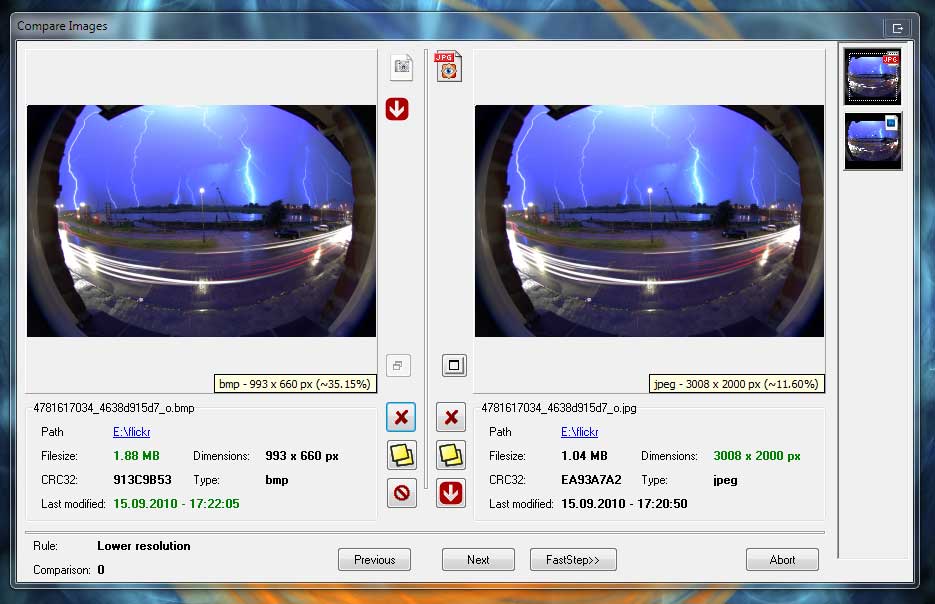
SimilarImages
SimilarImages aims to find duplicate and similar images by analyzing the visual content of photos rather than relying on file names or metadata. To accomplish this, it creates a color and location fingerprint for each image and stores the results in a local cache. In theory, this approach should allow it to identify images that have different formats, resolutions, or compression levels while speeding up future scans.
During my testing, however, the tool felt very dated. Although it managed to find some similar images, the detection accuracy fell well behind modern duplicate photo finders. Furthermore, the interface looks outdated, and the overall workflow feels cumbersome compared to newer alternatives.
The biggest problem is that SimilarImages has effectively reached the end of its life. The developer has publicly stated that there will be no significant future development, no major improvements to the matching algorithms, and no native support for modern platforms outside Windows. As a result, users should not expect better performance, new features, or compatibility improvements going forward.
While the caching system helps reduce scan times on subsequent runs, it cannot compensate for the software’s aging code base and limited capabilities. Consequently, SimilarImages feels more like a historical project than a practical duplicate photo finder for today’s large image collections.
Overall, SimilarImages earns its place near the bottom of this list. It still works to a certain extent, but the outdated interface, discontinued development, and mediocre detection accuracy make it difficult to recommend when far better alternatives exist.
Key Features:
- Analyzes image content using visual fingerprints
- Detects near-duplicate images across formats and sizes
- Caches scan results to speed up future runs
- Supports large media collections (images and videos)
Pros
- Can detect visually similar images, not just exact duplicates
- Cached results improve performance on repeated scans
- Works with large media libraries in basic use cases
Cons
- Discontinued with no future updates or improvements
- Outdated interface and workflow
- Inconsistent duplicate detection accuracy
- Limited platform support and no modern optimization
- Feels like a legacy tool rather than an active solution
Pricing: Free
18. Duplicate Photo Cleaner
Duplicate Photo Cleaner
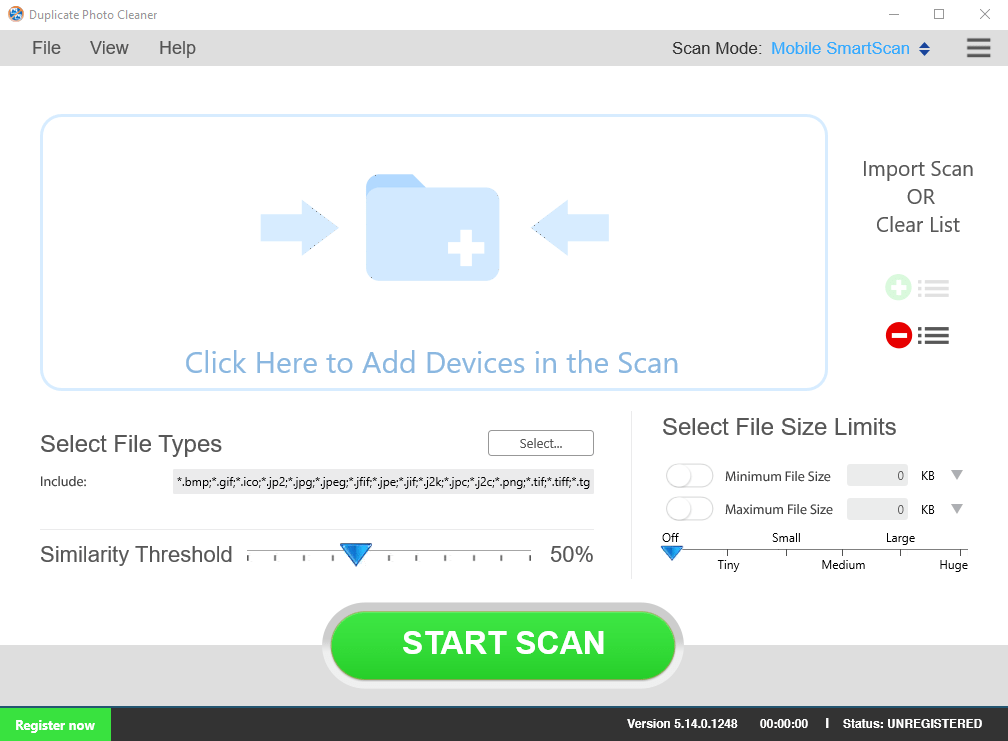
Duplicate Photo Cleaner markets itself as a complete solution for managing large photo libraries. It promises to detect both exact duplicates and visually similar images by analyzing content instead of relying only on file names or file size. In addition, it lets users adjust the similarity threshold, which should help fine-tune results depending on how strict the scan needs to be. The tool also advertises cross-platform support for PC, Mac, and mobile devices through its Mobile SmartScan mode.
During my testing, I started with the standard workflow. I simply dragged folders into the scan area and launched the analysis. The tool then processed the images and produced a mixed list of duplicates and similar photos. However, the accuracy did not match the marketing claims, and I had to manually verify many questionable matches.
Next, I tested the mobile scanning feature. Unfortunately, performance dropped significantly. The tool relies on MTP (Media Transfer Protocol), which slows down large transfers and makes scanning mobile devices extremely inefficient. In addition, the software does not support iPhone scanning at all, which immediately limits its usefulness for Apple users. As a result, the mobile feature feels incomplete rather than practical.
After that, I reviewed the overall usability and pricing. While the interface looks simple and beginner-friendly, the actual results feel inconsistent and unreliable. On top of that, the pricing model creates even more frustration. The software costs $49.95 per year, which feels very expensive for a tool that delivers average detection accuracy and limited mobile support.
Overall, Duplicate Photo Cleaner performs poorly compared to modern duplicate photo finders. It feels overpriced, underpowered, and inconsistent in real-world use. While it may work for very basic cleanup tasks, it does not justify its subscription cost, especially when better and more accurate alternatives exist at lower prices.
Key Features:
- Detects duplicate and similar photos using content-based analysis
- Adjustable similarity threshold for scan sensitivity
- Cross-platform support (Windows, macOS, Android via SmartScan)
- Drag-and-drop folder scanning workflow
- Mobile device scanning via MTP connection
Pros
- Simple and beginner-friendly interface
- Supports both duplicate and similar image detection
- Works on desktop and Android devices
Cons
- Inaccurate results with many false matches
- Very slow mobile scanning via MTP
- No support for iPhone scanning
- Expensive subscription pricing ($49.95/year)
- Poor value compared to modern alternatives
Pricing: $49.95/year
19. Duplicate Photo & Video Cleaner
Duplicate Photo & Video Cleaner
When I tested Duplicate Photo & Video Cleaner by DuckHead Software, I immediately noticed inconsistencies in branding and distribution. The website uses multiple names for the same product, and download links redirect unpredictably between app stores. As a result, the entire setup process feels confusing and untrustworthy from the start.
Next, I reviewed the software interface and documentation. The website content contains grammatical errors, broken links, and unclear explanations. In addition, many of the claims about “AI-based analysis” lack technical clarity and appear more like marketing language than real functionality. This raised concerns about the tool’s overall credibility.
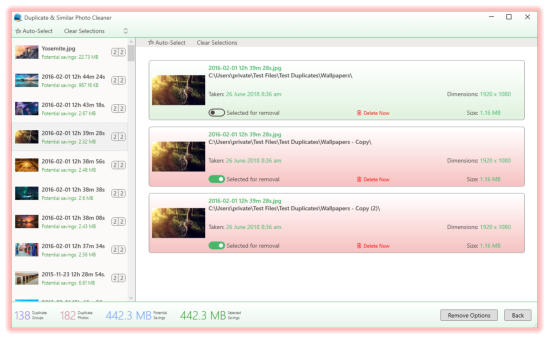
During installation and testing, I found a very basic wizard-style interface with only two scan modes: duplicate photos and similar photos. However, the tool offers no meaningful control over similarity thresholds or detection logic. Although it auto-selects files for deletion, I could not verify or influence how it made those decisions.
After the scan, the results appeared in a split layout with small thumbnails and limited detail. Unfortunately, this made reviewing large sets of images difficult and inefficient. In addition, the tool groups results automatically, but the grouping logic feels unclear and inconsistent during real use.
Overall, Duplicate Photo & Video Cleaner delivers a poor experience. It feels unreliable, confusing, and unpolished, with weak documentation and questionable marketing claims. Based on my testing, I rate it 1 out of 5 because it fails to provide accurate, transparent, or trustworthy duplicate detection.
Key Features:
- Finds duplicate and similar photos and videos
- Supports multiple image formats (JPG, PNG, BMP, TIFF, GIF, HEIC, AVIF, DNG)
- Supports video formats (MP4, MOV, AVI, WMV, MPG, HEVC, and more)
- Scans local folders, drives, USB, and network locations
- Auto-selects files for deletion based on internal rules
Pros
- Supports both photos and videos in one tool
- Can scan multiple storage locations
- Simple wizard-style interface
Cons
- Confusing branding and inconsistent download sources
- Unclear and poorly written documentation
- Questionable “AI” claims without real transparency
- No control over auto-selection logic
- Small thumbnails make results hard to review
- Inconsistent grouping of duplicate results
- Overall unreliable duplicate detection performance
Pricing: $39.99
20. Quick Photo Finder
Quick Photo Finder
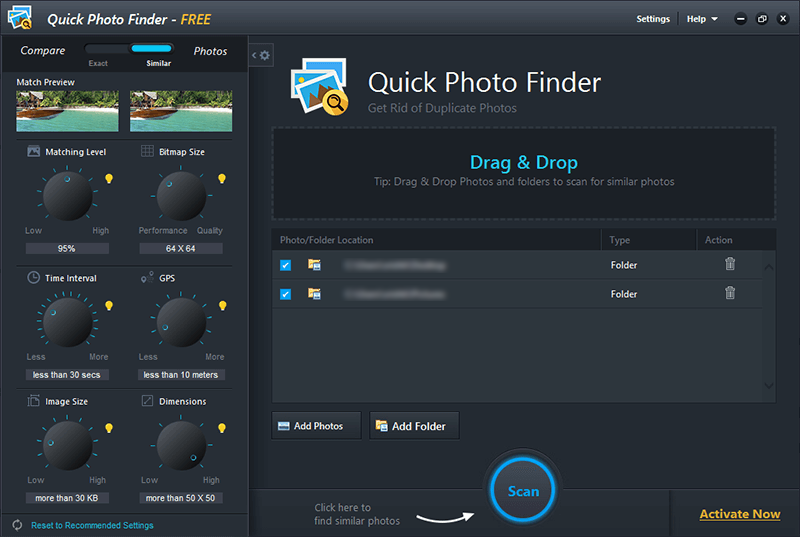
Quick Photo Finder claims to detect similar images and remove duplicates quickly. At first glance, the interface looks modern and easy to use. However, during my testing, I quickly noticed that the actual performance does not match the marketing claims.
The tool appears to rely on a perceptual hash (pHash) approach, with a “Bitmap Size” control that supposedly adjusts accuracy and speed. In practice, this method produces unreliable results. It often groups completely different images as similar while missing obvious duplicates, which makes the output difficult to trust.
Next, I tested the filtering options. Unfortunately, they feel extremely limited. The tool only allows basic size and dimension filters using preset values. It does not offer precise control, and it completely lacks important filters such as date, file name, or location. As a result, it struggles to handle real-world photo collections efficiently.
In addition, the developer claims broad format support, including JPEG, PNG, TIFF, BMP, and GIF. However, in my test, this coverage feels very limited for modern libraries. Compared to advanced tools that support dozens of formats and RAW files, Quick Photo Finder falls behind significantly.
Overall, Quick Photo Finder delivers poor similarity detection, weak filtering options, and limited format support. On top of that, it uses a time-limited license priced too high for its capabilities. Based on my testing, I rate it 1 out of 5 because it feels basic, unreliable, and overpriced compared to better alternatives.
Key Features:
- Finds duplicate and similar images using perceptual hash (pHash)
- Bitmap Size control to adjust scan quality and performance
- Basic filtering by file size and image dimensions (preset values)
- Scans common image formats like JPG, PNG, BMP, GIF, and TIFF
Pros
- Clean and modern-looking interface
- Simple to use for basic duplicate searches
Cons
- Unreliable similarity detection results
- Often mismatches unrelated images as duplicates
- Very limited filtering options (no date, name, or location filters)
- Only supports a small number of image formats
- Misses many obvious duplicate images
- Time-limited license despite weak functionality
Pricing: 50 euor/year
21. XnViewMP – Poor Similar Image Finder
XnViewMP
I tested XnViewMP mainly for its duplicate and similar image detection, not for its image viewing capabilities. While the software performs well as a viewer, its duplicate search feature delivered disappointing results and only achieved a 1 out of 5 rating in my testing.
First, XnViewMP impressed me as an image viewer. It offers multiple browsing modes such as thumbnails, fullscreen, filmstrip, and slideshow. In addition, it supports over 500 image formats, including JPEG, PNG, RAW, HEIC, GIF, and APNG. As a result, it handles large and diverse image libraries very well for viewing and basic organization.
However, things changed when I tested the duplicate detection feature. I ran scans on large folders and quickly noticed that the performance dropped significantly. In some cases, the process took 5 to 15 minutes, and occasionally the software froze completely, even on a powerful system.
Next, I checked the results, and the accuracy disappointed me further. The tool flagged many unrelated images as duplicates, especially when photos shared similar colors or lighting. At the same time, it missed obvious duplicates, which made the output unreliable for real cleanup work.
Finally, the workflow felt incomplete. XnViewMP does not offer automatic duplicate removal, so I had to manually review and delete files one by one. Combined with freezing issues on large libraries, this made duplicate management slow and frustrating.
Overall, XnViewMP works very well as an image viewer, but it fails as a duplicate photo finder. Based on my testing, I rate its duplicate detection capability 1 out of 5. If you need a viewer, it is a strong option. However, if you want reliable duplicate removal, better tools exist that deliver faster scans, higher accuracy, and proper automation.
Key Features:
- Duplicate and similar image search based on visual comparison
- Multiple viewing modes (thumbnail, fullscreen, filmstrip, slideshow)
- Supports 500+ image formats including RAW, HEIC, PNG, JPEG, GIF
- Batch processing tools for large image collections
- Basic image editing and lossless transformations
Pros
- Excellent image viewer with rich navigation options
- Wide format support for almost all image types
- Useful batch processing features
- Free for personal and educational use
Cons
- Poor duplicate detection accuracy with many false matches
- Misses obvious duplicate images during scans
- Slow and unstable when processing large libraries
- Frequent freezing during duplicate search
- No automatic duplicate removal workflow
- Not suitable for serious duplicate photo management
Pricing: €29 Euro
Full Comparison Table: All 21 Duplicate Photo Finders
| # | Software | Best For | Platform | Price | Rating |
|---|---|---|---|---|---|
| 1 | MindGems Duplicate Image Finder | Best overall performance, accuracy, and features | Windows | Free / $39.95 PRO | ★★★★★ |
| 2 | Duplicate Photo Finder | Reverse image search and duplicate cleanup | Windows | Free / Paid | ★★★★★ |
| 3 | Duplicate Image Finder | Lightroom duplicate detection | Windows | Free / Paid | ★★★★★ |
| 4 | Duplicate File Finder | Exact duplicate images and files | Windows | Free | ★★★★★ |
| 5 | VisiPics | Basic duplicate image detection | Windows | Free | ★★★☆☆ |
| 6 | macOS Photos App | Built-in duplicate cleanup | macOS | Included with macOS | ★★★☆☆ |
| 7 | Similar Image Search | Finding visually similar images | Windows | Free | ★★★★☆ |
| 8 | Awesome Duplicate Photo Finder | Simple photo cleanup (Adware) | Windows | Free | ★★★☆☆ |
| 9 | ManyProg Duplicate Image Remover | Exact duplicate photos only – compares pixels | Windows | Free | ★★★☆☆ |
| 10 | PictureEcho | Compares only photo dates | Windows | $39.97 per year | ★★★☆☆ |
| 11 | Anti-Dupl | Basic photo content comparison | Windows | Free (Open Source) | ★★★☆☆ |
| 12 | AllDup | Exact duplicate image finding | Windows | Free | ★★★★☆ |
| 13 | Breeftornado Duplicate Image Finder | Basic command line tool – no user interface | Windows | Free (Open source) | ★★★☆☆ |
| 14 | Duplicate Photos Fixer Pro | Marked as PUP (potentially unwanted program) by antivirus apps | Windows / macOS | $42.00 per year | ★★★☆☆ |
| 15 | Duplicate Photo Finder by RenegadeMinds | Simple duplicate image cleanup – cannot find similar photos | Windows | Free | ★★★☆☆ |
| 16 | dupeGuru Picture Edition | Basic open-source duplicate detection | Windows / macOS / Linux | Free | ★★★★☆ |
| 17 | SimilarImages | Analyzes image content using visual fingerprints (discontinued) | Windows | Free | ★★★☆☆ |
| 18 | Duplicate Photo Cleaner | Simple interface for beginners – many false matches | Windows / macOS | $49.95 per year | ★★☆☆☆ |
| 19 | Duplicate Photo & Video Cleaner | Photo and video duplicate cleanup | Windows / Android | $39.99 | ★★★☆☆ |
| 20 | Quick Photo Finder | Nice user interface – poor duplicate photo detection | Windows | 50 Euro per year | ★☆☆☆☆ |
| 21 | XnView MP | Image management and duplicate searches | Windows / macOS / Linux | Free / Commercial | ★★★☆☆ |
How to Choose the Right Duplicate Photo Finder
- OS Compatibility: Choose a solution that fully supports your operating system. MindGems Duplicate Image Finder is designed specifically for Windows and delivers excellent performance and deep system integration.
- Budget: Lifetime licenses like MindGems’ $39.95 option can save money compared to subscription-based tools like Duplicate Photos Fixer Pro ($39.95/year).
- Photo Library Size: If you manage large collections with 100,000+ photos, performance matters. MindGems Duplicate Image Finder is optimized for speed and memory efficiency, even with massive photo libraries and is tested with 1 million images.
- Image Format Support: Make sure the software supports all image formats you use. MindGems Duplicate Image Finder supports more than 300 RAW cameras, as well as all popular image formats including HEIC, WEBP, JPEG, PNG, TIFF, and many more.
- Features: Beginners benefit from the clean and intuitive interface, while advanced users can take advantage of powerful filtering, similarity settings, and flexible scan options.
How to Safely Remove Duplicate Photos
- Back up your photos to an external drive or cloud storage service such as Google Drive, OneDrive, or Dropbox.
- Scan your photo collection with a tool like MindGems Duplicate Image Finder.
- Preview matches with MindGems’ side-by-side viewer to avoid mistakes before deleting files.
Use MindGems’ “Auto-check” Selection Assistant to automatically keep the best copy, such as the highest resolution image or the lossless file format version. - Delete duplicates to the Recycle Bin and verify the results before permanently removing them, or move them to a temporary folder first.
Tip: MindGems’ preview, copy, and move options help ensure that you never accidentally lose your original photos.
Frequently Asked Questions About Duplicate Photo Finder Software
Final Verdict: Best Duplicate Photo Finder Software for Windows
After comparing the most popular duplicate photo finder tools, MindGems Duplicate Image Finder stands out as one of the best solutions for Windows users. It combines advanced similar image detection, high scanning speed, support for RAW and HEIC files, and an intuitive interface that makes photo cleanup fast and safe.
Whether you need to remove exact duplicates, find visually similar photos, or organize massive image collections, MindGems Duplicate Image Finder delivers professional-level accuracy while remaining easy to use for beginners.
Still, the best duplicate photo finder depends on your specific needs and workflow.
- For Windows users: MindGems Duplicate Image Finder offers the best balance of speed, accuracy, and advanced features.
- For free duplicate photo finder software: dupeGuru Picture Edition remains a solid option for basic cleanup tasks.
- For detecting similar and edited photos: MindGems Duplicate Image Finder excels with advanced visual comparison technology.
- For large photo libraries: MindGems Duplicate Image Finder is optimized for high performance and low memory usage.
Ready to free up disk space and organize your photo collection?
Quick to install, easy to use, and powerful enough for even the largest photo libraries. Let us know your thoughts in the comments below. Which one is your favorite, did we miss something?
Pingback: Lightroom Duplicate Finder - Delete Duplicate Photos
Thank you for this review. I have been searching and trying several duplicate photo finders via trial and they all seem less robust and somewhat amateur compared to Visual Similarity Duplicate Image Finder PRO. I’m almost certain that you have me sold.
Great review and great list. Tried many of the listed tools and I completely agree with your ranking. Keep the good work. Thank you!
Thank you for sharing this comprehensive list of duplicate photo finders. It saved me a lot of time.
Tried Visual Similarity Duplicate Image Finder PRO – what can I say – it is way ahead of any other tool I’ve tried. Thank you for sharing.
Very complete article. Covers many aspects of the duplicate photo finding process. The tools towards the end are totally useless, but the top picks are great indeed.
I tried some free tools – but they are a total waste of time.
I ended up buying your recommended VSDIF PRO and oh boy – it really is the only tool that I will ever need to organize my photos. So many features – other tools can not cover even 10% of what it can do.
Wish I found this article earlier. I purchased WebMinds Easy Duplicate Finder and it was total crap. I paid $60 for it just to find our that it expired after 1 year of use. VSDIF PRO is just $40 for a lifetime license and is a way more advanced tool. Well … lesson learner … read and research before you buy.
Thank you for sharing.
Hi, Very interesting, good job and thanks for sharing such a good blog. your article is so convincing that I never stop myself to say something about it. You’re doing a great job. Keep it up.
I have a photo library of roughly 100,000 images. Due to WhatsApp usage, many of these photos exist multiple times in different sizes. My goal is to keep only the original version, including the original digitization date and all original metadata.
I’m really impressed by how the tool finds similar images by actually comparing image content rather than relying on resizing and checksums. This allows me to detect the same or very similar pictures even when they have different dimensions, which will help me remove a significant number of duplicates.
That said, I also see room for improvement-though this may partly be due to me just getting started with the tool. I would really appreciate better support for a second screen, for example to display image previews. Additionally, it would be very helpful to be able to show more metadata in the list view or next to the preview. In some cases, I have 100% duplicates where one copy is missing metadata, and having that information visible would make decisions much easier.
I’m sure I’ll discover more improvement ideas as I continue using the tool.
Hello
Thank you for your feedback, but what you describe is already present in MindGems Duplicate Image finder.
1. You have both Preview and Multi-Preview tabs at the bottom of the app
2. You have Image Information tab at the top-right with all the EXIF info for the currently selected image.
Great breakdown of duplicate photo finder tools-this is super helpful, especially the real-world testing with 30,000 images. I like how you compared accuracy, speed, and safety instead of just listing features. Visual Similarity Duplicate Image Finder PRO seems like a solid choice for large libraries. Thanks for putting together such a detailed and honest review-definitely bookmarking this for future use!
Great review! Finding and removing duplicate photos can save valuable storage space and make photo management much easier. I appreciate the detailed comparisons and practical insights that help readers choose the right tool for their needs.