

Below you will find the most frequently asked questions.
Click the question that you are interested in to scroll to the answers section. You can also use the search functionality in the web browser to find a particular keyword on the page.
Do not forget to check also the blog area as it contains a lot of information, tutorials and examples and provides a search option for easier navigation: www.mindgems.com/article/
Fast Duplicate File Finder (FDFF) is a tool developed for years and we guarantee that it will properly identify ALL duplicate files.
1. Make sure that the files are really duplicates. You can use a DIFF tool to do that. Please note that two files are duplicates if their BINARY content is 100% identical to the last byte. For example two Word documents that contain the same text and that are stored with different versions of Microsoft Word will not necessarily be detected as 100% duplicates as the two versions of Microsoft Word may write additional data in the file headers that is different in the two versions of the application. Such files should be identified using the SIMILARITY mode instead. Duplicate files can have different names, extensions, dates and attributes, but the content has to be exactly the same. We guarantee that FDFF will identify such files.
2. Make sure that the user account used to start FDFF has sufficient privileges to access the files. If the tool has not permission to read the files it can not compare them. Try running the tool as Administrator.
3. Make sure that an antivirus application is not blocking access to the files and is not preventing the normal operation of your system. Usually antivirus tools cause more troubles than they solve. Try to disable the antivirus tool and retry the scan. You can also check the log files of your antivirus application to see if it is blocking access to the files. You can report "false positive" to your antivirus vendor if its blocking FDFF and add it to the exception list of the antivirus tool.
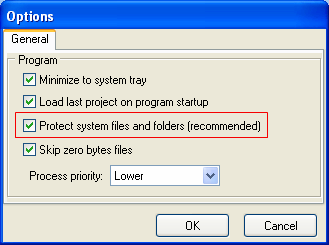
4. Fast Duplicate File Finder has an option to protect your system files and folders which is enabled by default. Either move your files outside the protected folders or disable the option. Please note that the data on your desktop is also considered as protected in order not to delete duplicate icons and applications that may reside on the desktops of the other user accounts on your machine.
5. The other possible reason for the application not to identify certain files is that you may have set filters. Make sure that the filtering button is not pressed (down) - the button with the funnel icon on the tool-bar. If it is pressed just click it once - this will raise the button denoting that the filtering is no longer active. Clicking it again will bring up the filter settings dialog.
6. Make sure that you have not ticked the "Exclude from self-scan" button in front of the folder name in the folders list. You can find information on that option in the help file.
7. Make sure that your paths are not longer than the Windows maximum path limit of 260 characters - including the file name. This is a windows limitation - not a limitation of FDFF itself.
If you have moved the files to a folder just go to the root of that folder and copy the files and/or directories to the root of the corresponding drive that they belong to.
If you have deleted the files to the Recycle Bin explore its content, select all the files and/or folders inside and by right-clicking the selection choose the "Restore" pop-up menu item.
If you have permanently deleted the files there is not much to be done. You still have chances to restore some data by using an undelete/un-erase application though the chances are really low. You can Goggle to find such application on the web. Use your computer as less as possible until your try the undelete applications as the deleted data may be overwritten and permanently damaged. The space that the deleted data was occupying is now marked as free and the next write operation may use it.
Some files are listed and the following message appears: "Some files could not be deleted or moved and will remain checked in the list. Make sure they are not in use or located on a read-only media and retry."
As pointed in the message FDFF can not delete the files because, they are either in use and locked by another application or they are located on a read-only media like CD-ROM. There is nothing that you can do in the second case as you can not delete files from a CD-ROM. In the first case you can save the project file and restart your computer. Before starting any other processes (that may open and lock your files), start FDFF, load the project and try to perform the delete operation again. If you still have files that are in use these may be ones used by your operating system (we do not recommend deleting such files) or they may be in use by applications that are in your startup list and have been loaded during boot time. You can locate and disable such applications and retry.
Generally the duplicate file finder should not crash or freeze, but due to the huge amount of data that the application processes it is possible to find damaged files in your system that cause problems. What you can do?
The fact that two files have the same name and sizes does not make them duplicates. Fast Duplicate File Finder analyzes the content of your files so even if the two files have a single byte difference then they are not 100% duplicates and will not be listed as such.
If you still doubt that the files are different you can use a HEX DIFF tool to compare them and see for yourself that they are not exact duplicates - we guarantee that FDFF works perfectly and identifies ALL duplicate files.
If you want to find files with duplicate names then use the "Similar File Names" scan method and set the similarity to 100%.
If you want to find similar files use the "Similar Files" mode and set the similarity percentage to the desired level.
If you want to find files with the same sizes you can use the "File Size (equal file sizes)" mode.
We no longer provide our tools on CD. There are many reasons for that and here are just few of those:
There are several possible reasons for that:
Our tools are 20 years on the market and are proven to be the best of their kind. If a product X finds more duplicates that is not something that you should be happy about - exactly the opposite. You should immediately stop using such tool as it means that it incorrectly identifies files that are not duplicate as such.
There are many poor tools on the market that compare file dates, sizes, names or CRC, MD5 checksums of the files and report those as duplicates. These are not proper ways to identify duplicate files that is why such tools report more duplicates and if you compare the content of those files in a HEX EDITOR DIFF tool you will see that the content inside is different.
The only proper way of identifying duplicate files is to compare their content. We guarantee that ANY tool that scans faster than FDFF or reports more duplicates does not work properly.
Of course you can find files with duplicate names or same file sizes in FDFF too, but those are separate scan modes that make it clear that those files have only certain properties that are the same. What other tools are doing by listing such files as duplicates is VERY DANGEROUS as completely different files may have the same size.
 About
About Features
 Download
 Register (buy)
 Screen Shots
 What's New?
 FAQ
FAQ Awards
 Tutorials